MOTOSHARE 🚗🏍️
Turning Idle Vehicles into Shared Rides & Earnings
From Idle to Income. From Parked to Purpose.
Earn by Sharing, Ride by Renting.
Where Owners Earn, Riders Move.
Owners Earn. Riders Move. Motoshare Connects.
With Motoshare, every parked vehicle finds a purpose.
Owners earn. Renters ride.
🚀 Everyone wins.
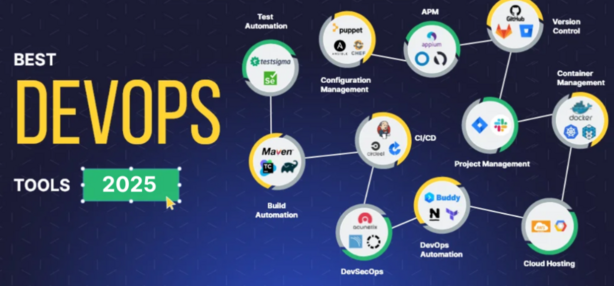
Introduction
In the world of software development and IT operations, DevOps platforms are becoming a critical part of the workflow. These tools facilitate the collaboration between development and operations teams, automating processes, speeding up software delivery, and ensuring continuous integration and continuous delivery (CI/CD). In 2025, the DevOps landscape is evolving rapidly, and businesses are relying on these platforms more than ever to ensure their operations are seamless, efficient, and scalable.
For those choosing a DevOps tool, it’s essential to focus on features like automation capabilities, integration support, scalability, and user-friendliness. A robust DevOps platform streamlines workflows, enhances collaboration, and reduces the time-to-market for software products. As organizations shift to cloud-native environments and microservices architectures, selecting the right DevOps platform is more critical than ever.
In this post, we will explore the top 10 DevOps platforms tools in 2025, highlighting their features, pros, cons, and comparisons to help you make an informed decision.
Top 10 DevOps Platforms Tools in 2025
1. GitLab
Logo/Brand:
Short Description:
GitLab is a comprehensive DevOps platform that supports the full software development lifecycle. It allows for source code management, CI/CD pipelines, monitoring, and security all in one platform. GitLab is known for its seamless integration with Git and its ease of use.
Key Features:
- Fully integrated CI/CD pipelines
- Git repository management with version control
- Auto DevOps for automatic build, test, and deployment
- Security scanning (SAST, DAST, Dependency Scanning)
- Kubernetes integration
- Built-in monitoring and observability tools
Pros:
- Easy to set up and configure
- Unified platform that handles CI/CD, security, and monitoring
- Strong community support and open-source availability
Cons:
- Limited integrations with non-Git-based tools
- Can become resource-heavy with large projects
- Performance issues with large-scale deployments
2. Jenkins
Logo/Brand:
Short Description:
Jenkins is an open-source automation server used to build, test, and deploy code in a CI/CD pipeline. It is widely used due to its flexibility and vast ecosystem of plugins that support almost every technology and platform.
Key Features:
- Extensive plugin ecosystem
- Open-source and highly customizable
- Distributed builds and scalability
- Integration with nearly every tool in the DevOps space
- Easy pipeline creation using a simple scripting language
Pros:
- Highly customizable and flexible
- Large, active open-source community
- Excellent support for distributed builds
Cons:
- Setup and configuration can be complex
- Performance issues with heavy load or large-scale deployments
- Maintenance and upgrades require significant effort
3. CircleCI
Logo/Brand:
Short Description:
CircleCI is a cloud-native DevOps platform that automates testing and deployment. It is known for its fast, efficient, and scalable CI/CD processes, with integrations for major cloud services like AWS, Google Cloud, and Azure.
Key Features:
- Advanced parallelism for faster builds
- Integration with major cloud platforms (AWS, Google Cloud, Azure)
- Customizable workflows and pipelines
- Automated Docker container management
- Smart caching for faster builds
- Extensive API support for integrations
Pros:
- Fast and efficient pipeline execution
- Easy-to-use configuration and interface
- Excellent integration with cloud platforms
Cons:
- Limited support for non-cloud-based tools
- Pricing can become expensive for larger teams
- Complexity in managing multiple pipelines
4. Azure DevOps
Logo/Brand:
Short Description:
Azure DevOps by Microsoft offers a comprehensive suite of tools for software development, from planning and development to deployment and monitoring. It supports a wide range of programming languages and integrates seamlessly with other Microsoft services.
Key Features:
- Comprehensive toolset: Boards, Repos, Pipelines, Test Plans, and Artifacts
- Support for multiple programming languages
- Integrated with Azure services and resources
- Secure and scalable cloud infrastructure
- Real-time collaboration tools
Pros:
- Rich set of features across all stages of development
- Seamless integration with Microsoft products
- Strong security and compliance features
Cons:
- Steep learning curve for beginners
- Best suited for teams already using Microsoft Azure
- Cost can increase with larger teams or extensive usage
5. Docker
Logo/Brand:
Short Description:
Docker is a platform used to automate the deployment of applications inside lightweight containers. It is widely used in DevOps for creating isolated environments and ensures consistency across development, testing, and production environments.
Key Features:
- Containerization of applications
- Easy creation and management of Docker images
- Integration with Kubernetes for orchestration
- Efficient resource utilization
- Docker Compose for multi-container applications
Pros:
- Simplifies application deployment and management
- Great for microservices architectures
- Scalable and portable across different environments
Cons:
- Steep learning curve for beginners
- Performance issues in certain high-load scenarios
- Requires careful management of container resources
6. Travis CI
Logo/Brand:
Short Description:
Travis CI is a cloud-based CI/CD tool that integrates easily with GitHub repositories. It automates code testing, building, and deployment, enabling developers to ship code faster.
Key Features:
- Seamless GitHub integration
- Support for multiple programming languages
- Real-time testing and deployment
- Easy-to-use configuration
- Cloud-hosted and scalable infrastructure
Pros:
- Simple integration with GitHub repositories
- Fast and easy setup
- Supports multiple languages and frameworks
Cons:
- Limited integrations compared to larger platforms
- Pricing can become expensive for high-volume users
- Can experience delays with heavy loads
7. Bamboo
Logo/Brand:
Short Description:
Bamboo by Atlassian is a continuous integration and deployment server that automates the release management process. It integrates deeply with other Atlassian tools like Jira and Bitbucket, making it ideal for teams already using the Atlassian ecosystem.
Key Features:
- Integrated with Atlassian tools (Jira, Bitbucket)
- Supports parallel and cross-platform builds
- Advanced branching and deployment strategies
- Real-time deployment and notifications
- Built-in Docker support
Pros:
- Excellent integration with Atlassian products
- Strong support for complex workflows
- Reliable and scalable performance
Cons:
- Expensive for small teams
- Learning curve for new users
- Can be overkill for small projects
8. Terraform
Logo/Brand:
Short Description:
Terraform is an open-source tool for infrastructure as code (IaC). It enables DevOps teams to define and provision infrastructure using a high-level configuration language, ensuring consistency and scalability across environments.
Key Features:
- Infrastructure as code (IaC) support
- Multi-cloud provider support (AWS, Azure, GCP)
- Modular configurations for reuse
- Version-controlled infrastructure setup
- Extensive community modules for quick deployments
Pros:
- Simplifies infrastructure management
- Supports multiple cloud platforms
- Strong community support and resources
Cons:
- Requires familiarity with code and scripting
- Learning curve for beginners
- Can be complex for very large infrastructures
9. Ansible
Short Description:
Ansible is an open-source automation tool for IT tasks such as configuration management, application deployment, and task automation. It uses simple YAML configuration files, making it user-friendly and effective for DevOps.
Key Features:
- Simple and readable YAML syntax
- No agent required on target machines
- Powerful orchestration features
- Extensible and modular via plugins
- Integration with cloud platforms and containers
Pros:
- Easy to use and configure
- Highly extensible with plugins
- No need for agents on remote systems
Cons:
- Limited error handling for larger infrastructures
- Performance issues with large-scale environments
- Limited support for non-Linux systems
10. Kubernetes
Logo/Brand:
Short Description:
Kubernetes is an open-source platform for automating container orchestration, scaling, and management. It’s the de facto standard for containerized application management, providing powerful tools for CI/CD and microservices management.
Key Features:
- Automatic container orchestration
- Support for microservices architectures
- Self-healing capabilities (auto-recovery of pods)
- Horizontal scaling and load balancing
- Robust ecosystem and community support
Pros:
- Ideal for managing containerized applications at scale
- Strong community and ecosystem
- Great for microservices architectures
Cons:
- Steep learning curve for beginners
- Can be complex to configure and manage
- Requires significant resources for large deployments
Comparison Table
| Tool Name | Best For | Platform(s) Supported | Standout Feature | Pricing | G2/Capterra/Trustpilot Rating |
|---|---|---|---|---|---|
| GitLab | Large DevOps Teams | Web, Linux, Windows, Mac | Unified CI/CD and monitoring | Free / Custom | 4.5/5 |
| Jenkins | Flexibility & Customization | Web, Linux, Windows | Plugin-rich ecosystem | Free | 4.4/5 |
| CircleCI | Fast Build & Deployment | Web, Linux | Smart Caching | Free / Starts at $15/month | 4.6/5 |
| Azure DevOps | Microsoft Ecosystem | Web, Windows, Linux | Seamless Azure Integration | Custom | 4.3/5 |
| Docker | Containerization | Web, Linux, Windows, Mac | Containerized Deployment | Free / Custom | 4.7/5 |
| Travis CI | GitHub Integration | Web, Linux | Real-time Deployment | Free / Custom | 4.3/5 |
| Bamboo | Atlassian Ecosystem | Web, Linux, Windows, Mac | Integration with Jira | Starts at $10/month | 4.2/5 |
| Terraform | Infrastructure Management | Web, Linux, Windows | Multi-cloud provider support | Free / Custom | 4.6/5 |
| Ansible | IT Automation | Web, Linux | Agentless Architecture | Free / Custom | 4.5/5 |
| Kubernetes | Container Orchestration | Web, Linux, Windows, Mac | Container Scaling | Free | 4.7/5 |
Which DevOps Platforms Tool is Right for You?
Small Teams/Startups:
If you are a small team just starting with DevOps, Travis CI or CircleCI might be ideal, as they are simple to configure and offer quick CI/CD pipelines.
Large Enterprises:
For larger organizations with complex workflows, GitLab, Azure DevOps, or Bamboo are better suited due to their comprehensive feature sets, including project management, CI/CD, and integration with other enterprise tools.
Cloud-Native Applications:
If you are building microservices-based applications, Docker and Kubernetes will be essential, providing the tools to manage containers and scale your infrastructure.
Automation Needs:
For teams focused on infrastructure automation, Terraform and Ansible are powerful tools that allow for provisioning and configuring environments as code.
Conclusion
In 2025, the DevOps landscape continues to evolve, and selecting the right platform is crucial for success. Whether you’re a small team looking to streamline your CI/CD pipelines or a large enterprise with complex infrastructure, there’s a DevOps platform that fits your needs. Tools like GitLab, Jenkins, and CircleCI are leading the charge, providing powerful features that help accelerate software delivery.
FAQs
- What are DevOps platforms?
DevOps platforms are tools designed to automate the software development lifecycle, facilitating continuous integration, deployment, and monitoring. - Which DevOps platform is best for small teams?
Travis CI and CircleCI are great choices for small teams due to their simplicity and fast setup. - Is Jenkins still relevant in 2025?
Yes, Jenkins remains highly relevant in 2025 due to its flexibility, extensive plugin ecosystem, and broad support for DevOps processes. - Are there any free DevOps platforms?
Many DevOps tools, such as GitLab and Travis CI, offer free plans with limited features for small teams or individual developers. - How do I choose the right DevOps platform for my team?
Consider factors like team size, workflow complexity, integration requirements, and budget. Platforms like GitLab and Jenkins are great for large teams, while CircleCI and Travis CI suit smaller teams or startups.