MOTOSHARE 🚗🏍️
Turning Idle Vehicles into Shared Rides & Earnings
From Idle to Income. From Parked to Purpose.
Earn by Sharing, Ride by Renting.
Where Owners Earn, Riders Move.
Owners Earn. Riders Move. Motoshare Connects.
With Motoshare, every parked vehicle finds a purpose.
Owners earn. Renters ride.
🚀 Everyone wins.
You get the error message “Bottom overflowed by 67 pixels” when the keyboard appears. Technically speaking, the viewport’s size was decreased, which led to an overflow in our layout. Look at the picture below:-
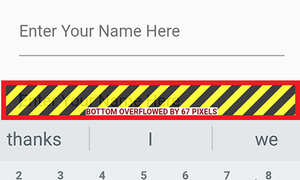
The widgets inside the scaffold might be prevented from resizing when the keyboard opens, although this could result in some widgets being hidden by the keyboard. The Scaffold widget’s resizeToAvoidBottomInset attribute can be used to do this.
The Column widget can also be contained within a scrollable widget. The SingleChildScrollView is an effective built-in widget offered by Flutter. The best way to prevent the “Bottom overflowed” problem when the keyboard opens is to do this.
If it’s not working, take the following actions:-
Android removal method 1In order to prevent the flutter code from being overridden, add resizeToAvoidBottomPadding: false to the scaffold and set windowSoftInputMode=”adjustResize” from the AndroidManifest.xml file as seen below:
Scaffold(
      resizeToAvoidBottomPadding: false,
      appBar: AppBar()
)Code language: JavaScript (javascript)
Method 2: Just Add Android (Not Recommended)When windowSoftInputMode=”stateVisible” is specified in the activity of the AndroidManifest.xml file, only Android will function and not iOS.
<activity
       ...
        android:windowSoftInputMode="stateVisible">
Code language: HTML, XML (xml)
Note: Don’t set it to android:windowSoftInputMode=”adjustResize”