MOTOSHARE 🚗🏍️
Turning Idle Vehicles into Shared Rides & Earnings
From Idle to Income. From Parked to Purpose.
Earn by Sharing, Ride by Renting.
Where Owners Earn, Riders Move.
Owners Earn. Riders Move. Motoshare Connects.
With Motoshare, every parked vehicle finds a purpose.
Owners earn. Renters ride.
🚀 Everyone wins.

What is REST
REST (Representational State Transfer) is an architectural style for designing networked applications, primarily web services, that emphasizes scalability, simplicity, and stateless communication. Introduced by Roy Fielding in his 2000 doctoral dissertation, REST defines a set of constraints for building reliable and performant web services.
RESTful services expose resources—such as users, orders, or products—via URIs (Uniform Resource Identifiers), and clients interact with these resources using standard HTTP methods like GET, POST, PUT, DELETE, and PATCH. The communication is stateless, meaning each request from client to server must contain all necessary information, and servers do not store client context between requests.
Key principles of REST include:
- Statelessness: No session information is stored server-side between requests.
- Client-Server Architecture: Separation of concerns between client and server.
- Cacheability: Responses can be cached to improve performance.
- Uniform Interface: Standardized methods and resource representation.
- Layered System: Architecture can be composed of layers, such as intermediaries or proxies.
- Code on Demand (optional): Servers can send executable code to clients.
REST has become the dominant approach for building web APIs due to its simplicity, interoperability, and alignment with existing web standards.
Major Use Cases of REST
1. Web APIs for Cloud Services
REST APIs power interactions with cloud platforms (AWS, Azure, Google Cloud), enabling users to manage resources programmatically.
2. Mobile Application Backends
Mobile apps consume RESTful APIs to fetch and manipulate data, supporting various client devices with a uniform interface.
3. Microservices Communication
REST is often used as the communication protocol between microservices in distributed architectures.
4. IoT Devices
RESTful services provide lightweight, stateless communication suited for IoT devices with limited resources.
5. Social Media Platforms
Social networks like Twitter and Facebook expose REST APIs to allow third-party integrations.
6. E-commerce Platforms
REST APIs handle catalog management, orders, payments, and customer data in e-commerce solutions.
7. Enterprise Integration
REST enables integration of diverse enterprise systems and legacy applications over the web.
How REST Works Along with Architecture
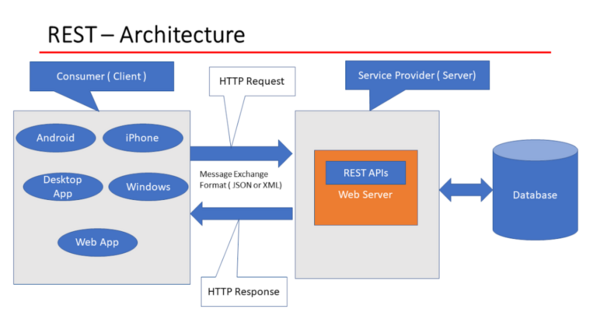
REST architecture revolves around resources, representations, and stateless communication over HTTP.
Key Architectural Elements:
- Resources
Resources represent entities such as users, products, or documents. Each resource is identified by a URI. For example:
https://api.example.com/users/123
Code language: JavaScript (javascript)- Representations
Resources are represented in formats like JSON, XML, or HTML. Clients receive resource representations in responses and can send updated representations in requests.
- HTTP Methods
REST leverages standard HTTP verbs to operate on resources:
| Method | Purpose |
|---|---|
| GET | Retrieve a resource |
| POST | Create a new resource |
| PUT | Update an existing resource |
| PATCH | Partially update a resource |
| DELETE | Remove a resource |
- Statelessness
Each HTTP request must contain all information for the server to process it independently. No client context is stored between requests on the server.
- Self-descriptive Messages
Requests and responses include all necessary metadata via headers, content type, caching directives, authentication, etc.
- Hypermedia as the Engine of Application State (HATEOAS)
Clients discover actions dynamically through hypermedia links in resource representations (though many APIs do not fully implement this).
REST Architecture Diagram
Client <--> HTTP Request/Response <--> Server (REST API)
Code language: HTML, XML (xml)
Clients send HTTP requests to server endpoints representing resources. Servers process requests, interact with data storage or services, and respond with resource representations.
Basic Workflow of REST
- Client Sends Request
The client constructs an HTTP request targeting a resource URI with the appropriate method (GET, POST, etc.), including any necessary headers or payload.
- Server Processes Request
The server interprets the request, performs the requested operation (e.g., fetch data, update record), and generates a response.
- Server Sends Response
The server replies with an HTTP status code indicating success or failure, headers describing metadata, and the resource representation (often JSON).
- Client Consumes Response
The client parses the response, updates its state or UI accordingly, and may issue further requests.
Step-by-Step Getting Started Guide for REST
Step 1: Understand HTTP Basics
Learn HTTP methods, status codes (200 OK, 404 Not Found, 201 Created, etc.), headers, and message structure.
Step 2: Design Your API Resources
Identify the key entities (resources) your API will expose, e.g., /users, /products, /orders.
Step 3: Define URIs and Methods
Map resources to URIs and HTTP verbs that align with REST principles.
Step 4: Choose Data Formats
Decide on response/request formats, usually JSON for modern APIs.
Step 5: Implement REST API Server
Use a framework like:
- Node.js with Express
- Python with Flask or Django REST Framework
- Java with Spring Boot
- Ruby on Rails
Create endpoints that handle HTTP requests, perform business logic, and return responses.
Example in Python (Flask):
from flask import Flask, jsonify, request

app = Flask(__name__)

users = [{'id':1, 'name':'Alice'}, {'id':2, 'name':'Bob'}]

@app.route('/users', methods=['GET'])
def get_users():
    return jsonify(users)

@app.route('/users/<int:user_id>', methods=['GET'])
def get_user(user_id):
    user = next((u for u in users if u['id'] == user_id), None)
    if user:
        return jsonify(user)
    else:
        return jsonify({'error': 'User not found'}), 404

@app.route('/users', methods=['POST'])
def create_user():
    data = request.get_json()
    users.append(data)
    return jsonify(data), 201

if __name__ == '__main__':
    app.run(debug=True)
Code language: JavaScript (javascript)
Step 6: Test Your API
Use tools like Postman, curl, or automated test suites to verify API behavior.
Step 7: Implement Authentication and Security
Use OAuth, JWT, or API keys to secure endpoints.
Step 8: Handle Errors and Status Codes Properly
Return meaningful HTTP status codes and error messages.
Step 9: Document Your API
Use OpenAPI (Swagger) or similar tools for API documentation.
Step 10: Deploy Your API
Host on cloud platforms like AWS, Azure, or Heroku.