MOTOSHARE 🚗🏍️
Turning Idle Vehicles into Shared Rides & Earnings
From Idle to Income. From Parked to Purpose.
Earn by Sharing, Ride by Renting.
Where Owners Earn, Riders Move.
Owners Earn. Riders Move. Motoshare Connects.
With Motoshare, every parked vehicle finds a purpose.
Owners earn. Renters ride.
🚀 Everyone wins.
Before moving further, hope you have already installed xampp and composer in your machine.
if not follow the below blog to do so.
First permission:
As you know the first thing our browser needs to run a Laravel project is, the index file which is located in the public folder
so we need to make it read and writable so that our browser can access it and if required can modify it.
Run the below command to grant access to the public folder
cd /opt/lampp/htdocs/YOUR_PROJECT
sudo chmod -R +rw publicCode language: PHP (php)
Second permission:
The next permission if for the storage folder, as you already know when our Laravel projects runs it create some logs files automatically if any error found in you code base,
Run the below command to grant access to the logs folder
cd /opt/lampp/htdocs/YOUR_PROJECT
sudo chmod -R +rw storage
Third permission:
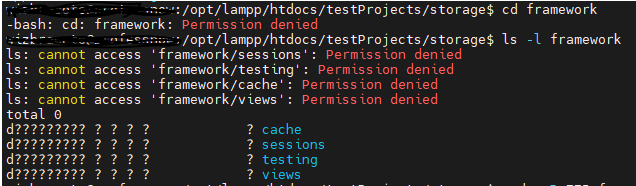
At the end, the final permission we have to give to our session folder which is located inside our storage/framework folder,
and every time we hit our project URL a new random session key is generated, that get stored in our session folder
so all of them are necessary to run a Laravel project
Run the below command to grand access to the framework and session
sudo chmod -R 775 framework
sudo chmod -R 775 session
That’s it, these all works for me hope it for you too