MOTOSHARE 🚗🏍️
Turning Idle Vehicles into Shared Rides & Earnings
From Idle to Income. From Parked to Purpose.
Earn by Sharing, Ride by Renting.
Where Owners Earn, Riders Move.
Owners Earn. Riders Move. Motoshare Connects.
With Motoshare, every parked vehicle finds a purpose.
Owners earn. Renters ride.
🚀 Everyone wins.
What is Laravel?
Laravel is a modern, open-source PHP framework designed for building robust, maintainable, and scalable web applications. Created by Taylor Otwell and released in 2011, Laravel has quickly become one of the most popular PHP frameworks worldwide, renowned for its elegant syntax, developer-friendly tools, and rich ecosystem.
Laravel is built on the Model-View-Controller (MVC) architectural pattern, which separates application logic (Model), user interface (View), and request handling (Controller). This separation of concerns improves code organization and facilitates collaboration.
Laravel abstracts many common web development tasks — routing, authentication, sessions, caching, database interactions, and more — providing an expressive and powerful syntax that allows developers to focus on application-specific logic rather than boilerplate code.
Additionally, Laravel integrates seamlessly with modern frontend tools, REST APIs, queues, task scheduling, real-time event broadcasting, and testing frameworks, making it ideal for both simple websites and complex enterprise applications.
What are the Major Use Cases of Laravel?
Laravel’s versatility and comprehensive feature set make it suitable for a wide variety of application types and industries:
1. Content Management Systems (CMS) and Blogs
Laravel’s modular structure, routing flexibility, and templating engine (Blade) make it an excellent choice for building content-heavy platforms, blogs, and CMS solutions where dynamic content management and user roles are essential.
2. E-commerce Applications
Robust e-commerce platforms demand complex features like product catalogs, shopping carts, payment gateways, order management, and customer accounts. Laravel offers built-in tools for handling authentication, validation, queues, and notifications, streamlining the development of e-commerce websites.
3. Enterprise-Level Applications
Enterprises often require complex applications involving workflow automation, reporting, multi-user role management, and integration with legacy systems. Laravel’s architecture supports building scalable and maintainable business applications with features like service containers and event-driven design.
4. RESTful API Development
Laravel makes building RESTful APIs straightforward through resource controllers, API authentication (via Laravel Sanctum or Passport), and rate limiting middleware. It supports JSON responses natively and integrates easily with frontend frameworks like React, Vue.js, and Angular.
5. Social Networks and Real-Time Apps
Features such as real-time event broadcasting (Laravel Echo), notifications, and task queues make Laravel suitable for building social platforms and interactive applications requiring real-time communication.
6. Microservices and Modular Systems
Laravel’s service container and package system facilitate modular development, making it possible to build microservices architectures or component-based applications.
7. Task Automation and Background Jobs
Laravel includes a native scheduler and robust queue system, allowing background processing of tasks like emails, report generation, and API calls asynchronously to improve performance.
How Laravel Works Along with Architecture?
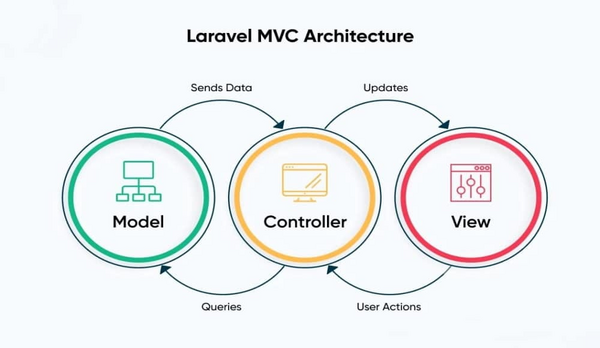
Laravel’s architecture is a well-designed blend of established software design principles and modern PHP features, structured around several key components:
1. Model-View-Controller (MVC) Pattern
- Model: Represents the data layer, typically using Laravel’s Eloquent ORM to interact with databases via expressive ActiveRecord syntax. Models define database tables, relationships, and business logic related to data.
- View: Uses Laravel’s Blade templating engine to render HTML dynamically. Blade supports template inheritance, components, and simple PHP embedding, enabling clean and maintainable frontend code.
- Controller: Handles user input and requests, coordinates with models to retrieve or store data, and returns responses by rendering views or JSON for APIs.
2. Routing Layer
Laravel’s routing system maps HTTP requests to controllers or closure functions. It supports RESTful routing, route groups, middleware, named routes, and route model binding, offering flexible URL handling.
3. Service Container and Dependency Injection
The service container is Laravel’s powerful tool for managing class dependencies and performing dependency injection. It promotes loose coupling and testability by automatically injecting required services into controllers or other classes.
4. Middleware
Middleware layers act as filters for HTTP requests, enabling features like authentication, CSRF protection, logging, and CORS headers by processing requests before they reach routes or controllers.
5. Database and Eloquent ORM
Laravel supports multiple database systems and provides:
- Migrations: Version-controlled schema changes.
- Query Builder: Fluent interface for database queries.
- Eloquent ORM: ActiveRecord implementation that maps models to tables and supports complex relationships (one-to-many, many-to-many, polymorphic).
6. Queues and Task Scheduling
Queues enable deferring time-consuming tasks (emails, notifications) using various backends like Redis or database queues. The scheduler allows cron-like task automation within Laravel’s ecosystem.
7. Event System
Laravel’s event broadcasting supports decoupled event-driven programming, enabling real-time notifications and asynchronous processing.
8. Security
Laravel includes built-in mechanisms for password hashing, input validation, SQL injection prevention, cross-site scripting (XSS) protection, and CSRF tokens.
9. Testing
Laravel integrates PHPUnit and provides helpers for HTTP testing, database transactions, and mocking services, facilitating robust automated testing.
What are the Basic Workflow of Laravel?
The typical Laravel development workflow follows these stages:
1. Project Setup
Initialize a new Laravel project using Composer and configure environment variables.
2. Routing and Controllers
Define routes in routes/web.php or routes/api.php and link them to controller methods that handle requests.
3. Database Schema Design
Define migrations to create and modify database tables and run migrations to update the database schema.
4. Model Creation
Create Eloquent models corresponding to database tables, defining relationships and business logic.
5. View Development
Design Blade templates to render data dynamically and create reusable components.
6. Implement Business Logic
Handle data manipulation in controllers and models, applying validation and authorization rules.
7. Background Processing
Configure queues and schedule tasks for asynchronous processing.
8. Testing
Write and execute unit and feature tests to verify application correctness.
9. Deployment
Prepare the application for production with caching, optimization, and environment configuration.
Step-by-Step Getting Started Guide for Laravel
Step 1: Install Composer
Ensure Composer is installed for PHP dependency management.
curl -sS https://getcomposer.org/installer | php
sudo mv composer.phar /usr/local/bin/composer
Code language: JavaScript (javascript)
Step 2: Create a New Laravel Project
Create a fresh Laravel project via Composer:
composer create-project --prefer-dist laravel/laravel myproject
cd myproject
Step 3: Configure Environment Variables
Copy .env.example to .env and update database credentials and other settings.
DB_CONNECTION=mysql
DB_HOST=127.0.0.1
DB_PORT=3306
DB_DATABASE=laravel_db
DB_USERNAME=root
DB_PASSWORD=secret
Step 4: Generate Application Key
Run the key generator to set the application encryption key:
php artisan key:generate
Code language: CSS (css)
Step 5: Run Database Migrations
Create the initial database schema:
php artisan migrate
Step 6: Serve the Application
Start the built-in development server:
php artisan serve
Visit http://127.0.0.1:8000 in your browser.
Step 7: Create a Model and Controller
Generate a model and corresponding controller:
php artisan make:model Post -m
php artisan make:controller PostController --resource
Code language: CSS (css)
The -m flag creates a migration file.
Step 8: Define Database Schema
Edit the migration file in database/migrations to define columns:
Schema::create('posts', function (Blueprint $table) {
    $table->id();
    $table->string('title');
    $table->text('content');
    $table->timestamps();
});
Code language: PHP (php)
Run migrations:
php artisan migrate
Step 9: Define Routes
In routes/web.php:
Route::resource('posts', PostController::class);
Code language: JavaScript (javascript)
Step 10: Implement Controller Logic
Populate controller methods (index, show, store, etc.) to interact with the Post model.
Step 11: Create Blade Views
In resources/views/posts/, create Blade templates (index.blade.php, show.blade.php, create.blade.php).