MOTOSHARE 🚗🏍️
Turning Idle Vehicles into Shared Rides & Earnings
From Idle to Income. From Parked to Purpose.
Earn by Sharing, Ride by Renting.
Where Owners Earn, Riders Move.
Owners Earn. Riders Move. Motoshare Connects.
With Motoshare, every parked vehicle finds a purpose.
Owners earn. Renters ride.
🚀 Everyone wins.
What is JSP?
JavaServer Pages (JSP) is a server-side technology that enables the creation of dynamic, platform-independent web content by embedding Java code into HTML pages. Developed as part of the Java EE platform by Sun Microsystems (now Oracle), JSP serves as a powerful tool for building web applications that can dynamically respond to user inputs, session data, and backend resources like databases.
Unlike static HTML pages, JSP files are processed on the server, where embedded Java code is executed to produce customized HTML output tailored to each user request. This makes JSP an essential technology for applications where content varies according to user interaction or real-time data.
JSP’s syntax allows mixing standard HTML tags with Java code fragments, expressions, and special tags, facilitating rapid development while leveraging the full power of Java’s programming capabilities. JSP complements Java Servlets by providing a more convenient way to write the presentation layer of web applications, improving code readability and maintainability.
What are the Major Use Cases of JSP?
JSP is widely adopted for many types of web applications. Here are the primary use cases:
1. Dynamic Content Generation
One of JSP’s core strengths is generating dynamic web pages that update content based on user input, database queries, or business logic. For example, e-commerce sites use JSP to display product lists that vary depending on user preferences or inventory status.
2. Form Processing and User Interaction
JSP facilitates processing HTML forms submitted by users. It can read user input, validate data, and respond accordingly—whether by displaying confirmation messages, error handling, or further data manipulation.
3. Session and State Management
Web applications require maintaining user state across multiple requests. JSP provides mechanisms to handle sessions, cookies, and application context, enabling personalized user experiences and secure login systems.
4. Database Integration
Most real-world applications depend on databases. JSP pages often interact with databases via Java Database Connectivity (JDBC) or other persistence frameworks to fetch, update, and display data dynamically.
5. MVC Architecture
JSP is often used as the View component in the Model-View-Controller (MVC) design pattern. Here, JSP handles the user interface rendering, servlets or frameworks like Spring or Struts manage control flow (Controller), and JavaBeans or Enterprise JavaBeans represent the data model.
6. Reusable Components with Custom Tags
JSP supports custom tag libraries, enabling developers to create reusable components that encapsulate complex behavior, promoting cleaner code and separation of concerns.
How JSP Works Along with Architecture?
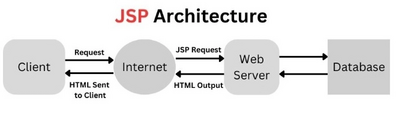
JSP operates within a servlet container (web server), relying on the Java EE platform’s robust infrastructure. The overall architecture involves these key components and processes:
1. Client Request
The process begins when a client’s web browser sends an HTTP request to access a JSP page hosted on the server.
2. JSP Engine / Servlet Container
The JSP engine inside the servlet container (like Apache Tomcat) receives this request. It checks if the requested JSP page has been previously compiled.
3. Translation to Servlet
If the JSP page is new or modified, the container translates the JSP into a Java servlet source code file. This involves converting the JSP directives, expressions, and scriptlets into equivalent Java methods and classes.
4. Compilation
The generated Java servlet source code is then compiled by the server’s Java compiler into bytecode (.class files).
5. Servlet Loading and Execution
The compiled servlet class is loaded into memory, and the servlet’s service() method handles the request by executing embedded Java code, processing business logic, and generating dynamic HTML content.
6. Response Delivery
The servlet sends the dynamically generated HTML response back to the client’s browser, completing the cycle.
7. Caching for Efficiency
For subsequent requests, if the JSP file remains unchanged, the container bypasses the translation and compilation steps, directly executing the precompiled servlet to optimize performance.
JSP Architecture Diagram (Conceptual)
Client Browser  --> HTTP Request -->  Web Server/Servlet Container
                                        |
                                        V
                              JSP Engine translates JSP
                                        |
                                        V
                              Servlet Source Code
                                        |
                                        V
                              Java Compiler compiles Servlet
                                        |
                                        V
                              Servlet Execution (service method)
                                        |
                                        V
                              Dynamic HTML Response sent back to Client
What are the Basic Workflow Steps of JSP?
Understanding the JSP life cycle and workflow is key to effective development:
Step 1: Client Sends Request
The browser requests a JSP page via HTTP, e.g., http://localhost:8080/app/home.jsp.
Step 2: JSP Translation
The server checks if the JSP has been compiled before or if the source has changed. If needed, the JSP page is translated into a servlet’s Java source code.
Step 3: Servlet Compilation
The servlet source code is compiled into a .class file using the Java compiler.
Step 4: Class Loading and Initialization
The servlet container loads the compiled servlet class and calls its init() method to initialize any resources.
Step 5: Request Handling
The servlet’s service() method is called, which executes the embedded Java code, interacts with other Java components or databases, and constructs the response.
Step 6: Response Generation
The servlet produces HTML (or other content types), which the server sends back to the client.
Step 7: Servlet Lifecycle Management
The servlet remains in memory for handling future requests until the server shuts down or the servlet is reloaded.
Step-by-Step Getting Started Guide for JSP
If you’re new to JSP, here is a detailed guide to kick off your development journey:
Step 1: Install Java Development Kit (JDK)
Download and install the latest JDK from Oracle or OpenJDK. Ensure your environment variables (e.g., JAVA_HOME) are properly set.
Step 2: Download and Set Up Apache Tomcat Server
Tomcat is a widely used servlet container for running JSP and servlets.
- Download Tomcat from the Apache website.
- Extract it to a preferred location.
- Start the server by running the startup script (
startup.baton Windows orstartup.shon Linux/Mac).
Step 3: Create a Web Application Directory Structure
Create a folder structure following the Java EE web application conventions:
yourapp/
  ├── WEB-INF/
  │     ├── web.xml
  │     └── classes/
  └── index.jsp
WEB-INF/web.xmlis the deployment descriptor (can be minimal or empty for simple JSP apps).- JSP files like
index.jspgo in the root or appropriate folders.
Step 4: Write Your First JSP Page
Create index.jsp with the following content:
<%@ page language="java" contentType="text/html; charset=UTF-8" %>
<html>
<head><title>Welcome to JSP</title></head>
<body>
  <h1>Hello, JSP World!</h1>
  <p>Current Date and Time: <%= new java.util.Date() %></p>
</body>
</html>
Code language: HTML, XML (xml)
Step 5: Deploy Your Application
- Copy your application folder (
yourapp) into Tomcat’swebappsdirectory. - Start or restart Tomcat.
Step 6: Access Your JSP Page in Browser
Navigate to http://localhost:8080/yourapp/index.jsp.
You should see your JSP page rendered with the dynamic date and time.
Step 7: Explore JSP Syntax and Features
- Directives: Control page-level settings, e.g.,
<%@ page %>,<%@ include %>. - Scriptlets: Embed Java code blocks with
<% code %>. - Expressions: Output values with
<%= expression %>. - Declarations: Define variables/methods with
<%! declarations %>.
Step 8: Use JavaBeans and JSTL
- Use JavaBeans to separate business logic.
- Learn JSTL (JSP Standard Tag Library) to reduce Java code in JSP and improve readability.
Additional Tips and Best Practices
- Avoid scriptlets: Modern JSP development favors Expression Language (EL) and JSTL to reduce Java code in JSP files.
- Use MVC pattern: Separate concerns by using servlets or frameworks for control logic and JSP for view rendering.
- Manage session carefully: Use sessions to personalize user experience but avoid storing large objects.
- Secure JSP pages: Protect sensitive pages using authentication and authorization mechanisms.
- Optimize JSP performance: Cache frequently accessed data and minimize JSP recompilation by managing includes and tag libraries properly.