MOTOSHARE 🚗🏍️
Turning Idle Vehicles into Shared Rides & Earnings
From Idle to Income. From Parked to Purpose.
Earn by Sharing, Ride by Renting.
Where Owners Earn, Riders Move.
Owners Earn. Riders Move. Motoshare Connects.
With Motoshare, every parked vehicle finds a purpose.
Owners earn. Renters ride.
🚀 Everyone wins.

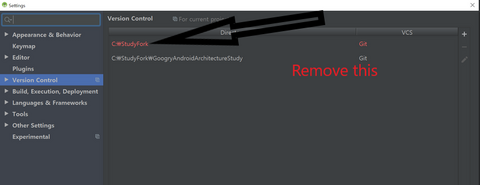
“VCS root mapping” refers to the way a Version Control System (VCS) like Git, Subversion, or Mercurial maps files in a repository to a local directory structure on a developer’s machine.
An “invalid VCS root mapping” error typically occurs when the mapping between the repository and the local directory structure is incorrect or missing.
Here are some possible causes and solutions:
- Incorrect VCS root mapping: Check that the VCS root mapping in your IDE or build system matches the directory structure of your repository. If you have moved or renamed files or directories, update the mapping accordingly.
- Missing VCS root mapping: If you’re setting up a new project, make sure to configure the VCS root mapping correctly in your IDE or build system.
- Incorrect version control system: Make sure you’re using the correct VCS for your repository. For example, if your repository is using Git, make sure your IDE or build system is also using Git.
- Access issues: Ensure that you have proper access to the repository, and that you have permission to read and write files.