MOTOSHARE 🚗🏍️
Turning Idle Vehicles into Shared Rides & Earnings
From Idle to Income. From Parked to Purpose.
Earn by Sharing, Ride by Renting.
Where Owners Earn, Riders Move.
Owners Earn. Riders Move. Motoshare Connects.
With Motoshare, every parked vehicle finds a purpose.
Owners earn. Renters ride.
🚀 Everyone wins.
Error
FAILURE: Build failed with an exception. * What went wrong: A problem occurred configuring project ‘:app’. > Could not open cp_proj generic class cache for build file ‘C:\Users\dharm\AndroidStudioProjects\my_hospital_now\android\app\build.gradle’ (C:\Users\dharm.gradle\caches\7.2\scripts\b3h9kpbsn0ml2oi5s7go52cjs). > BUG! exception in phase ‘conversion’ in source unit ‘BuildScript‘ class org.codehaus.groovy.ast.expr.TupleExpression cannot be cast to class org.codehaus.groovy.ast.expr.ArgumentListExpression (org.codehaus.groovy.ast.expr.TupleExpression and org.codehaus.groovy.ast.expr.ArgumentListExpression are in unnamed module of loader org.gradle.internal.classloader.VisitableURLClassLoader @6a4f787b) * Try: Run with –stacktrace option to get the stack trace. Run with –info or –debug option to get more log output. Run with –scan to get full insights.
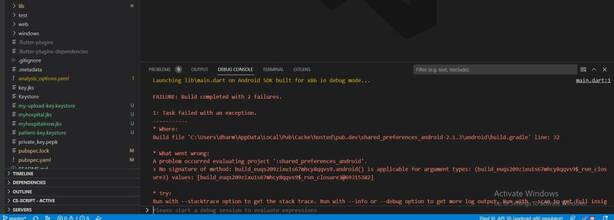
Solution
It seems that necessary Android 27 API’s are missing in your Android sdk directory. go to ~/library/android/sdk/tools/bin and run sdkmanager –list to check if you have platform-tools and platforms;android-27 installed. If not, then you can install them by running sdkmanager “platform-tools” “platforms;android-27”
If you have Android Studio, then you can install them via Android Studio’s GUI, too.
- open file menu—> project structure—>project settings—>project
- check your project SDK
- also check >>>project structure—>platform settings—>sdks
- give same SDK and click ok
- try to run project
FAILURE: Build failed with an exception.
* What went wrong:
A problem occurred configuring root project ‘android’.
> Could not resolve all files for configuration ‘:classpath’.
> Could not find com.android.tools.build:gradle:8.3.
Searched in the following locations:
– https://dl.google.com/dl/android/maven2/com/android/tools/build/gradle/8.3/gradle-8.3.pom
– https://repo.maven.apache.org/maven2/com/android/tools/build/gradle/8.3/gradle-8.3.pom
Required by:
project :
* Try:
> Run with –stacktrace option to get the stack trace.
> Run with –info or –debug option to get more log output.
> Run with –scan to get full insights.
> Get more help at https://help.gradle.org.
BUILD FAILED in 8s
Error: Gradle task assembleDebug failed with exit code 1
FAILURE: Build failed with an exception.
* What went wrong:
A problem occurred configuring root project ‘android’.
> Could not resolve all files for configuration ‘:classpath’.
> Could not find com.android.tools.build:gradle:8.3.
Searched in the following locations:
– https://dl.google.com/dl/android/maven2/com/android/tools/build/gradle/8.3/gradle-8.3.pom
– https://repo.maven.apache.org/maven2/com/android/tools/build/gradle/8.3/gradle-8.3.pom
Required by:
project :
> Could not find org.jetbrains.kotlin:kotlin-gradle-plugin:41.9.10.
Searched in the following locations:
– https://dl.google.com/dl/android/maven2/org/jetbrains/kotlin/kotlin-gradle-plugin/41.9.10/kotlin-gradle-plugin-41.9.10.pom
– https://repo.maven.apache.org/maven2/org/jetbrains/kotlin/kotlin-gradle-plugin/41.9.10/kotlin-gradle-plugin-41.9.10.pom
Required by:
project :
* Try:
> Run with –stacktrace option to get the stack trace.
> Run with –info or –debug option to get more log output.
> Run with –scan to get full insights.
> Get more help at https://help.gradle.org.
BUILD FAILED in 40s
Error: Gradle task assembleDebug failed with exit code 1