MOTOSHARE 🚗🏍️
Turning Idle Vehicles into Shared Rides & Earnings
From Idle to Income. From Parked to Purpose.
Earn by Sharing, Ride by Renting.
Where Owners Earn, Riders Move.
Owners Earn. Riders Move. Motoshare Connects.
With Motoshare, every parked vehicle finds a purpose.
Owners earn. Renters ride.
🚀 Everyone wins.
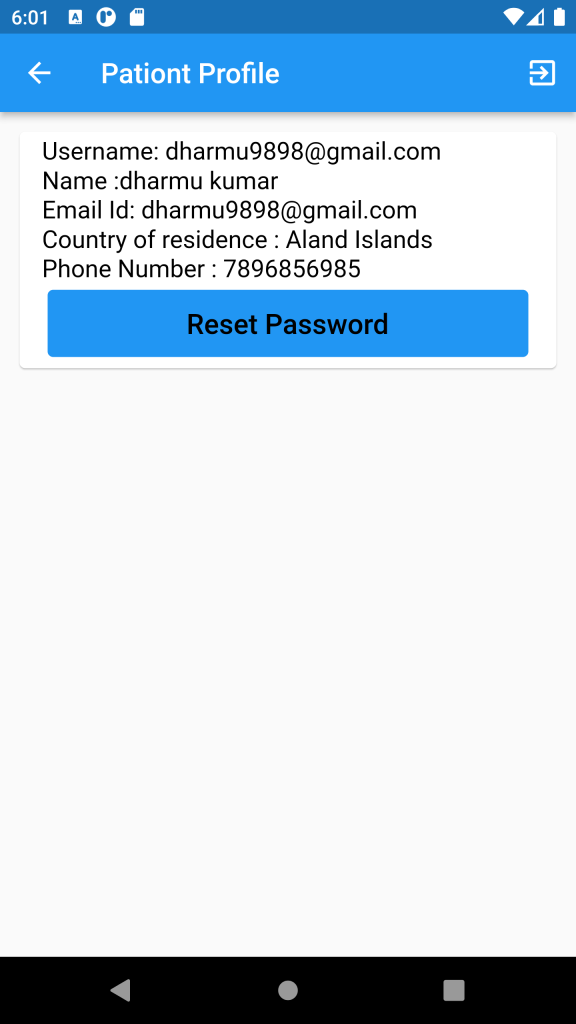
To display only one data using FutureBuilder<List>, you can modify the builder method of the FutureBuilder widget to return a single widget instead of a list. Here’s an
Step -1
 body: new FutureBuilder<List>(
          future: authServices.getUserProfile(),
          builder: (context, snapshot) {
            if (snapshot.hasError) print(snapshot.error);
            print("yaha tak data");
            print(snapshot.data);
            if (snapshot.hasData) {
              // Only display the first item in the list
              var data = snapshot.data[0];
              // return Text(data.toString());
              return ItemList(list: snapshot.data);
            } else {
              return new Center(
                child: new CircularProgressIndicator(),
              );
            }
          },
        ));Code language: PHP (php)
Step -2
To display only the first item of data in the ItemList widget, you can modify the itemCount property of ListView.builder to 1 instead of list.length. Then, you can access the first item in the list using list[0] instead of list[i]. Here’s an updated version of the ItemList widget:
// ignore: must_be_immutable
class ItemList extends StatelessWidget {
  List list;
  ItemList({this.list});
  @override
  Widget build(BuildContext context) {
    return new ListView.builder(
        itemCount: 1, // Only display the first item in the list
        itemBuilder: (context, index) {
          var data = list[0];
          return new Container(
            padding: const EdgeInsets.all(10.0),
            child: new Card(
                child: new ListTile(
              title: new Text('Username: ${data['email']}',
                  style: TextStyle(
                    fontSize: 17.0,
                    color: Colors.black,
                  )),
              subtitle: Column(
                mainAxisAlignment: MainAxisAlignment.start,
                crossAxisAlignment: CrossAxisAlignment.start,
                textDirection: TextDirection.ltr,
                children: <Widget>[
                  new Text('Name :${data['name']}',
                      style: TextStyle(
                        fontSize: 20.0,
                        color: Colors.black,
                      )),
                  new Text('Email Id: ${data['email']}',
                      style: TextStyle(
                        fontSize: 17.0,
                        color: Colors.black,
                      )),
                  new Text('Country of residence : ${data['country']}',
                      style: TextStyle(
                        fontSize: 20.0,
                        color: Colors.black,
                      )),
                  new Text('Phone Number : ${data['phone']}',
                      style: TextStyle(
                        fontSize: 20.0,
                        color: Colors.black,
                      )),
                ],
              ),
            )),
          );
        });
  }
}
Code language: PHP (php)
In the Profile widget, you can replace return Text(data.toString()); with return ItemList(list: snapshot.data); to display the ItemList widget instead of just the text representation of the first item in the list.