MOTOSHARE 🚗🏍️
Turning Idle Vehicles into Shared Rides & Earnings
From Idle to Income. From Parked to Purpose.
Earn by Sharing, Ride by Renting.
Where Owners Earn, Riders Move.
Owners Earn. Riders Move. Motoshare Connects.
With Motoshare, every parked vehicle finds a purpose.
Owners earn. Renters ride.
🚀 Everyone wins.

1. Introduction to GCC
The GNU Compiler Collection (GCC) is a cornerstone of modern software development, especially within the open-source ecosystem. Originally created by Richard Stallman in 1987 as the GNU C Compiler, GCC has grown into a comprehensive collection of compilers supporting several programming languages such as C, C++, Objective-C, Fortran, Ada, and more.
GCC serves as a compiler system that converts human-readable source code into machine-level executable instructions, facilitating the creation of performant software on a vast range of hardware architectures — from desktops and servers to embedded systems.
Because of its open-source license, wide platform support, and powerful optimization capabilities, GCC remains the default and preferred compiler on most Unix-like operating systems, including Linux and BSD variants.
2. Major Use Cases of GCC
2.1 Compiling Native Applications
GCC is most commonly used to compile applications written in C and C++ on native platforms, providing reliable and optimized code generation.
2.2 Cross-Compilation for Embedded Systems
GCC enables cross-compilation, where developers build code on a host machine for execution on different target architectures (e.g., ARM Cortex-M microcontrollers, MIPS processors). This is crucial for embedded and IoT development.
2.3 Kernel and Operating System Development
The Linux kernel and many other OS kernels are compiled using GCC, taking advantage of its robust support for low-level programming, inline assembly, and optimizations.
2.4 Academic Research and Compiler Development
GCC’s modular architecture allows researchers and students to experiment with compiler optimizations, code generation, and static analysis.
2.5 Software Portability and Multi-language Support
With support for multiple languages and target architectures, GCC aids in porting software across diverse systems.
2.6 Performance Tuning and Optimization
GCC offers a rich set of compiler flags for fine-tuning code performance, including aggressive optimizations, vectorization, and link-time optimizations.
3. How GCC Works: Architecture and Components
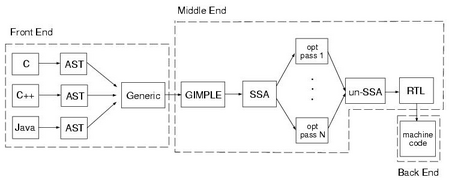
3.1 Front End: Language Parsing and Semantic Analysis
Each supported language has its own front end which performs:
- Lexical analysis (tokenizing source code).
- Syntax analysis (parsing tokens into Abstract Syntax Tree – AST).
- Semantic analysis (type checking, scope resolution).
- Generation of an Intermediate Representation (IR), called GIMPLE or Tree in GCC parlance.
3.2 Middle End: Optimization Phase
The middle end operates on the IR, performing machine-independent optimizations such as:
- Constant folding and propagation.
- Dead code elimination.
- Loop unrolling and vectorization.
- Inlining functions.
This stage improves the efficiency of the generated code regardless of the target architecture.
3.3 Back End: Target-Specific Code Generation
The back end translates the optimized IR into machine-specific assembly code, handling:
- Instruction selection based on the target CPU.
- Register allocation.
- Instruction scheduling.
- Emitting assembly or binary object code.
GCC supports a wide array of back ends for architectures like x86, ARM, PowerPC, RISC-V, MIPS, and more.
3.4 Assembler and Linker
After code generation, the assembler converts assembly into object files. The linker then combines multiple object files and libraries into an executable, resolving symbols and managing memory layout.
4. GCC Compilation Process: Step-by-Step Workflow
The full compilation involves several stages, often integrated via GCC driver:
4.1 Preprocessing
- Processes directives starting with
#such as#include,#define, and#ifdef. - Macro expansion and file inclusion.
- Output: Preprocessed source code.
4.2 Compilation
- Parses the preprocessed source.
- Converts to IR and performs language-specific semantic analysis.
- Generates assembly code.
4.3 Assembly
- Converts assembly code into machine-level object code.
4.4 Linking
- Combines all object files and libraries into an executable or shared library.
- Resolves external references.
- Applies link-time optimizations if enabled.
4.5 Optional Steps
- Static analysis, code coverage instrumentation, or sanitization if enabled by flags.
5. Practical Guide: Getting Started with GCC
Step 1: Installing GCC
- Linux:
sudo apt install build-essential # Debian/Ubuntu sudo yum install gcc gcc-c++ # RHEL/CentOS - macOS: Install Xcode command line tools:
xcode-select --install - Windows: Use MinGW-w64 or MSYS2 environments for native GCC.
Step 2: Writing Your First C Program
Create a file hello.c:
#include <stdio.h>

int main() {
    printf("Hello, GCC!\n");
    return 0;
}
Code language: PHP (php)
Step 3: Basic Compilation and Execution
Compile the program:
gcc hello.c -o hello
Code language: CSS (css)
Run the program:
./hello
Expected output:
Hello, GCC!
Step 4: Common GCC Compiler Options
-o <file>: Specify output executable name.-Wall: Enable most compiler warnings.-Werror: Treat warnings as errors.-O0,-O1,-O2,-O3,-Os: Optimization levels (none to aggressive).-g: Include debug information.-c: Compile only, produce object file.o.-std=c11: Specify language standard (e.g., C11).-I <path>: Add include directory.-L <path>and-l<name>: Link libraries.
Example with optimizations and debugging:
gcc -Wall -O2 -g hello.c -o hello
Code language: CSS (css)
Step 5: Compiling Multiple Files
Suppose you have main.c and utils.c:
gcc -c main.c -o main.o
gcc -c utils.c -o utils.o
gcc main.o utils.o -o myapp
Code language: CSS (css)
Step 6: Using GCC for C++
g++ program.cpp -o program
Code language: CSS (css)
g++ is a GCC front end for C++ that automatically links C++ standard libraries.
Step 7: Cross-Compilation Example
Compile for ARM architecture (assuming ARM GCC installed):
arm-linux-gnueabi-gcc hello.c -o hello-arm
Code language: CSS (css)
6. Advanced GCC Features and Tools
- Link-Time Optimization (LTO): Enables whole-program optimization.
gcc -flto -O3 hello.c -o hello - Sanitizers: Detect memory errors (
-fsanitize=address) or undefined behavior.gcc -fsanitize=address hello.c -o hello - Profiling: Generate profiling info (
-pg) for tools likegprof. - OpenMP Support: Compile parallel code with
-fopenmp. - Inline Assembly: Embed assembly code for low-level optimizations.
- Plugins and Customization: Extend GCC via plugins.
7. Best Practices When Using GCC
- Enable warnings (
-Wall) and fix all issues. - Use debugging symbols (
-g) during development. - Increment optimization gradually, check correctness after each step.
- Leverage static analysis and sanitizers to catch bugs early.
- Document compiler options in build scripts for reproducibility.
- Prefer makefiles or build systems (CMake, autotools) to manage complex builds.
8. Summary
GCC remains a fundamental tool in software development, powering the compilation of millions of applications worldwide. Its rich feature set, multi-language support, and extensive architecture support make it indispensable for developers from embedded systems to high-performance computing.
Mastering GCC’s workflow, commands, and optimization features will significantly enhance your programming efficiency and the performance of your compiled applications.