MOTOSHARE 🚗🏍️
Turning Idle Vehicles into Shared Rides & Earnings
From Idle to Income. From Parked to Purpose.
Earn by Sharing, Ride by Renting.
Where Owners Earn, Riders Move.
Owners Earn. Riders Move. Motoshare Connects.
With Motoshare, every parked vehicle finds a purpose.
Owners earn. Renters ride.
🚀 Everyone wins.

The Dart SDK is not set up.
First, check to see if your flutter framework SDK path is set whenever you encounter this error. My system does not have it configured. I will now demonstrate how to set up the Flutter SDK path. then your Dart SDK will be configured immediately. You must first install both plugins, such as Flutter and Dart. Let’s look at the steps below.
First, open the File menu.
Step 1 : Go to File Menu
Step 2: Press Ctrl + Alt + S to select Settings.
Step 3: Next, under the Language & Frameworks Tab, select Flutter.
Step 4: I installed Flutter in this directory (C:srcflutter) on my computer.
[Note: Please copy the location of the flutter installed on your PC]
Step 5: Copy the location above and paste it into the directory of your Flutter SDK:

Settings under File Menu
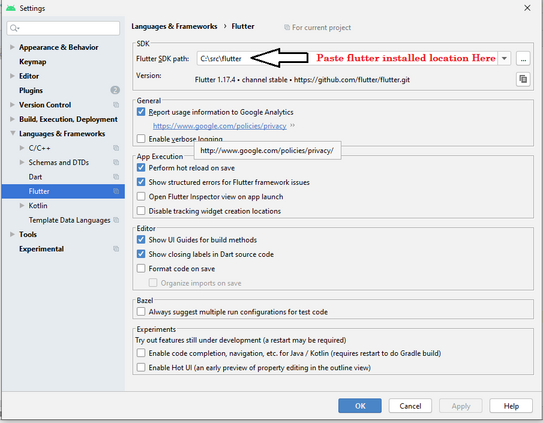
Set Flutter SDK path
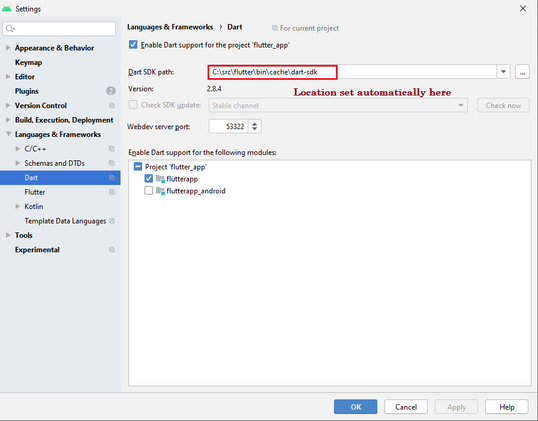
Dart SDK path set automatically
After applying above steps your error will be solved. Thanks for reading this article. if you find any other issue in Android Studio then comment us.
References :
https://stackoverflow.com/questions/48650831/dart-sdk-is-not-configured
Click Here (Youtube Video )