MOTOSHARE 🚗🏍️
Turning Idle Vehicles into Shared Rides & Earnings
From Idle to Income. From Parked to Purpose.
Earn by Sharing, Ride by Renting.
Where Owners Earn, Riders Move.
Owners Earn. Riders Move. Motoshare Connects.
With Motoshare, every parked vehicle finds a purpose.
Owners earn. Renters ride.
🚀 Everyone wins.
ReplicaSets
Definition – It is a Kubernetes object that maintains the number of pods (i.e. replicas of a given pod) and checks if the current number of pods are matching the desired number specified for the figure given in replicasets.
Advantage –
1.Its powerful – since at any point of time you can manage the scale of your app by this single configuration in the YAML.
2. Also – even if a pod gets killed/terminated – the ReplicaSet will always bring it back to the desired state.
Note – It is invoked and controlled by another K8s construct called Deployment. Hence within the deployment api-resource we define replicas and to scale up and scale down the replicas is always done on top of Deployment.
Its predecessor was ReplicationController and ReplicaSet is ReplicationController + Bug fixes.
Example and Commands
Commands to create a deployment of ReplicaSet with 3 pods and checking its status.
[centos@ip-172-31-22-14 ~]$ <strong>kubectl create deployment scaled-aar --image=scmgalaxy/nginx-devopsschoolv1 --replicas=3 -n=test-aar</strong>
deployment.apps/scaled-aar created
[centos@ip-172-31-22-14 ~]$ <strong>kubectl get deploy -n=test-aar</strong>
NAME         READY   UP-TO-DATE   AVAILABLE   AGE
scaled-aar   3/3     3            3           13s
[centos@ip-172-31-22-14 ~]$ <strong>kubectl get pods -n=test-aar</strong>
NAME                          READY   STATUS    RESTARTS   AGE
rajesh                        1/1     Running   0          88m
scaled-aar-747995fc79-4d6zm   1/1     Running   0          24s
scaled-aar-747995fc79-kxhx8   1/1     Running   0          24s
scaled-aar-747995fc79-z4nw7   1/1     Running   0          24s
[centos@ip-172-31-22-14 ~]$ <strong>kubectl describe deploy scaled-aar -n=test-aar</strong>
Name:                   scaled-aar
Namespace:              test-aar
CreationTimestamp:      Thu, 16 Sep 2021 06:15:36 +0000
Labels:                 app=scaled-aar
Annotations:            deployment.kubernetes.io/revision: 1
Selector:               app=scaled-aar
Replicas:               3 desired | 3 updated | 3 total | 3 available | 0 unavailable
StrategyType:           RollingUpdate
MinReadySeconds:        0
RollingUpdateStrategy:  25% max unavailable, 25% max surge
Pod Template:
  Labels:  app=scaled-aar
  Containers:
   nginx-devopsschoolv1:
    Image:        scmgalaxy/nginx-devopsschoolv1
    Port:         <none>
    Host Port:    <none>
    Environment:  <none>
    Mounts:       <none>
  Volumes:        <none>
Conditions:
  Type           Status  Reason
  ----           ------  ------
  Available      True    MinimumReplicasAvailable
  Progressing    True    NewReplicaSetAvailable
OldReplicaSets:  <none>
NewReplicaSet:   scaled-aar-747995fc79 (3/3 replicas created)
Events:
  Type    Reason             Age   From                   Message
  ----    ------             ----  ----                   -------
  Normal  ScalingReplicaSet  55s   deployment-controller  Scaled up replica set scaled-aar-747995fc79 to 3Code language: HTML, XML (xml)
Note the following in describe output – NewReplicaSet: scaled-aar-747995fc79 (3/3 replicas created)
This is the indication that ReplicatSet is formed. Also again note that we 3 different pods once deployment creation finished.
Get Details of ReplicaSet
Post deployment creation if we want to see the details of the replicaset formed we can use the describe command to get the details as well.
Note how it even shows the last few events and mentions that its internally invoking ReplicationController
[centos@ip-172-31-22-14 ~]$ <strong>kubectl describe rs -n=test-aar</strong>
Name:           scaled-aar-747995fc79
Namespace:      test-aar
Selector:       app=scaled-aar,pod-template-hash=747995fc79
Labels:         app=scaled-aar
                pod-template-hash=747995fc79
Annotations:    deployment.kubernetes.io/desired-replicas: 2
                deployment.kubernetes.io/max-replicas: 3
                deployment.kubernetes.io/revision: 1
Controlled By:  Deployment/scaled-aar
Replicas:       2 current / 2 desired
Pods Status:    2 Running / 0 Waiting / 0 Succeeded / 0 Failed
Pod Template:
  Labels:  app=scaled-aar
           pod-template-hash=747995fc79
  Containers:
   nginx-devopsschoolv1:
    Image:        scmgalaxy/nginx-devopsschoolv1
    Port:         <none>
    Host Port:    <none>
    Environment:  <none>
    Mounts:       <none>
  Volumes:        <none>
Events:
  Type    Reason            Age   From                   Message
  ----    ------            ----  ----                   -------
  Normal  SuccessfulCreate  39m   replicaset-controller  Created pod: scaled-aar-747995fc79-kxhx8
  Normal  SuccessfulCreate  39m   replicaset-controller  Created pod: scaled-aar-747995fc79-z4nw7
  Normal  SuccessfulCreate  39m   replicaset-controller  Created pod: scaled-aar-747995fc79-4d6zm
  Normal  SuccessfulCreate  34m   replicaset-controller  Created pod: scaled-aar-747995fc79-9bfj8
  Normal  SuccessfulCreate  28m   replicaset-controller  Created pod: scaled-aar-747995fc79-98s7k
  Normal  SuccessfulCreate  28m   replicaset-controller  Created pod: scaled-aar-747995fc79-c6n68
  Normal  SuccessfulDelete  25m   replicaset-controller  Deleted pod: scaled-aar-747995fc79-c6n68
  Normal  SuccessfulDelete  25m   replicaset-controller  Deleted pod: scaled-aar-747995fc79-4d6zm
  Normal  SuccessfulDelete  25m   replicaset-controller  Deleted pod: scaled-aar-747995fc79-98s7kCode language: HTML, XML (xml)
Or if you just want to get a basic summary – can try below :-
[centos@ip-172-31-22-14 ~]$ <strong>kubectl get rs -n=test-aar</strong>
NAME                    DESIRED   CURRENT   READY   AGE
scaled-aar-747995fc79   2         2         2       44mCode language: HTML, XML (xml)
Change the Replicas with ease – Scale up / down
Method 1
Edit in the deployment YAML formed by edit. Here as we see – we changed in the vi edit the replicas from 3 to 5 and when we got pods we see 2 new pods (see age is 7s) along with existing 3 getting made
[centos@ip-172-31-22-14 ~]$ <strong>kubectl edit deploy scaled-aar -n=test-aar</strong>
deployment.apps/scaled-aar edited
[centos@ip-172-31-22-14 ~]$ kubectl get pods -n=test-aar
NAME                          READY   STATUS    RESTARTS   AGE
rajesh                        1/1     Running   0          99m
scaled-aar-747995fc79-4d6zm   1/1     Running   0          11m
scaled-aar-747995fc79-98s7k   1/1     Running   0          7s
scaled-aar-747995fc79-9bfj8   1/1     Running   0          6m20s
scaled-aar-747995fc79-c6n68   1/1     Running   0          7s
scaled-aar-747995fc79-z4nw7   1/1     Running   0          11mCode language: HTML, XML (xml)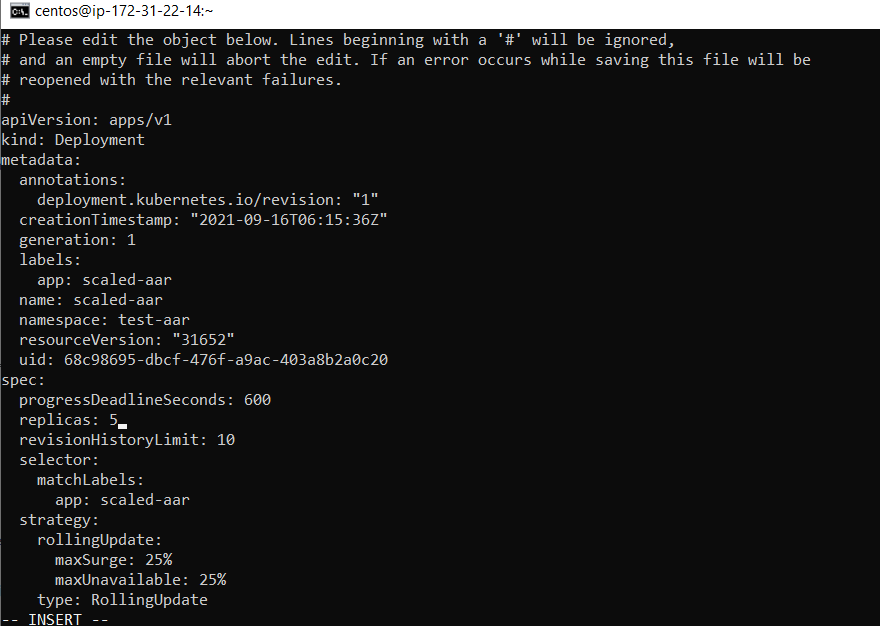
Method 2
Alternatively we can use the scale command on the deployment.
For example – as we see below we have scaled down the deployment to 2 replicas and so only 2 remain out of the earlier 5 and rest 3 are removed.
[centos@ip-172-31-22-14 ~]$ <strong>kubectl scale --replicas=2 deploy/scaled-aar -n=test-aar</strong>
deployment.apps/scaled-aar scaled
[centos@ip-172-31-22-14 ~]$ <strong>kubectl get pods -n=test-aar</strong>
NAME                          READY   STATUS    RESTARTS   AGE
rajesh                        1/1     Running   0          102m
scaled-aar-747995fc79-9bfj8   1/1     Running   0          9m16s
scaled-aar-747995fc79-z4nw7   1/1     Running   0          14mCode language: HTML, XML (xml)
Checking if desired state maintained
Here we got list of pods under a deployment with ReplicaSet, deleted 1 and performed a query to get again.
Note how we see – scaled-aar-747995fc79-9bfj8 is being formed in place of the terminated one.
[centos@ip-172-31-22-14 ~]$ <strong>kubectl get pods -n=test-aar</strong>
NAME                          READY   STATUS    RESTARTS   AGE
rajesh                        1/1     Running   0          93m
scaled-aar-747995fc79-4d6zm   1/1     Running   0          4m45s
scaled-aar-747995fc79-kxhx8   1/1     Running   0          4m45s
scaled-aar-747995fc79-z4nw7   1/1     Running   0          4m45s
[centos@ip-172-31-22-14 ~]$ <strong>kubectl delete pods scaled-aar-747995fc79-kxhx8 -n=test-aar</strong>
pod "scaled-aar-747995fc79-kxhx8" deleted
[centos@ip-172-31-22-14 ~]$ <strong>kubectl get pods -n=test-aar</strong>
NAME                          READY   STATUS              RESTARTS   AGE
rajesh                        1/1     Running             0          93m
scaled-aar-747995fc79-4d6zm   1/1     Running             0          5m10s
<strong>scaled-aar-747995fc79-9bfj8   0/1     ContainerCreating   0          3s</strong>
scaled-aar-747995fc79-z4nw7   1/1     Running             0          5m10sCode language: HTML, XML (xml)