MOTOSHARE 🚗🏍️
Turning Idle Vehicles into Shared Rides & Earnings
From Idle to Income. From Parked to Purpose.
Earn by Sharing, Ride by Renting.
Where Owners Earn, Riders Move.
Owners Earn. Riders Move. Motoshare Connects.
With Motoshare, every parked vehicle finds a purpose.
Owners earn. Renters ride.
🚀 Everyone wins.
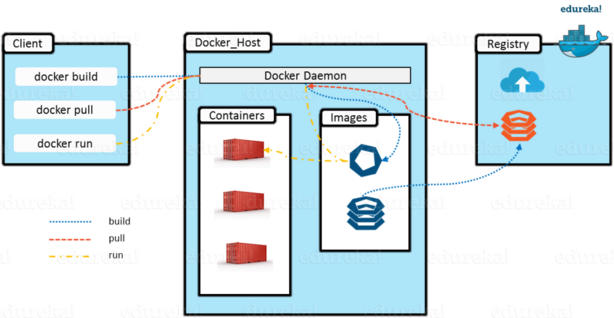
1..Docker
allows user to create , deploy and run applications
managing software packages called containers
It allows to break down application into small services.
It is an open platform for developing, and running applications.
2…containers
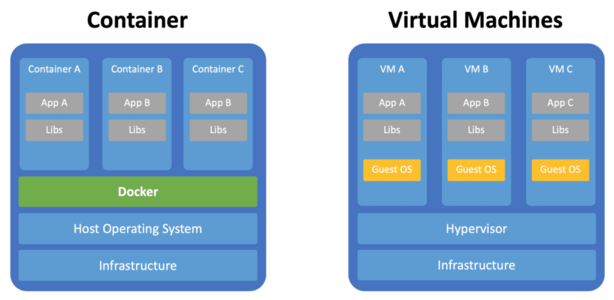
fully independent APP Run time environment
create – start – stop – restart – kill – start – pause – un pause -Stop – Remove
it simplify the build, test, deploy pipelines
have isolated libraries to run the application
3….Advantages
i. Ability to run anywhere
ii. Cost effective and fast deployment
iii. flexibility
iv. Security
v. Consistent and isolated environment
4..commands
1.docker exec — access the running container
2.docker ps — list the running container
3.docker rm — used to delete stopped container
4.docker version — get the currently installed version
5.docker pull –pull the images from the docker
6.docker run –create a container from an image
7.docker stop — stop running container
8.docker kill –kills the containers by stopping its execution immediately
9.docker ps -a —show all the running and exists containers
10.docker images — list all the stored docker images