MOTOSHARE 🚗🏍️
Turning Idle Vehicles into Shared Rides & Earnings
From Idle to Income. From Parked to Purpose.
Earn by Sharing, Ride by Renting.
Where Owners Earn, Riders Move.
Owners Earn. Riders Move. Motoshare Connects.
With Motoshare, every parked vehicle finds a purpose.
Owners earn. Renters ride.
🚀 Everyone wins.
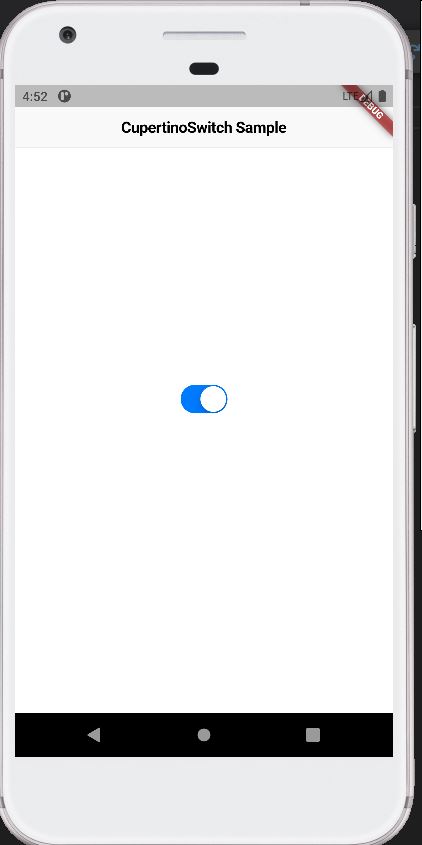
To use the CupertinoSwitch widget, you can import the cupertino package and simply instantiate it like any other widget:
import 'package:flutter/cupertino.dart';
import 'package:flutter/material.dart';

void main() {
  runApp(const MyApp());
}

class MyApp extends StatelessWidget {
  const MyApp({super.key});

  // This widget is the root of your application.
  @override
  Widget build(BuildContext context) {
    return const CupertinoApp(
      theme: CupertinoThemeData(brightness: Brightness.light),
      home: CupertinoSwitchExample(),
    );
  }
}

class CupertinoSwitchExample extends StatefulWidget {
  const CupertinoSwitchExample({super.key});

  @override
  State<CupertinoSwitchExample> createState() => _CupertinoSwitchExampleState();
}

class _CupertinoSwitchExampleState extends State<CupertinoSwitchExample> {
  bool switchValue = true;

  @override
  Widget build(BuildContext context) {
    return CupertinoPageScaffold(
      navigationBar: const CupertinoNavigationBar(
        middle: Text('CupertinoSwitch Sample'),
      ),
      child: Center(
        child: CupertinoSwitch(
          // This bool value toggles the switch.
          value: switchValue,
          activeColor: CupertinoColors.activeBlue,
          onChanged: (bool? value) {
            // This is called when the user toggles the switch.
            setState(() {
              switchValue = value ?? false;
            });
          },
        ),
      ),
    );
  }
}
Code language: JavaScript (javascript)