MOTOSHARE 🚗🏍️
Turning Idle Vehicles into Shared Rides & Earnings
From Idle to Income. From Parked to Purpose.
Earn by Sharing, Ride by Renting.
Where Owners Earn, Riders Move.
Owners Earn. Riders Move. Motoshare Connects.
With Motoshare, every parked vehicle finds a purpose.
Owners earn. Renters ride.
🚀 Everyone wins.
Amazon Web Services: A Comprehensive Overview
Amazon Web Services (AWS) is a cloud computing platform provided by Amazon. It offers a suite of cloud-based services such as computing power, storage, and databases, enabling businesses to scale and operate more efficiently. Launched in 2006, AWS has become one of the most widely used cloud platforms in the world, serving millions of customers, from startups to large enterprises. AWS allows businesses to rent computing resources on a pay-as-you-go basis, making it highly cost-effective and scalable for all kinds of use cases.
In this guide, we’ll explore what AWS is, its major use cases, how it works, its architecture, and provide a step-by-step guide on how to get started with AWS.
What is Amazon Web Services (AWS)?
Amazon Web Services (AWS) is a comprehensive and widely adopted cloud platform offering more than 200 fully featured services from data centers globally. It provides a wide range of computing resources, storage options, databases, machine learning tools, analytics, and networking capabilities, among others. AWS operates on a pay-as-you-go pricing model, which means you only pay for what you use, allowing businesses to scale their infrastructure up or down as needed without upfront investments in physical hardware.
AWS is divided into different service categories, including:
- Compute: Provides virtual servers (EC2), serverless computing (Lambda), and containers (ECS, EKS).
- Storage: Services like Amazon S3 (object storage), EBS (block storage), and Glacier (cold storage) allow businesses to store data of any scale.
- Databases: AWS offers managed relational (RDS), NoSQL (DynamoDB), and in-memory (ElastiCache) database services.
- Networking: AWS provides networking services such as Amazon VPC (Virtual Private Cloud), Route 53 (DNS), and Elastic Load Balancing (ELB).
- Machine Learning: Amazon SageMaker is a fully managed service to build, train, and deploy machine learning models.
AWS operates on the principles of scalability, reliability, and flexibility, and it has become the go-to cloud provider for businesses looking to leverage the cloud for computing and storage resources.
What Are the Major Use Cases of Amazon Web Services?
AWS’s broad range of services allows it to cater to a wide variety of use cases across industries. Below are some of the major use cases of AWS:
1. Web and Mobile Application Hosting
AWS offers highly scalable cloud services that allow businesses to host web applications and mobile backends with minimal effort. With AWS’s Elastic Compute Cloud (EC2), businesses can run virtual servers, while services like AWS Lambda provide serverless architecture. Additionally, with Amazon S3, applications can store static files such as images, videos, and documents.
2. Data Storage and Backup
AWS provides several storage solutions for different needs. Amazon S3 offers highly durable and scalable object storage, while EBS is used for block-level storage, often used by EC2 instances. Businesses can also use Amazon Glacier for archival storage at a lower cost, making AWS an excellent choice for backup and disaster recovery solutions.
3. Big Data Analytics
AWS enables businesses to process and analyze massive amounts of data with tools like Amazon EMR (Elastic MapReduce), which is based on Hadoop, and Amazon Redshift, a fully managed data warehouse service. AWS also provides Kinesis for real-time data streaming and analytics, as well as machine learning services like Amazon SageMaker to build predictive models on big data.
4. Cloud-Based Databases
AWS offers managed database services that help businesses avoid the complexities of database management. Amazon RDS supports multiple database engines (MySQL, PostgreSQL, SQL Server, etc.), while Amazon DynamoDB is a fully managed NoSQL database that supports key-value and document data models.
5. Internet of Things (IoT)
AWS supports IoT use cases with services like AWS IoT Core, which helps in connecting IoT devices, processing data, and managing devices at scale. With AWS IoT, businesses can capture and analyze data from sensors and devices in real-time, making it suitable for industries like manufacturing, healthcare, and agriculture.
6. Machine Learning and AI
AWS offers a rich set of tools for machine learning and artificial intelligence. Amazon SageMaker provides a fully managed service to build, train, and deploy machine learning models. Additionally, AWS Deep Learning AMIs offer pre-configured environments for deep learning model development.
7. Content Delivery and Streaming
AWS provides a powerful Content Delivery Network (CDN) through Amazon CloudFront, which accelerates the distribution of content (websites, videos, software) globally with low latency. For video streaming applications, AWS provides Media Services for encoding, processing, and delivering high-quality video content.
How Amazon Web Services Works: Architecture and Components
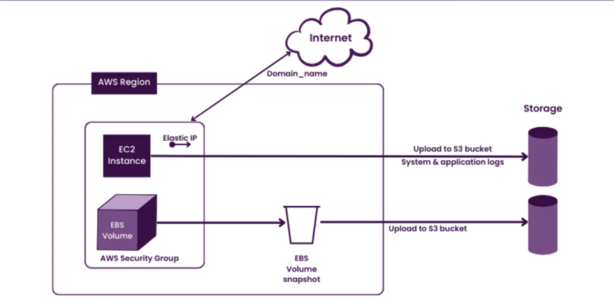
Amazon Web Services operates on a distributed architecture that leverages cloud computing principles to provide scalable, flexible, and highly available infrastructure. Below are the key architectural components of AWS:
1. Global Infrastructure
AWS operates globally with data centers in multiple geographic regions, known as Regions. Each region consists of multiple Availability Zones (AZs), which are isolated locations within a region to provide fault tolerance and high availability. This distributed architecture ensures that AWS services are highly available and resilient to localized failures.
2. Compute Services
At the core of AWS’s computing infrastructure is Amazon EC2 (Elastic Compute Cloud), which allows users to provision virtual machines (instances) to run applications. These instances come in various sizes and configurations to match specific workloads. AWS also provides Lambda for serverless computing, where you can run code without provisioning or managing servers.
3. Storage and Databases
AWS offers multiple storage options, including:
- Amazon S3 for scalable object storage.
- Amazon EBS for persistent block storage attached to EC2 instances.
- Amazon Glacier for low-cost, long-term archival storage.
For databases, AWS provides:
- Amazon RDS for relational databases.
- Amazon DynamoDB for NoSQL databases.
- Amazon Redshift for data warehousing.
4. Networking and Content Delivery
- Amazon VPC (Virtual Private Cloud) allows users to create isolated networks within AWS to securely connect resources and configure network security.
- Elastic Load Balancing (ELB) distributes incoming traffic to multiple EC2 instances for high availability.
- Amazon CloudFront is the CDN that speeds up content delivery globally, reducing latency for end users.
5. Security and Identity
AWS offers robust security services to protect data, identities, and applications. AWS Identity and Access Management (IAM) enables secure access control, while AWS Shield provides DDoS protection. Additionally, AWS Key Management Service (KMS) helps in encryption key management for secure data storage.
6. Monitoring and Management
AWS provides various tools to monitor and manage resources:
- Amazon CloudWatch collects monitoring data and logs for all AWS services.
- AWS CloudTrail tracks API activity for auditing and governance.
- AWS Systems Manager allows you to automate operational tasks across AWS resources.
Basic Workflow of Amazon Web Services
The basic workflow of using AWS can be broken down into the following steps:
- Sign Up for AWS: Create an AWS account and select a payment plan (credit card or invoicing for businesses).
- Provision Resources: Use the AWS Management Console, CLI, or SDKs to provision computing, storage, and network resources, such as EC2 instances, S3 buckets, or databases.
- Deploy Applications: Install and configure software applications on AWS resources. This may involve setting up databases, web servers, and integrating APIs.
- Monitor Resources: Utilize AWS services like CloudWatch to monitor resource usage and health. Adjust resources as needed to optimize performance and cost.
- Scale Resources: AWS’s elastic capabilities allow you to scale resources up or down based on demand. Use auto-scaling groups for automatic scaling of compute resources.
- Security and Backup: Implement security controls using IAM, enable encryption for data storage, and set up automated backups and disaster recovery plans.
Step-by-Step Getting Started Guide for Amazon Web Services
Step 1: Create an AWS Account
To begin using AWS, you need to sign up for an AWS account. Go to the AWS homepage and click Sign Up. Provide the necessary information, including your email address, company name, and payment information. Once your account is created, you’ll have access to the AWS Management Console.
Step 2: Access the AWS Management Console
The AWS Management Console is a web-based interface that allows you to manage all AWS services. Once logged in, you can navigate through the dashboard and begin provisioning resources like EC2 instances, S3 buckets, and more.
Step 3: Launch Your First EC2 Instance
To start using AWS’s computing power, launch an EC2 instance:
- In the AWS Management Console, go to EC2.
- Click Launch Instance, select an Amazon Machine Image (AMI), choose an instance type (e.g., t2.micro for low-cost usage), configure the instance, and finally, click Launch.
- Once the instance is launched, connect to it using SSH (for Linux instances) or RDP (for Windows instances).
Step 4: Set Up S3 Storage
- In the AWS Management Console, go to S3 and create a new bucket.
- Configure permissions, upload files to your S3 bucket, and manage access controls (e.g., setting public read access for static files).
Step 5: Monitor Your Usage
AWS offers various monitoring tools like CloudWatch to track your resource usage, performance metrics, and logs. Set up alerts to notify you when your resources exceed certain thresholds.