MOTOSHARE 🚗🏍️
Turning Idle Vehicles into Shared Rides & Earnings
From Idle to Income. From Parked to Purpose.
Earn by Sharing, Ride by Renting.
Where Owners Earn, Riders Move.
Owners Earn. Riders Move. Motoshare Connects.
With Motoshare, every parked vehicle finds a purpose.
Owners earn. Renters ride.
🚀 Everyone wins.
Introduction
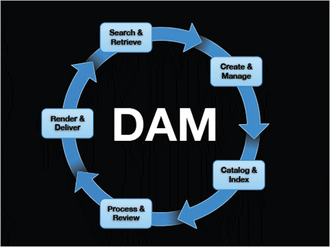
In an era driven by digital content, effective Digital Asset Management (DAM) is no longer a luxury—it’s a necessity. As we move into 2025, organizations are managing exponentially growing volumes of digital files: images, videos, documents, design files, and more. Without a centralized system, locating, sharing, securing, and tracking assets becomes chaotic and time-consuming.
Digital Asset Management (DAM) tools provide a centralized platform to store, organize, retrieve, and share digital content efficiently. Whether you’re a marketing agency handling hundreds of campaigns or an enterprise safeguarding brand consistency, choosing the right DAM software can greatly improve workflows, team collaboration, compliance, and content lifecycle management.
In 2025, users should look for DAM tools that offer intuitive UI/UX, AI-driven tagging, smart search, integrations with creative tools (like Adobe or Canva), robust permissions, scalability, and cloud-native access. Let’s dive into the top 10 DAM tools to consider in 2025.
Top 10 Digital Asset Management (DAM) Tools in 2025
1. Bynder
Short Description: Bynder is a popular cloud-based DAM designed for brand consistency and content automation for marketing teams.
Key Features:
- AI-powered asset tagging & smart filters
- Brand portal for on-brand templates
- Creative workflow and version control
- Native integrations (Adobe CC, Canva, Salesforce)
- Video management with preview & annotations
- Role-based access control and analytics
- Mobile access and branded portals
Pros:
- Excellent UI/UX for creative teams
- Scalable for large enterprises
Cons:
- Premium pricing for advanced features
- Some learning curve for automation flows
2. Brandfolder (Smartsheet)
Short Description: Brandfolder, now part of Smartsheet, offers enterprise-grade DAM with analytics and AI for marketing and creative professionals.
Key Features:
- AI-powered metadata tagging and search
- Smart CDN links for asset distribution
- User permissions and guest access control
- Built-in asset analytics (views, downloads, etc.)
- Adobe CC and Microsoft integrations
- Workflow automation and approval flows
Pros:
- Easy sharing with external stakeholders
- Strong performance analytics
Cons:
- Higher cost for full feature access
- Less customizable UI than some rivals
3. Canto
Short Description: Canto offers an easy-to-use cloud DAM solution for mid-sized companies focusing on marketing, media, and retail.
Key Features:
- Smart folders and facial recognition
- Drag-and-drop interface for uploads
- Asset expiration control
- Branded portals for external sharing
- Collaboration features with annotations
- Multilingual support
Pros:
- User-friendly for non-technical users
- Strong search and categorization tools
Cons:
- Limited customization
- May not suit very large organizations
4. Widen Collective (Acquia DAM)
Short Description: A highly scalable DAM platform, Widen (now Acquia DAM) is ideal for global enterprises with complex asset needs.
Key Features:
- Modular platform (DAM, PIM, workflow, portals)
- Extensive metadata and taxonomy management
- Video transcoding & preview
- Insightful dashboards and reporting
- Custom metadata schemas
- Integrations with CMS, PIM, ERP systems
Pros:
- Highly scalable for enterprise environments
- Excellent metadata structuring
Cons:
- Complex onboarding process
- Premium-priced plans
5. Adobe Experience Manager (AEM) Assets
Short Description: Adobe’s enterprise DAM is part of the Adobe Experience Cloud, suited for enterprises invested in the Adobe ecosystem.
Key Features:
- Native Adobe CC integrations
- Automated smart tagging using Adobe Sensei AI
- Asset versioning, approval workflows
- Headless CMS capabilities
- Dynamic media delivery
- Multilingual and multi-site support
Pros:
- Powerful for creative teams
- End-to-end Adobe ecosystem integration
Cons:
- Expensive and resource-intensive
- Steep learning curve
6. MediaValet
Short Description: Cloud-native DAM with a focus on scalability, MediaValet is trusted by industries ranging from education to government.
Key Features:
- Unlimited users and storage
- Microsoft Azure-based infrastructure
- Advanced security compliance (SOC 2, HIPAA)
- Auto AI-tagging, facial recognition
- Custom portals and branding
- Creative workflow automation
Pros:
- Ideal for large teams and scalability
- Strong customer support
Cons:
- Interface can feel dated
- Limited offline functionality
7. Extensis Portfolio
Short Description: Extensis Portfolio is a flexible DAM for mid-to-large organizations, especially those with local server preferences.
Key Features:
- Hybrid on-premise/cloud deployment
- Keyword-based auto-categorization
- Asset versioning and metadata tagging
- Easy asset search and preview
- Custom branding and portal creation
Pros:
- Strong offline/on-prem capabilities
- Great value for SMBs
Cons:
- UI not as modern as cloud-native rivals
- Limited integrations
8. Cloudinary
Short Description: Popular among developers and eCommerce businesses, Cloudinary excels in visual asset delivery and performance optimization.
Key Features:
- Dynamic media transformation (resize, crop)
- APIs and SDKs for seamless integration
- AI image/video optimization
- Asset lifecycle and versioning
- Headless DAM capabilities
- CDN delivery
Pros:
- Highly flexible for developers
- Powerful real-time asset transformation
Cons:
- Developer-focused; not ideal for creatives
- Complex setup for non-tech users
9. Pics.io
Short Description: An affordable, lightweight DAM built on Google Drive, ideal for startups and small teams.
Key Features:
- Operates over Google Drive storage
- Metadata customization
- Version control and comments
- Visual asset comparison
- Chrome extension support
- Simple workflow tools
Pros:
- Budget-friendly
- Google Workspace integration
Cons:
- Limited enterprise features
- No offline access or advanced AI tagging
10. Filecamp
Short Description: Filecamp is a user-friendly DAM solution for agencies and SMBs that want simplicity and branding.
Key Features:
- Unlimited users on all plans
- Custom branding and themes
- File approvals and annotations
- Keywords and metadata support
- Client portals and sharing tools
Pros:
- Easy to set up and use
- Unlimited users make it cost-effective
Cons:
- No native video editing tools
- Less scalable for large teams
Comparison Table
| Tool Name | Best For | Platforms | Standout Feature | Pricing | G2/Capterra Rating |
|---|---|---|---|---|---|
| Bynder | Enterprises, Agencies | Web, Mobile | AI-powered smart filters | Custom pricing | 4.5+ |
| Brandfolder | Marketing teams | Web | Asset performance analytics | Starts at $1600/mo | 4.6+ |
| Canto | Mid-sized businesses | Web, Mobile | Facial recognition & smart folders | Starts at $600/mo | 4.4+ |
| Widen (Acquia DAM) | Enterprises, Global brands | Web | Modular DAM + PIM + portals | Custom pricing | 4.5+ |
| Adobe AEM Assets | Adobe ecosystem users | Web | Adobe Sensei-powered automation | Enterprise only | 4.3+ |
| MediaValet | Scalable enterprise DAM | Web | Unlimited storage/users | Custom pricing | 4.4+ |
| Extensis Portfolio | On-prem DAM users | Windows, Mac | On-prem and hybrid support | Starts at $4995/year | 4.2+ |
| Cloudinary | Developers, E-commerce | Web, API | Dynamic media transformation | Free / Pay-as-you-go | 4.5+ |
| Pics.io | Startups, Google Drive users | Web | Works over Google Drive | Starts at $50/mo | 4.6+ |
| Filecamp | Creative teams, SMBs | Web | Unlimited users, branded portals | Starts at $29/mo | 4.4+ |
Which Digital Asset Management (DAM) Tool is Right for You?
Small Businesses & Startups
Choose Pics.io or Filecamp for affordable, easy-to-use DAM solutions. Their lightweight features and user-friendly interface make them ideal for small teams.
Mid-Sized Companies
Canto and Extensis Portfolio strike a balance between power and simplicity. They provide good search, tagging, and sharing tools without the complexity of enterprise systems.
Creative Agencies
Bynder and Brandfolder are built for visual content workflows, with brand control and asset performance metrics at their core.
Enterprises & Large Teams
Widen Collective, Adobe AEM, and MediaValet offer high scalability, compliance, workflows, and enterprise integration capabilities.
Developers or E-Commerce Platforms
If you’re looking to automate media workflows via APIs or need dynamic transformations, Cloudinary is a clear winner.
Conclusion
As digital content continues to explode in volume and importance, a robust Digital Asset Management system is vital to stay organized, secure, and collaborative. In 2025, DAM tools are evolving with AI, cloud-native delivery, and integration-first design—making it easier than ever to manage assets efficiently.
Choosing the right DAM software depends on your size, needs, and future scalability goals. Use free trials or demos to evaluate what works best for your team—and make digital chaos a thing of the past.
FAQs
1. What is a Digital Asset Management (DAM) system?
A DAM system is software that helps organizations store, organize, manage, retrieve, and distribute digital content such as images, videos, and documents.
2. How is DAM different from cloud storage like Google Drive?
While cloud storage focuses on basic file storage and sharing, DAM tools offer advanced metadata tagging, workflow automation, version control, and brand portals.
3. Do I need a DAM tool for a small business?
Yes. Even small businesses benefit from better file organization, faster collaboration, and secure external sharing—especially when handling creative assets.
4. Are DAM tools secure?
Yes, most enterprise DAM solutions offer features like role-based access, encryption, audit trails, and compliance with data protection standards.
5. Which DAM tools work best with Adobe Creative Cloud?
Bynder, Brandfolder, and Adobe AEM Assets offer native integration with Adobe tools like Photoshop, Illustrator, and InDesign.