MOTOSHARE 🚗🏍️
Turning Idle Vehicles into Shared Rides & Earnings
From Idle to Income. From Parked to Purpose.
Earn by Sharing, Ride by Renting.
Where Owners Earn, Riders Move.
Owners Earn. Riders Move. Motoshare Connects.
With Motoshare, every parked vehicle finds a purpose.
Owners earn. Renters ride.
🚀 Everyone wins.
Introduction
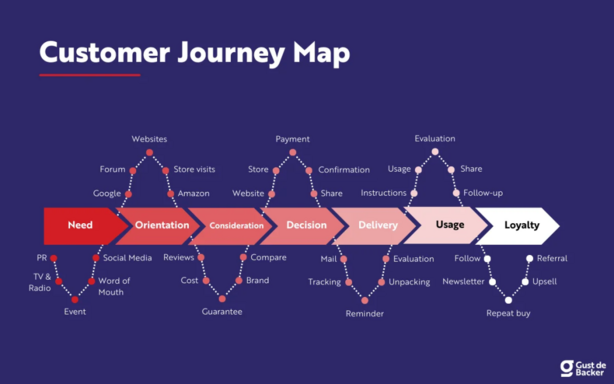
Customer journey mapping has become a cornerstone of modern marketing, providing businesses with a visual representation of a customer’s interactions with a brand from start to finish. In 2025, with the ever-growing complexity of digital touchpoints, creating a clear and insightful journey map has become more important than ever. Companies need tools that help them understand their customers’ behavior, pain points, and overall experience across multiple channels.
Customer journey mapping tools help businesses collect, organize, and analyze customer data, enabling them to deliver personalized and seamless experiences. These tools are invaluable for marketers, customer experience teams, and product managers seeking to refine their strategies and optimize customer interactions. When choosing a tool, it’s crucial to consider factors such as ease of use, customization options, integration capabilities, and the ability to visualize data effectively.
Top 10 Customer Journey Mapping Tools in 2025
1. Smaply
- Short Description: Smaply is a powerful customer journey mapping tool that focuses on creating detailed journey maps with ease. It’s designed for teams looking to visualize their customer experiences across various touchpoints.
- Key Features:
- Customizable journey maps
- Integration with other tools (e.g., Slack, Jira)
- Real-time collaboration
- Ability to create personas and customer insights
- Multi-channel tracking
- Pros & Cons:
- Pros:
- Intuitive interface with drag-and-drop functionality
- Real-time team collaboration
- Cons:
- Limited advanced analytics
- Can be overwhelming for beginners
- Pros:
2. Lucidchart
- Short Description: Lucidchart is a visual workspace tool that allows teams to create comprehensive customer journey maps. It’s known for its easy-to-use interface and versatile diagramming features.
- Key Features
- Robust diagramming capabilities
- Integration with Google Workspace, Microsoft Office
- Templates for journey mapping
- Collaborative editing
- Easy export options (PDF, PNG)
- Pros & Cons:
- Pros:
- Powerful visualization tools
- Excellent collaboration features
- Cons:
- Steeper learning curve for beginners
- Limited customer journey-specific templates
- Pros:
3. Miro
- Short Description: Miro is an online collaboration and brainstorming tool, perfect for mapping out customer journeys. It’s ideal for teams that need to visualize complex processes.
- Key Features:
- Infinite canvas for brainstorming and mapping
- Collaboration features (sticky notes, voting)
- Integrates with other tools (Slack, Google Drive)
- Customizable templates for journey mapping
- Cross-platform functionality
- Pros & Cons:
- Pros:
- Highly flexible for various use cases
- Excellent for remote teams
- Cons:
- Can be overwhelming for new users
- Needs a stable internet connection for best performance
- Pros:
4. UXPressia
- Short Description: UXPressia is a customer journey mapping tool that emphasizes user experience and persona development. It’s perfect for teams that focus on improving UX across all touchpoints.
- Key Features:
- Visual journey maps
- Persona building
- Stakeholder alignment features
- Multi-channel customer journey tracking
- Ability to share maps with clients
- Pros & Cons:
- Pros:
- Focus on user experience and personas
- Strong collaboration tools
- Cons:
- Limited customization options
- No free version
- Pros:
5. Monday.com
- Short Description: Monday.com is a project management tool that also offers customer journey mapping features, making it a great all-in-one solution for businesses that need to track both internal processes and customer experiences.
- Key Features:
- Visual journey mapping boards
- Customizable workflows
- Integration with over 40 tools (Slack, Google Sheets, etc.)
- Time tracking and reporting features
- Team collaboration tools
- Pros & Cons:
- Pros:
- Strong project management integration
- Highly customizable boards
- Cons:
- Overkill for teams only needing journey mapping
- Can become expensive with advanced features
- Pros:
6. Optimove
- Short Description: Optimove is a customer journey mapping and analytics platform designed for customer retention and marketing automation. It’s ideal for data-driven businesses looking to personalize their customer experiences.
- Key Features:
- AI-powered customer segmentation
- Personalized journey mapping
- Automation of marketing tasks
- Advanced analytics and reporting
- Integration with CRM and email tools
- Pros & Cons:
- Pros:
- Strong focus on customer retention
- Excellent analytics features
- Cons:
- Expensive for small businesses
- Requires a learning curve for full feature use
- Pros:
7. Klipfolio
- Short Description: Klipfolio is a data visualization tool that can be used for customer journey mapping, enabling businesses to create custom dashboards that track key customer metrics across all channels.
- Key Features:
- Real-time customer data tracking
- Customizable dashboards
- Integration with CRM and analytics tools
- Multi-channel insights
- Reporting tools
- Pros & Cons:
- Pros:
- Excellent for data-driven decision-making
- Customizable dashboards
- Cons:
- Limited journey mapping-specific features
- Can be complicated for non-technical users
- Pros:
8. HubSpot
- Short Description: HubSpot is a leading CRM and marketing platform with customer journey mapping tools designed to help teams align marketing, sales, and customer service efforts.
- Key Features:
- Customer relationship management (CRM)
- Marketing automation tools
- Email tracking and analytics
- Customizable customer journey maps
- Integration with third-party apps
- Pros & Cons:
- Pros:
- All-in-one CRM and marketing automation
- Great for small to medium-sized businesses
- Cons:
- Limited customization for large enterprises
- Pricing can get expensive as the business grows
- Pros:
9. Salesforce Journey Builder
- Short Description: Salesforce’s Journey Builder is a powerful tool for creating personalized customer journeys, particularly useful for marketing teams looking to integrate data across various touchpoints.
- Key Features:
- Visual journey mapping
- Cross-channel marketing automation
- Personalization and segmentation features
- Real-time data tracking
- Integration with Salesforce CRM
- Pros & Cons:
- Pros:
- Excellent for Salesforce users
- Powerful automation features
- Cons:
- Not ideal for non-Salesforce users
- Can be complex for new users
- Pros:
10. Touchpoint Dashboard
- Short Description: Touchpoint Dashboard offers an intuitive customer journey mapping tool designed to help businesses understand their customer experiences and improve their touchpoints with visual insights.
- Key Features:
- Visual touchpoint tracking
- Multi-channel customer journey mapping
- Integration with existing analytics tools
- User-friendly interface
- Real-time updates
- Pros & Cons:
- Pros:
- Simple and easy to use
- Excellent for small teams
- Cons:
- Lacks advanced automation features
- Limited customization options
- Pros:
Comparison Table
| Tool Name | Best For | Platform(s) Supported | Standout Feature | Pricing | Rating |
|---|---|---|---|---|---|
| Smaply | UX designers, marketers | Web-based | Customizable journey maps | Starts at $20/month | 4.5/5 |
| Lucidchart | Designers, team collaboration | Web-based, Desktop | Diagramming capabilities | Free / Starts at $7 | 4.7/5 |
| Miro | Remote teams, creative agencies | Web-based, iOS, Android | Infinite canvas for brainstorming | Free / Starts at $8 | 4.6/5 |
| UXPressia | UX designers, customer experience teams | Web-based | Persona building | Starts at $25/month | 4.3/5 |
| Monday.com | Project managers, marketers | Web-based, iOS, Android | Customizable workflows | Starts at $10/user | 4.4/5 |
| Optimove | Data-driven businesses | Web-based | AI-powered segmentation | Custom pricing | 4.6/5 |
| Klipfolio | Data analysts, marketing teams | Web-based | Real-time data dashboards | Starts at $49/month | 4.2/5 |
| HubSpot | Small to mid-sized businesses | Web-based, iOS, Android | All-in-one CRM & marketing automation | Free / Starts at $45 | 4.7/5 |
| Salesforce Journey Builder | Enterprise marketing teams | Web-based | Cross-channel marketing automation | Custom pricing | 4.8/5 |
| Touchpoint Dashboard | Small teams, consultants | Web-based | Easy-to-use touchpoint tracking | Starts at $10/month | 4.4/5 |
Which Customer Journey Mapping Tool is Right for You?
When selecting a customer journey mapping tool, consider the following factors:
- Company Size: Small businesses might prefer user-friendly and affordable tools like HubSpot or Miro, while large enterprises may require advanced features, such as Salesforce Journey Builder or Optimove.
- Industry: UXPressia is great for UX designers, while Klipfolio suits businesses needing data-heavy, real-time insights.
- Budget: Tools like Lucidchart and Touchpoint Dashboard offer affordable pricing for small teams, whereas tools like Salesforce and Optimove cater to higher budgets with extensive features.
- Features: Prioritize features like real-time collaboration, automation, and analytics based on your team’s needs.
Conclusion
As customer experiences become more complex, journey mapping tools are essential for businesses striving to understand and improve their customer interactions. These tools not only help in creating personalized experiences but also allow businesses to visualize the customer journey across multiple touchpoints. As we move into 2025, customer journey mapping tools are evolving to be more powerful, intuitive, and integrated with other business systems, making them even more critical for long-term success. Be sure to explore demos and free trials to find the best tool for your needs.
FAQs
- What is customer journey mapping?
- Customer journey mapping is the process of visualizing a customer’s interactions with a brand, from initial awareness to post-purchase. It helps businesses understand customer behavior, pain points, and opportunities for improvement.
- Why is customer journey mapping important in 2025?
- In 2025, with multiple digital touchpoints, understanding the full customer journey is crucial for delivering personalized and seamless experiences. Journey maps help businesses track and optimize customer interactions across all channels.
- What are the best customer journey mapping tools?
- Some of the top customer journey mapping tools in 2025 include Smaply, Lucidchart, Miro, and HubSpot.
- How do I choose the right customer journey mapping tool?
- Choose based on factors like your company size, industry, budget, and the specific features you need (e.g., integration, collaboration, analytics).
- Are there free customer journey mapping tools?
- Yes, tools like Lucidchart and Miro offer free versions with limited functionality, ideal for small teams or basic journey mapping needs.