MOTOSHARE 🚗🏍️
Turning Idle Vehicles into Shared Rides & Earnings
From Idle to Income. From Parked to Purpose.
Earn by Sharing, Ride by Renting.
Where Owners Earn, Riders Move.
Owners Earn. Riders Move. Motoshare Connects.
With Motoshare, every parked vehicle finds a purpose.
Owners earn. Renters ride.
🚀 Everyone wins.
What is Django Models?
In the Django web framework, Models are the foundational abstraction layer that represents your application’s data and business logic. A model is a Python class that subclasses django.db.models.Model and corresponds to a single database table. Each attribute of the model class represents a database field, describing the type and constraints of the data.
Django Models provide a powerful Object-Relational Mapping (ORM) system that translates Python code into SQL queries behind the scenes, abstracting away the complexities of direct database manipulation. This allows developers to focus on writing clear, maintainable Python code while Django handles the interactions with the database seamlessly.
Django Models not only define the schema but also encapsulate methods and behaviors related to the data they represent. Through models, Django supports all common database operations like CRUD (Create, Read, Update, Delete), complex queries, joins, transactions, and more.
Major Use Cases of Django Models
Django Models are used extensively across all types of web applications and software projects, due to their flexibility and integration:
1. Database Schema Definition
Models allow developers to define database tables entirely in Python, specifying fields (columns), data types (char, integer, datetime), constraints (unique, nullability), and default values. This eliminates the need for writing SQL schema scripts manually.
2. CRUD Operations
Django Models provide a high-level API for common database operations:
- Create: Instantiate and save new objects.
- Read: Query database records using a powerful QuerySet API supporting filters, aggregates, and annotations.
- Update: Modify and save existing objects.
- Delete: Remove objects safely with support for cascading.
3. Relationships and Foreign Keys
Models support various types of relationships:
ForeignKeyfor many-to-one relationships.ManyToManyFieldfor many-to-many relationships.OneToOneFieldfor one-to-one relationships.
This makes modeling complex data schemas straightforward and intuitive.
4. Data Validation
Models include built-in validation at both the field and model level, ensuring data integrity before it reaches the database. Validation rules include field types, max lengths, choices, custom validators, and model clean methods.
5. Database-Agnostic Development
Django Models abstract away database backend specifics, enabling developers to write portable code that works with multiple databases such as PostgreSQL, MySQL, SQLite, and Oracle without changing model code.
6. Automatic Schema Migrations
Using Django’s migrations framework, models support evolving your database schema incrementally as your application changes, enabling version control of database changes and safe upgrades/downgrades.
7. Admin Interface and Forms
Django Admin auto-generates interfaces and forms based on models, providing quick, out-of-the-box tools to manage data. Models also integrate with Django Forms and ModelForms to simplify input handling and validation.
8. Custom Business Logic
Beyond data definition, models can contain custom methods, computed properties, and signals to implement domain logic directly on data objects.
How Django Models Work Along With Architecture?
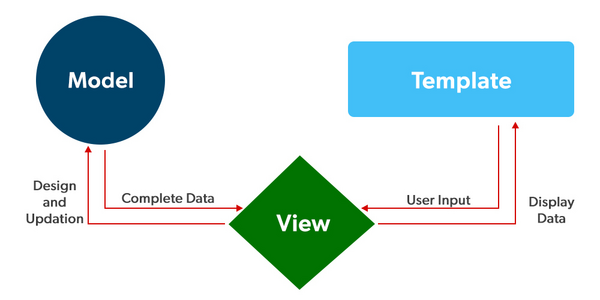
Django Models fit into Django’s Model-View-Template (MVT) architectural pattern, playing the role of the Model.
1. Model Layer
- Model Classes: Defined in Python, represent database tables.
- Fields: Model attributes map to columns; field classes specify data types and options (e.g.,
CharField,IntegerField). - Meta Class: Inner class for metadata such as table names, ordering, unique constraints.
2. Django ORM
- Converts model operations into optimized SQL queries.
- Uses QuerySets — lazy-evaluated, chainable query builders that support filtering, aggregation, and annotations.
- Supports complex joins internally, so developers write Pythonic filters instead of SQL.
3. Database Abstraction Layer
- The ORM interacts with the database backend using the configured database driver.
- Supports multiple relational databases via backend adapters.
- Handles connection pooling, transactions, and query compilation.
4. Migration System
- Models are the source of truth for schema.
- Django’s
makemigrationsinspects model changes and generates migration files. migrateapplies those migrations to the database, ensuring schema synchronization.
5. Integration with Views and Templates
- Views retrieve and manipulate model data.
- Templates render model data into HTML or other formats.
- Forms and ModelForms bind model fields to user input.
6. Signals and Hooks
- Models emit signals on save, delete, or other events.
- Allows decoupled processing like cache invalidation, auditing, or notifications.
Basic Workflow of Django Models
Here is a typical workflow to use Django Models effectively:
Step 1: Define Your Models
Create classes for each data entity in your app’s models.py, defining fields and relationships.
Step 2: Create Migrations
Generate migration files to reflect the schema changes:
python manage.py makemigrations
Code language: CSS (css)
Step 3: Apply Migrations
Apply the migrations to update the database schema:
python manage.py migrate
Code language: CSS (css)
Step 4: Use the ORM
- Create new records:
book = Book(title="Django for Beginners", author="Jane Doe")
book.save()
Code language: JavaScript (javascript)- Query data:
books = Book.objects.filter(author="Jane Doe")
Code language: JavaScript (javascript)- Update data:
book.title = "Advanced Django"
book.save()
Code language: JavaScript (javascript)- Delete data:
book.delete()
Code language: CSS (css)
Step 5: Use with Admin and Forms
- Register your model in
admin.pyfor easy data management. - Use ModelForms for user input binding.
Step-by-Step Getting Started Guide for Django Models
Step 1: Install Django and Set Up Project
pip install django
django-admin startproject myproject
cd myproject
Step 2: Create an App
python manage.py startapp myapp
Code language: CSS (css)
Step 3: Define Models
In myapp/models.py:
from django.db import models

class Book(models.Model):
    title = models.CharField(max_length=200)
    author = models.CharField(max_length=100)
    published_date = models.DateField(null=True, blank=True)

    def __str__(self):
        return self.title
Step 4: Register App
Add 'myapp' to INSTALLED_APPS in myproject/settings.py.
Step 5: Create and Apply Migrations
python manage.py makemigrations myapp
python manage.py migrate
Code language: CSS (css)
Step 6: Use the Django Shell for CRUD Operations
python manage.py shell
Code language: CSS (css)
from myapp.models import Book
# Create
book = Book(title="Learning Django", author="Jane Smith")
book.save()
# Read
all_books = Book.objects.all()
# Update
book.title = "Mastering Django"
book.save()
# Delete
book.delete()
Code language: PHP (php)Step 7: Register Model with Admin
In myapp/admin.py:
from django.contrib import admin
from .models import Book

admin.site.register(Book)
Code language: JavaScript (javascript)
Run server:
python manage.py runserver
Code language: CSS (css)
Advanced Model Features
- Custom Methods: Add behaviors directly on model classes.
- Managers: Customize QuerySets for models.
- Meta Options: Control database table names, ordering, unique constraints.
- Signals: Trigger actions on model events.
- Model Inheritance: Abstract base classes and multi-table inheritance.
- Validators: Custom field validation logic.
- Related Objects API: Easy navigation of related data via
related_name.