MOTOSHARE 🚗🏍️
Turning Idle Vehicles into Shared Rides & Earnings
From Idle to Income. From Parked to Purpose.
Earn by Sharing, Ride by Renting.
Where Owners Earn, Riders Move.
Owners Earn. Riders Move. Motoshare Connects.
With Motoshare, every parked vehicle finds a purpose.
Owners earn. Renters ride.
🚀 Everyone wins.
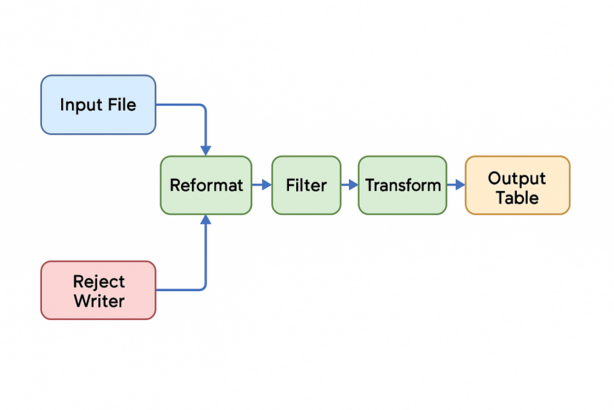
Here’s a complete overview of an Ab Initio workflow — from end-to-end — designed to help you visualize how an Ab Initio ETL (Extract-Transform-Load) pipeline functions in a data engineering or enterprise data warehouse setting.
📌 Ab Initio Workflow: Full Lifecycle
🔶 1. Project Setup
- Create a new Project in Ab Initio GDE (Graphical Development Environment)
- Define project metadata:
- File formats
- Parameter sets
- Environment variables
- Layouts (e.g., fixed-width, delimited)
🔶 2. Graph Design (ETL Logic)
This is the core step where you design the data pipeline using Graphs (data flows). Each graph is made up of components that represent individual steps.
🛠️ Components Involved:
| Step | Component | Purpose |
|---|---|---|
| Extract | Input File, FTP, Read DB | Read source data from files or databases |
| Cleanse | Reformat, Filter, Transform | Data standardization and transformation |
| Validate | Validate, Reject Writer | Validate formats, values, duplicates |
| Transform | Join, Sort, Rollup | Apply business rules |
| Load | Output Table, Write File, Bulk Load | Load into data warehouse or target |
All of this is visually connected in the GDE canvas using edges.
🔶 3. Metadata Management
- Define schema using
.dml(Data Manipulation Language) files - Use Data Profiler for source data exploration
- Maintain versioned metadata via EME (Enterprise Meta Environment)
🔶 4. Parameterization and Config
- Use
.mp(parameter files) for reusable variables like:- File paths
- DB credentials
- Timestamps
- Enable graph portability across environments (dev, QA, prod)
🔶 5. Testing & Debugging
- Use GDE’s Test Run to simulate execution
- Monitor using Data Viewer
- Add
CheckpointsandWatchpoints - Use Log files (
.log,.out) to troubleshoot
🔶 6. Deployment
- Graphs are deployed to Unix/Linux environments
- Deployed as
.ksh(Shell Script) - Schedulers like:
Airflow,Autosys,Control-M, or- Ab Initio’s Co>Operating System scheduler
trigger jobs on schedule
🔶 7. Monitoring
- Use Conduct>It or Control Center to:
- Monitor execution
- Restart failed jobs
- Manage dependencies
- Error and audit logs saved for compliance
🔶 8. Exception Handling & Logging
- Capture and route bad data to:
Reject FilesError Tables
- Use
Rollbacks,Abort, andCustom Scriptsfor critical failures
🔶 9. Version Control
- Store graphs, metadata, and scripts in EME Repository
- Tracks:
- Version history
- Change control
- Collaboration
🔶 10. Data Lineage & Impact Analysis
- Use Metadata Hub + Data Lineage Graphs
- Track source-to-target lineage
- Analyze impact of schema or logic changes
📊 Ab Initio Workflow Summary Diagram
[SOURCE SYSTEMS]
     |
     v
[Input Components] --> [Transformations] --> [Validation/Reject Handling]
     |                         |                     |
     v                         v                     v
[Business Rules]       [Aggregation / Join]     [Audit & Logs]
     |
     v
[Target Systems: DW, APIs, Flat Files]
🧠 Real-World Use Case Example
Bank Loan Processing
- Source: Daily loan applications from portal → CSV files
- Transformation: Clean missing fields, apply credit score logic
- Load: Push to Oracle Data Warehouse
- Rejected data: Sent to Data Steward for manual review
- Automation: Scheduled every night via Control-M
- Lineage: Tracks which rule rejected which record
✅ Best Practices
- Use modular graphs for reusability
- Always define reject paths
- Log both success and failures with timestamps
- Parameterize everything to avoid hardcoding
- Regularly sync with EME
Here are the typical Ab Initio component commands or configuration steps for each stage in the workflow, based on your ETL process:
✅ 1. Extract
| Component | Command/Usage |
|---|---|
Input File | Configure with .dat or .csv file sourcefilename := "input/datafile.csv" |
Read DB (via Run SQL or Database Input) | Example: sql_query := "SELECT * FROM customers"connection := "oracle_prod" |
FTP (using Run Program) | command := "ftp -n < script.ftp" where script.ftp contains login and get commands |
✅ 2. Cleanse
| Component | Command/Usage |
|---|---|
Reformat | Define output DML and transformation logic:out.field1 :: in.field1;<br>out.full_name :: string_concat(in.first_name, " ", in.last_name); |
Filter | Filtering rows with conditions:if (in.age > 18) output; else reject; |
Transform | Use Transform Function or custom .ml (multi-language) functions |
✅ 3. Validate
| Component | Command/Usage |
|---|---|
Validate | Example rule:if is_null(in.email) then reject else output; |
Reject Writer | Capture rejected records:filename := "rejects/rejected_records.dat" |
✅ 4. Transform (Business Logic)
| Component | Command/Usage |
|---|---|
Join | Configure using key fields:join_keys := [in1.id = in2.id] |
Sort | Define sort key:key := in.dateorder := ascending |
Rollup | Use group_key := in.category and define accumulate logic to aggregate values |
✅ 5. Load
| Component | Command/Usage |
|---|---|
Output Table | Write to DB:table := "dw.customer_dim"connection := "oracle_prod" |
Write File | filename := "output/cleaned_data.dat" |
Bulk Load | Use DB-specific loaders like Oracle SQL*Loader via Run Program or Write DB Table (bulk) |
🔗 Visual Connection (GDE Canvas)
- Connect components using edges (data flow lines).
- Define edge layout format using
.dml. - Example:
OutPort1 -> InPort1;
Here’s a comprehensive guide to Ab Initio command-line options, typically used when running graphs, managing metadata, and interacting with the Co>Operating System (co>op), GDE, and EME repositories.
✅ 1. Running Graphs (.mp or .ksh)
Use the air sandbox run or direct .ksh shell execution.
🔹 Basic Graph Execution
graph.ksh
Code language: CSS (css)
🔹 With Parameters
graph.ksh param1=value1 param2=value2
🔹 Run with air
air sandbox run graph.mp -param param1=value1 -param param2=value2
✅ 2. Managing Sandboxes
🔹 Create a Sandbox
air sandbox create /path/to/sandbox
🔹 List Sandboxes
air sandbox list
Code language: PHP (php)
🔹 Delete a Sandbox
air sandbox delete /path/to/sandbox
Code language: JavaScript (javascript)
✅ 3. Working with Graphs
🔹 Compile a Graph
air graph compile graph.mp
Code language: CSS (css)
🔹 Run a Graph
air graph run graph.mp
Code language: CSS (css)
🔹 Validate a Graph
air graph validate graph.mp
Code language: CSS (css)
✅ 4. Metadata Management with EME
🔹 Checkout an Item
eme checkout path::/project/folder/graph.mp
Code language: JavaScript (javascript)
🔹 Check-in an Item
eme checkin path::/project/folder/graph.mp
Code language: JavaScript (javascript)
🔹 View History
eme history path::/project/folder/graph.mp
Code language: JavaScript (javascript)
🔹 Promote to Higher Environment
eme promote path::/project/folder/graph.mp -to QA
Code language: JavaScript (javascript)
✅ 5. Co>Operating System Utilities
| Command | Purpose |
|---|---|
m_ls | Ab Initio aware ls command |
m_cp | Copy between sandboxes or logical locations |
m_mv | Move metadata or sandbox items |
m_rm | Remove files or graphs |
m_mkdir | Make directory for sandbox or project structure |
air sandbox describe | Show full metadata and layout info |
air sandbox scan | Refresh sandbox structure |
air project list | List all projects |
✅ 6. Runtime Debugging Tools
| Option | Description |
|---|---|
-trace | Enables execution trace |
-verbose | Outputs more details to stdout |
-logfile <file> | Direct logs to a custom file |
-record_counts | Shows records processed per edge |
-validate_only | Validates graph without running it |
Example:
graph.ksh -trace -record_counts -logfile /tmp/run.log
✅ 7. Environment Management
| Command | Purpose |
|---|---|
abinitio_env | View Ab Initio environment variables |
setenv VAR value or export VAR=value | Set variables like AB_HOME, EME_HOME |
which air | Find the air binary path |
echo $AB_HOME | Check base install path |
📁 Common Directories
| Path | Purpose |
|---|---|
$AB_HOME | Base directory of Ab Initio |
$EME_HOME | EME repository base |
sandbox/graphs/ | Graph (.mp) files |
sandbox/params/ | Parameter (.mp) files |
sandbox/layouts/ | DML definitions |
sandbox/scripts/ | .ksh or automation logic |
Would you like a sample script that runs an Ab Initio graph with full logging, parameterization, and email alerting in case of failure?