MOTOSHARE 🚗🏍️
Turning Idle Vehicles into Shared Rides & Earnings
From Idle to Income. From Parked to Purpose.
Earn by Sharing, Ride by Renting.
Where Owners Earn, Riders Move.
Owners Earn. Riders Move. Motoshare Connects.
With Motoshare, every parked vehicle finds a purpose.
Owners earn. Renters ride.
🚀 Everyone wins.

What is Next.js?
Next.js is a powerful, open-source React framework developed by Vercel that revolutionizes how developers build web applications. It extends React’s capabilities by enabling server-side rendering (SSR), static site generation (SSG), incremental static regeneration (ISR), API routes, and more — all out of the box. Launched in 2016, Next.js has quickly become one of the most widely adopted frameworks in the React ecosystem because it addresses common challenges such as SEO, performance, and developer experience.
At its core, Next.js is designed to optimize web application performance and search engine friendliness by allowing React components to be rendered on the server before they reach the client, resulting in faster initial load times and improved crawlability by search engines. Unlike traditional client-side React apps that rely solely on client-side rendering (CSR), Next.js embraces a hybrid rendering model, offering the best of both worlds by allowing pages to be rendered either statically at build time or dynamically on each request.
This hybrid approach makes Next.js highly versatile, supporting a wide range of applications — from simple blogs and marketing sites to complex, data-driven web apps and enterprise platforms.
Major Use Cases of Next.js
Next.js’s feature set and architecture enable it to be used in numerous scenarios:
1. SEO-Friendly Marketing Websites and Blogs
Traditional React apps can struggle with SEO because search engines may have difficulty indexing client-rendered content. Next.js solves this by enabling server-rendered pages and static site generation, making it ideal for marketing sites, blogs, portfolios, and landing pages that depend on organic search traffic.
2. E-commerce Platforms
Speed and SEO are crucial for e-commerce. Next.js supports incremental static regeneration, allowing product pages to update frequently without rebuilding the entire site. Its API routes simplify backend integration for payment, inventory, and user management.
3. SaaS and Enterprise Applications
Enterprise apps often need dynamic content, authentication, and API integrations. Next.js’s SSR and API route capabilities enable secure, scalable full-stack applications. It supports incremental static regeneration, allowing content to update without sacrificing performance.
4. Hybrid Content Sites
Sites combining static and dynamic content, like news portals or event platforms, benefit from Next.js’s ability to statically pre-render pages while dynamically serving frequently updated content.
5. Developer Portfolios and Documentation
Developers use Next.js for creating portfolios and technical documentation websites with fast loading times and clean navigation, leveraging static site generation with markdown support.
How Next.js Works Along with Architecture
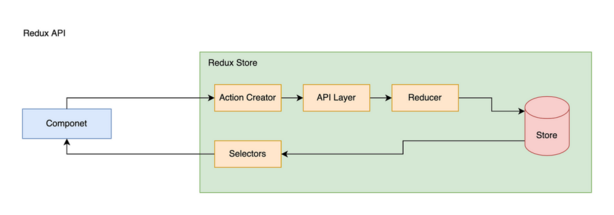
Understanding the internal workings of Next.js requires diving into its architecture and rendering strategies.
1. File-Based Routing
Next.js uses a file-based routing system where each file in the pages directory maps to a route automatically. For instance:
pages/index.js→/pages/about.js→/aboutpages/blog/[id].js→/blog/:id(dynamic route)
This eliminates the need for manual route configuration, speeding development.
2. Rendering Modes
Next.js supports multiple rendering modes:
- Static Generation (SSG): Pages are pre-rendered at build time into static HTML files. Great for pages with content that doesn’t change often.
- Server-Side Rendering (SSR): Pages are rendered on-demand on the server for every request. Useful for dynamic data that must always be fresh.
- Client-Side Rendering (CSR): Like standard React apps, some parts or components can be rendered purely client-side.
- Incremental Static Regeneration (ISR): A hybrid approach allowing static pages to be regenerated on the server after deployment at runtime, enabling stale pages to update.
3. Data Fetching APIs
Next.js provides dedicated functions to control rendering behavior:
getStaticProps()fetches data at build time for static generation.getServerSideProps()fetches data at request time for SSR.getStaticPaths()defines dynamic routes to pre-render during build.- Client-side data fetching happens via standard React hooks like
useEffect()or libraries like SWR.
4. API Routes
In pages/api/, developers create serverless functions that act as API endpoints. These functions can handle HTTP requests, interact with databases, or integrate third-party services. They run in serverless environments (like Vercel) without separate backend infrastructure.
5. Middleware and Edge Functions
Next.js supports middleware that executes on requests before routing decisions, enabling features like authentication, redirects, or headers manipulation at the edge.
6. Bundling and Optimization
Next.js uses Webpack and Babel under the hood, automatically optimizing JavaScript, CSS, and images. Code splitting ensures only necessary chunks load per page, improving performance.
7. Deployment Architecture
Next.js apps are ideally deployed on platforms like Vercel, which provide serverless functions, edge caching, CDN, and automatic scaling. This architecture reduces latency and enhances reliability globally.
Basic Workflow of Next.js Development
Building applications with Next.js generally follows this workflow:
Step 1: Project Initialization
Create a new Next.js project using CLI tools like create-next-app to scaffold the structure and install dependencies.
Step 2: Page and Component Creation
Develop pages in the pages directory, creating React components for UI encapsulation and reuse.
Step 3: Styling
Add CSS via global stylesheets, CSS Modules scoped per component, or CSS-in-JS solutions such as styled-components or Emotion.
Step 4: Data Fetching Integration
Implement data fetching with getStaticProps, getServerSideProps, or client-side fetching depending on needs.
Step 5: API Routes Development
Create API endpoints within pages/api for backend functionality, data CRUD operations, and serverless logic.
Step 6: Testing
Write tests using Jest, React Testing Library, or Cypress for UI and integration testing.
Step 7: Build and Optimize
Run next build to create optimized production builds with static assets and code-splitting.
Step 8: Deployment
Deploy to Vercel or other Node.js-compatible hosts. Monitor app performance and error tracking.
Step-by-Step Getting Started Guide for Next.js
Step 1: Prerequisites
Ensure you have Node.js (v12 or later) and npm or yarn installed.
Step 2: Create a New Next.js App
Run in terminal:
npx create-next-app my-next-app
# or
yarn create next-app my-next-app
Code language: PHP (php)
Follow prompts to configure.
Step 3: Run Development Server
Navigate to your project folder and start the dev server:
cd my-next-app
npm run dev
# or
yarn dev
Code language: PHP (php)
Open http://localhost:3000 in your browser.
Step 4: Create a New Page
Add a file pages/about.js:
export default function About() {
  return <h1>About Next.js</h1>;
}
Code language: JavaScript (javascript)
Visit http://localhost:3000/about.
Step 5: Implement Static Data Fetching
Modify pages/index.js:
export async function getStaticProps() {
  return {
    props: {
      message: 'Welcome to Next.js!'
    }
  };
}

export default function Home({ message }) {
  return <h1>{message}</h1>;
}
Code language: JavaScript (javascript)
Step 6: Create an API Endpoint
Create pages/api/hello.js:
export default function handler(req, res) {
  res.status(200).json({ text: 'Hello from API!' });
}
Code language: JavaScript (javascript)
Access at http://localhost:3000/api/hello.
Step 7: Add Styling
Add CSS Module styles/Home.module.css and import it in index.js.
Step 8: Build for Production
Run:
npm run build
npm start