MOTOSHARE 🚗🏍️
Turning Idle Vehicles into Shared Rides & Earnings
From Idle to Income. From Parked to Purpose.
Earn by Sharing, Ride by Renting.
Where Owners Earn, Riders Move.
Owners Earn. Riders Move. Motoshare Connects.
With Motoshare, every parked vehicle finds a purpose.
Owners earn. Renters ride.
🚀 Everyone wins.

What is Unix?
Unix is a robust, multiuser, multitasking operating system originally developed at AT&T’s Bell Labs in the late 1960s and early 1970s by Ken Thompson, Dennis Ritchie, and others. It has since evolved into a family of operating systems, inspiring many modern OS platforms including Linux, macOS, FreeBSD, Solaris, and AIX.
Unix’s enduring popularity is rooted in its design philosophy: build small, modular utilities that do one thing well, and allow these tools to be linked together to perform complex tasks. It provides a consistent environment for software development, file management, and user interaction via its command-line interface.
One of Unix’s defining characteristics is that “everything is a file” — hardware devices, processes, directories, and data streams are treated uniformly, simplifying how users interact with the system.
What Are the Major Use Cases of Unix?
Unix is used in a wide variety of fields, from academia to enterprise, due to its stability, security, and performance. Its use cases can be grouped as follows:
1. Server Operating System
Unix is the backbone of many internet services. It is commonly used to host web servers (Apache, Nginx), mail servers, database servers (MySQL, PostgreSQL), and DNS servers.
2. Software Development
Programmers rely heavily on Unix systems for writing and compiling code, version control (e.g., Git), and automation. Many open-source projects are built in Unix-like environments because of powerful tools such as make, gcc, gdb, and vim.
3. High-Performance Computing
In scientific and engineering fields, Unix-based systems are frequently deployed for simulations, modeling, and complex numerical calculations. Unix excels in environments where performance and stability are critical.
4. Networking and Infrastructure
Unix’s built-in networking stack and toolsets like netcat, ifconfig, and iptables make it ideal for building network infrastructure such as routers, firewalls, and VPN servers.
5. Embedded Systems
Many embedded systems, including routers, IoT devices, and industrial equipment, run a lightweight Unix variant due to its portability and efficiency.
6. Cybersecurity and Penetration Testing
Security professionals use Unix-based tools for vulnerability scanning, intrusion detection, and forensic analysis. Distributions like Kali Linux are built specifically for these purposes.
7. DevOps and Cloud Environments
Unix-like systems dominate the cloud. Major platforms (AWS, GCP, Azure) use Linux or Unix derivatives for hosting and automation. Tools like Docker, Kubernetes, Ansible, and Terraform often rely on Unix shell scripting.
How Unix Works: A Deep Dive into Architecture
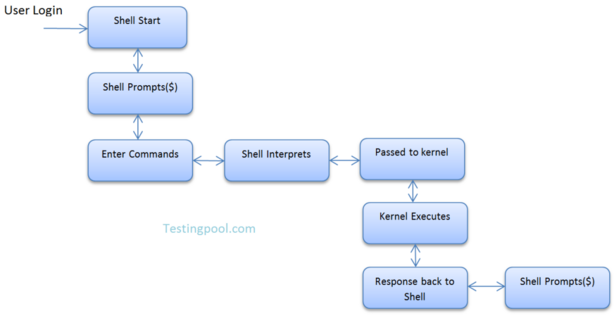
The Unix architecture is designed with simplicity, modularity, and flexibility in mind. Its core components include:
1. Kernel
The Unix kernel is the heart of the operating system. It manages CPU scheduling, memory, devices, and file systems. The kernel provides abstraction layers so that users and applications don’t directly interact with hardware.
Responsibilities of the kernel include:
- Process management
- Memory allocation
- Device control
- File system handling
- System calls
2. Shell
The Unix shell is a command-line interpreter. It provides an interface between the user and the kernel, reading user input and executing commands. Popular shells include:
- Bash (Bourne Again Shell)
- Zsh
- Ksh (Korn Shell)
- Csh (C Shell)
Shells also support scripting, variables, loops, and conditionals, enabling task automation.
3. File System
Unix uses a hierarchical file system with a single root directory (/). All other files and directories stem from this root. Some key directories include:
/bin: Essential user binaries/etc: Configuration files/home: User directories/var: Variable files like logs/dev: Device files
Every file, including directories and devices, is represented in the same way, enabling consistent file operations.
4. User Space and Utilities
Unix includes a large collection of small command-line tools (e.g., ls, cat, grep, awk, sed, find) that users can combine using pipes (|) to perform complex operations efficiently.
Basic Workflow of Unix
Using Unix effectively involves learning the command-line environment and understanding how to interact with files, processes, and users. Here’s a basic workflow:
1. Navigating the System
pwd        # Print current directory
ls         # List directory contents
cd         # Change directories
Code language: PHP (php)
2. Managing Files and Directories
touch file.txt        # Create a file
mkdir mydir           # Make a directory
cp file1 file2        # Copy files
mv file1 file2        # Move or rename
rm file.txt           # Delete a file
Code language: PHP (php)
3. Viewing and Editing Files
cat file.txt          # View file contents
less file.txt         # View file with scroll
nano file.txt         # Basic terminal text editor
vim file.txt          # Advanced text editor
Code language: CSS (css)
4. File Permissions and Ownership
chmod 755 script.sh   # Change permissions
chown user:group file # Change file ownership
Code language: CSS (css)
5. Managing Processes
ps aux                # Show running processes
kill PID              # Kill a process by ID
top                   # Real-time system monitor
Code language: PHP (php)
6. Searching and Filtering Data
grep "word" file.txt  # Search inside files
find / -name "file"   # Locate files
awk '{print $1}'      # Pattern scanning and processing
Code language: PHP (php)
7. Piping and Redirection
cat file.txt | grep "error" > errors.txt   # Save filtered output
Code language: PHP (php)
Step-by-Step Getting Started Guide for Unix
Step 1: Choose Your Unix Environment
- Install a Unix-like OS (e.g., Ubuntu, Fedora, macOS).
- Use Windows Subsystem for Linux (WSL) if on Windows.
- Use cloud-based environments (e.g., AWS EC2, Linode).
- Try browser-based Unix terminals (e.g., JSLinux).
Step 2: Open the Terminal
Launch the terminal application. On most Unix systems, this is a pre-installed utility that gives you direct CLI access.
Step 3: Learn the Essentials
Start by mastering basic commands mentioned above. Use man <command> to read the manual.
Example:
man ls
Step 4: Create Your First Shell Script
- Open a new file:
nano myscript.sh - Add a simple script:
#!/bin/bash echo "Welcome to Unix!" - Save and exit (
Ctrl + O,Enter, thenCtrl + X). - Make it executable and run:
chmod +x myscript.sh ./myscript.sh
Step 5: Explore Software Installation
Use package managers to install software:
- Debian/Ubuntu:
sudo apt update sudo apt install htop - Red Hat/CentOS:
sudo yum install htop
Step 6: Automate Tasks
Use cron to schedule jobs:
crontab -e
Example entry (runs script daily at 7 AM):
0 7 * * * /home/user/myscript.sh
Code language: JavaScript (javascript)
Step 7: Learn Shell Scripting
Understand variables, loops, and conditionals:
#!/bin/bash
name="Unix"
if [ "$name" = "Unix" ]; then
   echo "You are learning $name!"
fi
Code language: PHP (php)