MOTOSHARE 🚗🏍️
Turning Idle Vehicles into Shared Rides & Earnings
From Idle to Income. From Parked to Purpose.
Earn by Sharing, Ride by Renting.
Where Owners Earn, Riders Move.
Owners Earn. Riders Move. Motoshare Connects.
With Motoshare, every parked vehicle finds a purpose.
Owners earn. Renters ride.
🚀 Everyone wins.
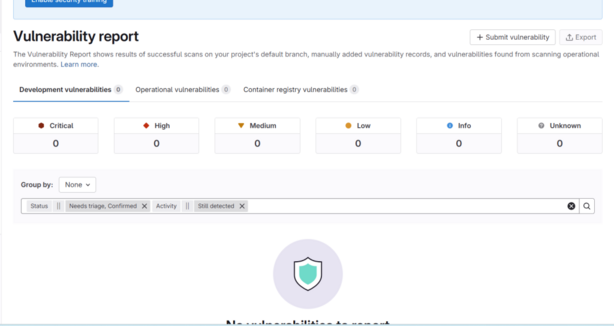
Step-by-Step Tutorial: Vulnerability Reporting in GitLab (Cloud, May 2025)
This guide explains how to submit, add, and understand vulnerabilities using the latest GitLab cloud version as of May 2025. All steps are tailored for the current GitLab UI and features.
1. Accessing the Vulnerability Report
- On the top bar, select Main menu > Projects and choose your project.
- In the left sidebar, go to Security & Compliance > Vulnerability report.
- The report displays cumulative vulnerabilities detected on the default branch by all completed security jobs25.
2. Submitting a New Vulnerability
Manual Submission
- In your project, navigate to Security & Compliance > Vulnerability report.
- Click Submit vulnerability (typically at the top right of the report page).
- Complete the form fields:
- Title: Brief summary of the vulnerability.
- Description: Detailed information, including steps to reproduce, potential impact, and affected components.
- Severity: Choose from Critical, High, Medium, Low, or Info.
- Other fields: Add evidence, references, or assign to a team member as needed.
- Click Submit to create the vulnerability entry2.
3. Adding Vulnerability Findings (Automated and Manual Methods)
A. Automated via CI/CD Security Scans
- Ensure your repository contains a
.gitlab-ci.ymlfile with security scanning jobs (SAST, DAST, Dependency Scanning, etc.). - Use GitLab’s security templates or AutoDevOps for quick setup.
- Example for SAST: text
include: - template: Security/SAST.gitlab-ci.yml
- Example for SAST: text
- Push code to trigger a pipeline. After completion, vulnerabilities found will appear in the Vulnerability Report automatically14.
B. Manually Add a Vulnerability Finding
- Go to Security & Compliance > Vulnerability report.
- Click Submit vulnerability and fill out the required details as described above25.
C. Generate Test Vulnerabilities (For Testing Purposes)
- Generate a personal access token with
apipermissions. - Find your project ID (visible on the project homepage).
- Clone the GitLab repository and navigate to the
gitlab/qadirectory. - Run: bash
GITLAB_QA_ACCESS_TOKEN=<your_token> GITLAB_URL="<your_gitlab_url>" bundle exec rake vulnerabilities:setup[<project_id>,<count>] --traceReplace placeholders with your actual values. This creates placeholder vulnerabilities for testing3.
4. Understanding the Vulnerability Report
Report Contents
- Totals by Severity: See counts of Critical, High, Medium, Low, and Info vulnerabilities.
- Filters: Filter by severity, scanner type, status, and more.
- Vulnerability Table: Each row shows:
Vulnerability Details Page
- Click a vulnerability to view:
Managing Vulnerabilities
- Change Status: Mark as Dismissed, Resolved, Confirmed, or Needs triage. Add comments or reasons (e.g., false positive, acceptable risk)4.
- Create Issue: Track remediation by creating a GitLab issue directly from the vulnerability.
- Resolve with AI: Use GitLab Duo to auto-generate a fix and open a merge request (Ultimate tier)6.
5. Viewing Vulnerabilities in Pipelines
- Go to Build > Pipelines in your project.
- Select a pipeline, then click the Security tab.
- Review findings, download scan results (JSON or CSV), and create issues or dismiss findings directly from the pipeline view7.
Sample .gitlab-ci.yml for SAST and Dependency Scanning
textinclude:
  - template: Security/SAST.gitlab-ci.yml
  - template: Security/Dependency-Scanning.gitlab-ci.yml
Push this file to your repository to enable automated security scanning.
Summary Table: Key Actions
| Action | Where to Go | Steps |
|---|---|---|
| Submit vulnerability | Vulnerability Report > Submit vulnerability | Fill form, set severity, submit25 |
| Add automated finding | Push code with security scans enabled | Use .gitlab-ci.yml with security templates14 |
| Add manual finding | Vulnerability Report > Submit vulnerability | Fill form as above25 |
| Generate test vulnerability | Local terminal with access token | Run rake vulnerabilities:setup script3 |
| Understand/report details | Vulnerability Report > Click vulnerability | Review details, status, linked issues/MRs, scoring246 |
| Manage status/remediation | Vulnerability details page | Change status, create issue, resolve with AI46 |
Tips
- Only users with the correct role (typically Developer or higher) can submit or manage vulnerabilities.
- Vulnerability reports aggregate results from the default branch only.
- For public projects, be cautious with sensitive vulnerability data when using AI remediation6.
- Use filters and sorting to prioritize vulnerabilities by severity and status.
Check sources