MOTOSHARE 🚗🏍️
Turning Idle Vehicles into Shared Rides & Earnings
From Idle to Income. From Parked to Purpose.
Earn by Sharing, Ride by Renting.
Where Owners Earn, Riders Move.
Owners Earn. Riders Move. Motoshare Connects.
With Motoshare, every parked vehicle finds a purpose.
Owners earn. Renters ride.
🚀 Everyone wins.
Argo CD
Argo CD is a declarative, GitOps continuous delivery (CD) tool specifically designed for Kubernetes environments. Its primary function is to automate the deployment and lifecycle management of applications by using Git repositories as the single source of truth for the desired state of applications and infrastructure.
How Argo CD Works
- GitOps Model: Argo CD follows the GitOps paradigm, where all Kubernetes resource configurations (such as manifests, Helm charts, or Kustomize overlays) are stored in a Git repository. This repository acts as the definitive record of the desired state for applications and infrastructure.
- Continuous Monitoring: Argo CD runs as a Kubernetes controller that continuously monitors both the Git repository and the live state of applications running in the Kubernetes cluster. It compares the actual state of the cluster with the desired state defined in Git.
- Automated Synchronization: When a difference (drift) is detected between the live state and the Git repository, Argo CD can automatically or manually synchronize the cluster to match the desired state. This ensures that the deployed applications are always consistent with the source of truth in Git.
- Multi-Format Support: Argo CD supports various configuration management tools and formats, including plain YAML/JSON manifests, Helm charts, Kustomize, Jsonnet, and custom plugins.
- Deployment Strategies: It enables advanced deployment strategies such as blue-green and canary deployments (often in combination with Argo Rollouts).
- Rollback and Audit: Every change is tracked in Git, allowing easy rollbacks to previous versions and providing a full audit trail of changes.
- Multi-Cluster and Multi-Tenancy: Argo CD can deploy applications to multiple Kubernetes clusters and supports multi-tenancy through role-based access control (RBAC) and project scoping.
- User Interfaces: It offers both a web-based UI and a CLI, allowing users to visualize application status, view differences, manage rollbacks, and trigger sync operations.
- Security and Access Control: Argo CD integrates with single sign-on (SSO) providers (OIDC, OAuth2, LDAP, SAML, etc.) and supports fine-grained RBAC for secure, multi-team environments.
Key Benefits
- Declarative and Automated: Ensures that application deployments are reproducible, auditable, and consistent.
- Visual Management: Provides a real-time, visual dashboard for monitoring and managing application deployments.
- Drift Detection: Automatically detects and remediates configuration drift between Git and the cluster.
- Extensible: Integrates with various Git providers, CI/CD pipelines, and supports webhooks for event-driven automation.
- Enterprise-Ready: Includes features like SSO, RBAC, multi-tenancy, and supports deployment to multiple clusters.
In summary, Argo CD brings the principles of GitOps to Kubernetes, enabling teams to manage deployments declaratively, automate synchronization, and maintain a secure, auditable, and scalable application delivery process.
Flux
Flux is an open-source continuous delivery (CD) and GitOps tool designed specifically for Kubernetes environments. Its core purpose is to automate the deployment and lifecycle management of applications and infrastructure by using Git repositories (and other sources like OCI artifacts) as the single source of truth for the desired state of your cluster.
How Flux Works
- GitOps Model: Flux follows the GitOps paradigm, where all Kubernetes resource configurations-such as manifests, Helm charts, and Kustomize overlays-are stored in a Git repository. This repository acts as the authoritative record of the desired state for your applications and infrastructure.
- Continuous Reconciliation: Flux runs a set of Kubernetes controllers that continuously monitor the specified Git repositories and the live state of the cluster. When a change is detected in the repository, Flux automatically applies the updates to the cluster, ensuring the actual state matches the desired state.
- Automated Deployments: Any change committed to the repository-such as a new manifest or updated Helm chart-triggers Flux to reconcile and update the cluster accordingly. This eliminates manual intervention and reduces the risk of human error.
- Drift Detection and Remediation: If someone makes a manual change in the cluster that diverges from what is defined in Git, Flux detects the drift and reverts the cluster to match the Git state, enforcing consistency at all times.
- Modular Architecture: Flux is built with a modular toolkit of controllers, including support for Kustomize, Helm, image automation, notifications, and more. This allows teams to use only the components they need.
- Progressive Delivery: By integrating with Flagger, Flux supports advanced deployment strategies such as canary releases, blue/green deployments, and A/B testing, enabling safe and controlled rollouts.
- Multi-Cluster and Multi-Tenancy: Flux can manage deployments across multiple clusters and supports true Kubernetes-native RBAC and namespace-based multi-tenancy.
- Security: Flux operates with a pull-based model and is designed with security best practices, including least-privilege access, integration with policy engines like OPA and Kyverno, and secure handling of secrets (e.g., via SOPS).
- Ecosystem Integration: Flux works with all major Git providers (GitHub, GitLab, Bitbucket), container registries, and CI/CD tools, and can send notifications to systems like Slack or Microsoft Teams.
Key Benefits
- Declarative and Automated: Ensures that deployments are reproducible, auditable, and consistent by treating Git as the single source of truth.
- Version Control and Auditability: All changes are tracked in Git, making it easy to audit, review, and roll back changes.
- Kubernetes Native: Built using Kubernetes APIs and custom resources, integrating seamlessly with the Kubernetes ecosystem.
- Flexible and Extensible: Modular design allows teams to tailor Flux to their specific needs, from simple deployments to complex, multi-cluster environments.
- Progressive Delivery and Automation: Supports advanced deployment strategies and automated image updates out of the box.
In summary, Flux enables teams to implement robust GitOps workflows for Kubernetes, automating application and infrastructure delivery, enforcing consistency, and providing a secure, auditable, and scalable approach to managing modern cloud-native environments.
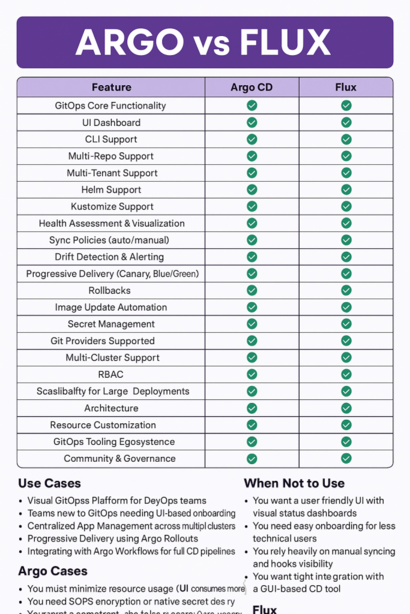
Comprehensive Feature Comparison: Argo CD vs Flux
Below is a detailed, side-by-side comparison of Argo CD and Flux across all major features relevant to Kubernetes GitOps workflows. The left column lists the features; the next columns indicate whether Argo CD or Flux supports them, and how.
| Feature | Argo CD | Flux CD |
|---|---|---|
| User Interface (UI) | Full-featured web UI with visual status, diff views, and rollback controls | No native UI; relies on CLI or third-party dashboards (e.g., Grafana) |
| Deployment Model | Pull-based GitOps with optional manual sync | Pull-based GitOps using Kubernetes controllers |
| Helm Support | Built-in Helm rendering or plugins | Native Helm controller with full Helm feature support |
| Kustomize Support | Native | Native |
| Multi-Cluster Management | Centralized UI for managing multiple clusters | Requires separate Flux instances per cluster |
| Sync Strategies | Manual/auto sync, sync waves, diff view, rollback | Manual/auto sync, per-app sync intervals, pause functionality |
| Drift Detection & Remediation | Automatic with visualizations | Always enforces Git state; auto-remediation |
| Progressive Delivery | Requires Flagger integration | Native integration with Flagger for canary/blue-green deployments |
| Image Update Automation | Needs external tools | Native via image automation controllers |
| Secrets Management | External tools (e.g., helm-secrets) | Native SOPS support |
| RBAC & Multi-Tenancy | Custom RBAC system with SSO integration | Kubernetes-native RBAC and namespace-based multi-tenancy |
| Policy Enforcement | Limited; relies on external tools (OPA/Kyverno) | Native OPA/Kyverno integration |
| Scalability | UI/data-fetching may bottleneck at scale | Horizontally scalable; handles tens of thousands of apps |
| Community & Governance | CNCF incubating, led by Intuit | CNCF graduated, led by Weaveworks |
| Learning Curve | Easier for developers (UI-driven) | Steeper, operator-centric |
Use Cases for Each Tool
Argo CD Use Cases
- Visual management: Teams needing a UI for monitoring deployments, diffing changes, and manual interventions.
- Application-centric workflows: Managing deployments as discrete “applications” with built-in health checks.
- Multi-cluster governance: Centralized control over multiple clusters via a single dashboard.
- Enterprise environments: SSO integration and custom RBAC for large organizations.
- Rollback-heavy workflows: Easily revert deployments using UI/CLI.
Flux CD Use Cases
- Lightweight GitOps: Resource-constrained environments (edge/IoT) with minimal overhead.
- Automated image updates: Continuous deployment of new container images without manual triggers.
- Modular architecture: Teams wanting to build custom GitOps workflows using only necessary components.
- Helm-centric deployments: Deep integration with Helm charts for complex releases.
- Policy-driven compliance: Enforcing security/compliance via OPA/Kyverno natively.
Reasons to Avoid Each Tool
Avoid Argo CD If:
- You need native progressive delivery (canary/blue-green) without third-party tools like Flagger.
- Your workflow requires automated image updates without external dependencies.
- You prioritize lightweight resource usage (Argo’s UI adds overhead).
- You need native secrets management (SOPS) without plugins.
- You manage thousands of apps (UI performance may degrade).
Avoid Flux CD If:
- Your team relies on a built-in UI for troubleshooting and rollbacks.
- You require centralized multi-cluster management from a single dashboard.
- You need SSO or custom RBAC beyond Kubernetes-native RBAC.
- Your workflow benefits from application-level abstractions (e.g., ApplicationSets).
- You prefer lower learning curves (Flux’s CLI/operator focus demands Kubernetes expertise).
Summary
- Choose Argo CD for UI-driven workflows, multi-cluster visibility, and enterprise-grade access control.
- Choose Flux CD for modularity, automated image updates, and Kubernetes-native extensibility.
Both tools are CNCF-backed and production-ready, but their strengths align with different operational priorities.