MOTOSHARE 🚗🏍️
Turning Idle Vehicles into Shared Rides & Earnings
From Idle to Income. From Parked to Purpose.
Earn by Sharing, Ride by Renting.
Where Owners Earn, Riders Move.
Owners Earn. Riders Move. Motoshare Connects.
With Motoshare, every parked vehicle finds a purpose.
Owners earn. Renters ride.
🚀 Everyone wins.

What is OpenCV?
OpenCV (Open Source Computer Vision Library) is a widely-used open-source computer vision and machine learning software library. Developed originally by Intel and now supported by an active global community, OpenCV provides a comprehensive set of tools, functions, and algorithms to enable real-time image processing, video analysis, and computer vision applications.
OpenCV is written primarily in C++ but offers interfaces for Python, Java, and MATLAB, making it accessible to a broad range of developers and researchers. It supports multi-platform deployment on Windows, Linux, macOS, Android, and iOS.
The library is optimized for performance, leveraging CPU and GPU capabilities, making it suitable for applications ranging from simple image transformations to complex machine learning models integrated with computer vision.
What are the Major Use Cases of OpenCV?
OpenCV’s versatility and extensive functionality make it applicable across many domains:
- Image Processing: Basic operations like filtering, color space conversions, edge detection, and morphological transformations.
- Object Detection and Recognition: Identifying faces, pedestrians, vehicles, and other objects using classifiers and deep learning models.
- Facial Recognition: Applications in security systems, authentication, and social media filters.
- Augmented Reality (AR): Tracking real-world objects and overlaying virtual objects in real-time.
- Robotics and Automation: Enabling robots to interpret visual data for navigation, obstacle avoidance, and manipulation.
- Medical Imaging: Analyzing X-rays, MRI, and ultrasound images to assist diagnosis.
- Traffic Monitoring and Smart Cities: Vehicle counting, license plate recognition, and pedestrian tracking.
- Industrial Inspection: Automated quality control by detecting defects in manufacturing processes.
- Gesture Recognition: Facilitating human-computer interaction through hand or body movements.
- Video Analysis: Motion detection, object tracking, and activity recognition for surveillance or sports analytics.
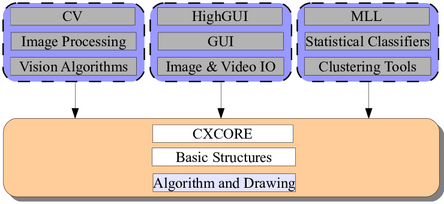
How OpenCV Works Along with Architecture?
OpenCV is architected as a modular library with a layered structure to efficiently process visual data:
1. Core Functionality Layer
- Provides basic data structures (matrices, vectors) and utility functions.
- Handles image I/O, color space conversions, and simple operations like pixel access.
2. Image Processing Module
- Implements filtering, edge detection (e.g., Canny), geometric transformations (scaling, rotation), and histograms.
3. Feature Detection and Description
- Detects keypoints and extracts descriptors (SIFT, SURF, ORB) for matching and recognition.
4. Object Detection and Recognition
- Includes classifiers (Haar cascades, LBP) and supports integration with deep learning frameworks for more accurate detection.
5. Machine Learning Module
- Provides classic algorithms (SVM, k-NN, Random Forests) and interfaces for deep learning models.
6. Video Analysis Module
- Supports motion detection, optical flow, background subtraction, and object tracking.
7. High-Level APIs and Utilities
- Includes GUI components for displaying images/videos, camera calibration tools, and camera access APIs.
How it Works in Practice:
- Developers load images or video frames as matrix objects.
- Image data passes through chained OpenCV functions for preprocessing, feature extraction, or classification.
- Results are processed or visualized, often in real-time.
OpenCV also utilizes hardware acceleration (OpenCL, CUDA) to optimize performance on supported platforms.
What is the Basic Workflow of OpenCV?
- Capture or Load Image/Video:
Input visual data from cameras, files, or live streams. - Preprocessing:
Apply filters, resize, convert color spaces, or remove noise to enhance quality. - Feature Extraction:
Detect edges, keypoints, or regions of interest. - Analysis and Recognition:
Apply detection algorithms, classification models, or tracking. - Postprocessing and Visualization:
Draw bounding boxes, annotate images, or generate reports. - Output or Actuation:
Display results or send commands to actuators in robotics.
Step-by-Step Getting Started Guide for OpenCV
Step 1: Install OpenCV
- For Python, use pip:
pip install opencv-python
- For C++ or other languages, download from the official OpenCV site or use package managers.
Step 2: Load and Display an Image
import cv2

# Load an image from file
image = cv2.imread('sample.jpg')

# Display the image in a window
cv2.imshow('Sample Image', image)
cv2.waitKey(0)
cv2.destroyAllWindows()
Code language: PHP (php)
Step 3: Convert Image to Grayscale
gray_image = cv2.cvtColor(image, cv2.COLOR_BGR2GRAY)
cv2.imshow('Grayscale', gray_image)
cv2.waitKey(0)
cv2.destroyAllWindows()
Code language: JavaScript (javascript)
Step 4: Apply Edge Detection
edges = cv2.Canny(gray_image, 100, 200)
cv2.imshow('Edges', edges)
cv2.waitKey(0)
cv2.destroyAllWindows()
Code language: JavaScript (javascript)
Step 5: Use Object Detection (Face Detection example)
face_cascade = cv2.CascadeClassifier(cv2.data.haarcascades + 'haarcascade_frontalface_default.xml')
faces = face_cascade.detectMultiScale(gray_image, scaleFactor=1.1, minNeighbors=5)

for (x, y, w, h) in faces:
    cv2.rectangle(image, (x,y), (x+w, y+h), (255, 0, 0), 2)

cv2.imshow('Detected Faces', image)
cv2.waitKey(0)
cv2.destroyAllWindows()
Code language: JavaScript (javascript)
Step 6: Experiment with Video Capture
cap = cv2.VideoCapture(0)  # Use webcam

while True:
    ret, frame = cap.read()
    if not ret:
        break
    cv2.imshow('Webcam Feed', frame)
    if cv2.waitKey(1) & 0xFF == ord('q'):
        break

cap.release()
cv2.destroyAllWindows()
Code language: PHP (php)
Step 7: Explore Advanced Features
- Try feature detection, tracking, or integrate deep learning models.
- Use OpenCV’s DNN module to run pre-trained neural networks.