MOTOSHARE 🚗🏍️
Turning Idle Vehicles into Shared Rides & Earnings
From Idle to Income. From Parked to Purpose.
Earn by Sharing, Ride by Renting.
Where Owners Earn, Riders Move.
Owners Earn. Riders Move. Motoshare Connects.
With Motoshare, every parked vehicle finds a purpose.
Owners earn. Renters ride.
🚀 Everyone wins.
What is React Native?
React Native is an open-source framework developed by Facebook for building mobile applications using JavaScript and React. It allows developers to write cross-platform applications that can run on both iOS and Android, using a single codebase. React Native combines the flexibility and reusability of React with native components and APIs, enabling developers to build high-performance, native mobile apps without needing to write separate code for each platform.
React Native allows developers to write most of their application logic in JavaScript, while still having access to the platform-specific features of iOS and Android. This approach dramatically reduces the time and effort required to build mobile applications, as developers can reuse much of the same code across platforms. The framework uses a “bridge” to communicate between JavaScript and native code, allowing for a seamless integration with device-specific functionality.
What are the Major Use Cases of React Native?
React Native is well-suited for a variety of mobile application development scenarios, particularly where time-to-market and maintaining a shared codebase across multiple platforms are important. Some major use cases for React Native include:
- Cross-Platform Mobile Development:
The primary use case for React Native is to develop mobile applications that work across both iOS and Android platforms. By writing a single codebase, developers can avoid the need for duplicate development efforts, reducing costs and time spent on the development lifecycle. - Startups and MVPs (Minimum Viable Products):
React Native is ideal for startups or companies looking to quickly launch an MVP. It allows rapid development with minimal resources, and since the code can be reused for both iOS and Android, it’s an efficient choice for creating initial versions of mobile apps. - Performance-Sensitive Applications:
React Native offers near-native performance for most mobile applications. While not entirely on par with fully native apps in every use case, React Native’s performance is generally sufficient for many apps, particularly in areas such as social networking, e-commerce, and media streaming. - Apps Requiring Native Features:
React Native allows developers to access platform-specific features such as camera, GPS, and device storage via native modules. This makes it a great choice for apps that require direct access to native APIs without compromising the user experience or app performance. - Real-Time Applications:
React Native is widely used for developing real-time mobile applications such as chat apps, social media platforms, and notification systems. The asynchronous nature of JavaScript and the ability to integrate with real-time databases like Firebase makes React Native highly effective for real-time communication apps. - Enterprise-Level Applications:
Some large-scale businesses adopt React Native for creating enterprise-level mobile applications. React Native’s ability to integrate with existing backend systems and web applications allows for the smooth deployment of mobile apps that interact with legacy systems. - Games and Multimedia Apps:
React Native can be utilized for simple games or multimedia apps. While it may not be suitable for complex 3D games, it is efficient for apps that require multimedia integration, such as photo and video editing, media playback, and streaming.
How React Native Works Along with Architecture?
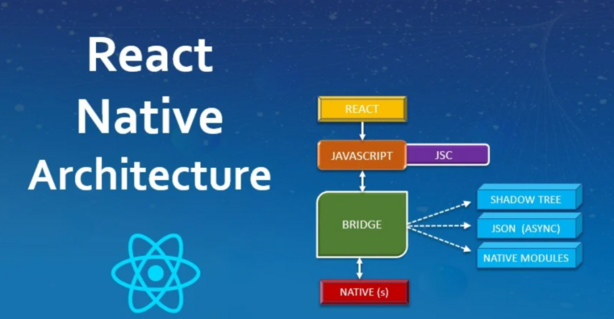
React Native’s architecture is designed to bridge the gap between JavaScript and native mobile code, allowing developers to build high-performance mobile apps. The core architecture of React Native is based on the interaction between the JavaScript thread, the native bridge, and the native modules. Here is an overview of how React Native works:
- JavaScript Thread:
React Native operates through a JavaScript thread where the main logic and UI components are written. This is where React components are rendered, and JavaScript code is executed. The JavaScript thread is responsible for managing the business logic, layout, and state management. - Bridge:
The bridge is a crucial part of React Native’s architecture, as it acts as a communication layer between the JavaScript thread and the native code. The JavaScript thread communicates with the bridge to call native APIs, and the bridge sends back the results to the JavaScript thread. The bridge allows developers to use platform-specific features and components without needing to write native code directly. - Native Modules:
Native modules in React Native allow developers to access platform-specific features or write custom native code (Objective-C, Swift for iOS, or Java/Kotlin for Android) when necessary. React Native provides several pre-built modules to interact with device APIs, such as camera, location services, and accelerometer. If a feature is not provided by the React Native framework out-of-the-box, developers can extend React Native by creating custom native modules. - UI Thread (Main Thread):
React Native uses a separate UI thread to handle rendering native components such as buttons, text, and views. This thread is responsible for rendering the app’s user interface and handling layout, animations, and transitions. React Native efficiently updates the UI in response to changes in the app’s state or props, ensuring smooth user interactions. - Rendering:
React Native uses a layout engine called Yoga (built by Facebook) for performing layout calculations. Yoga calculates the layout of React Native components using a Flexbox model, which is consistent across iOS and Android. Once the layout is calculated, it is rendered natively by the platform’s native components, providing a consistent experience across platforms. - Native UI Components:
React Native provides built-in components likeText,View,Button, andImage, which map directly to the platform’s native UI components. These components are optimized to give users a seamless, native-like experience on both iOS and Android.
What are the Basic Workflow of React Native?
The typical workflow in React Native development involves writing components, setting up the development environment, building the app, and running it on simulators/emulators or physical devices. Here is the basic workflow of React Native development:
- Set Up Development Environment:
- Install Node.js and npm (Node Package Manager).
- Install React Native CLI using npm or use Expo CLI for a managed workflow.
- Set up Android Studio for Android development and Xcode for iOS development (if working on macOS).
- Create a New React Native Project:
- Start by creating a new React Native project using the command:
npx react-native init MyApp
- Start by creating a new React Native project using the command:
- Develop Components:
- Write components using JSX (JavaScript XML), which looks similar to HTML but is used in JavaScript for defining the UI structure.
- Use React’s state and props to manage and pass data between components.
- Components in React Native are responsible for rendering the UI and handling user interactions.
- Running the App:
- Use the following command to run the app on an iOS simulator or Android emulator:
npx react-native run-android # For Android npx react-native run-ios # For iOS (on macOS)
- Use the following command to run the app on an iOS simulator or Android emulator:
- Developing for Both Platforms:
- React Native provides platform-specific code using platform modules like
Platform.OS. This allows for tailoring the app to behave differently on iOS and Android if needed. - Use the
react-nativecommand-line interface (CLI) or Expo CLI to manage assets and native modules.
- React Native provides platform-specific code using platform modules like
- Debugging and Testing:
- Use React Native Debugger or Chrome’s Developer Tools to debug JavaScript code and inspect network requests.
- For native debugging, use Android Studio and Xcode to inspect native code, logs, and performance.
- Building and Deploying:
- Once the app is complete, build the app for production using the following commands:
npx react-native run-android --variant=release # For Android npx react-native run-ios --configuration=Release # For iOS - After building the app, package it for submission to the Google Play Store (Android) or Apple App Store (iOS).
- Once the app is complete, build the app for production using the following commands:
Step-by-Step Getting Started Guide for React Native
To get started with React Native, follow these steps:
- Install Prerequisites:
- Install Node.js and npm from the official website.
- Install React Native CLI:
npm install -g react-native-cli
- Set Up Your Development Environment:
- For Android: Install Android Studio and set up the Android Emulator.
- For iOS: Install Xcode (macOS only).
- Follow the setup guides on the React Native documentation for platform-specific configurations.
- Create a New Project:
- Open a terminal and run:
npx react-native init MyFirstApp - Navigate into the project directory:
cd MyFirstApp
- Open a terminal and run:
- Run Your App:
- For Android:
npx react-native run-android - For iOS (macOS only):
npx react-native run-ios
- For Android:
- Develop Components:
- Open the
App.jsfile and start editing your components. For example:import React from 'react'; import { View, Text } from 'react-native'; const App = () => { return ( <View> <Text>Hello, React Native!</Text> </View> ); }; export default App;
- Open the
- Debug and Test:
- Use React Developer Tools or React Native Debugger to debug your app.
- Run on real devices for better performance testing.
- Build and Publish:
- When the app is ready, use the commands mentioned above to create release builds and submit them to the appropriate app store.