MOTOSHARE 🚗🏍️
Turning Idle Vehicles into Shared Rides & Earnings
From Idle to Income. From Parked to Purpose.
Earn by Sharing, Ride by Renting.
Where Owners Earn, Riders Move.
Owners Earn. Riders Move. Motoshare Connects.
With Motoshare, every parked vehicle finds a purpose.
Owners earn. Renters ride.
🚀 Everyone wins.
📘 What is spss-files?
spss-files typically refers to the file formats used by IBM SPSS Statistics, a leading software package for statistical analysis, survey data, and social sciences research. The most common and relevant file format under this umbrella is the .sav file, which stores datasets including variables, labels, and values in a compressed binary format.
These files are crucial in academic, psychological, market research, public health, and governmental research, where large and complex datasets need to be cleaned, coded, and statistically analyzed. While originally designed to be used within SPSS itself, .sav and other SPSS-related formats (e.g., .zsav, .por) are now supported across various open-source environments like R, Python, SAS, and Stata.
Additionally, spss-files may refer to the R or Python libraries (pyreadstat, savReaderWriter, haven) that provide tools to read, write, and manipulate SPSS data files outside the native SPSS software, empowering cross-platform data analysis.
🚀 Major Use Cases of SPSS Files
SPSS files are foundational in many real-world data processing and statistical analysis workflows:
1. Academic Research
Universities and research institutions use .sav files to share and store survey data, especially in psychology, sociology, economics, and education research. These files store metadata such as variable labels and value coding that are critical for interpretation.
2. Public Health & Epidemiology
Organizations like the CDC or WHO often release datasets in .sav format to ensure compatibility with statistical tools used by global researchers studying health outcomes, demographics, and disease trends.
3. Market Research
Survey data collected from consumers, user feedback, or brand studies is commonly stored and exchanged in SPSS format, allowing data scientists to apply modeling techniques, descriptive statistics, and segmentation.
4. Government & Policy Making
Many government datasets (census, employment, education) are stored as .sav to support decision-making processes through regression modeling, ANOVA, and time-series analysis.
5. Data Migration & Integration
SPSS files are often used as an intermediate format when moving data between systems or tools—especially from survey tools (like Qualtrics or LimeSurvey) into Python, R, or SQL environments for further analysis.
🧠 How SPSS Files Work (Architecture & Structure)
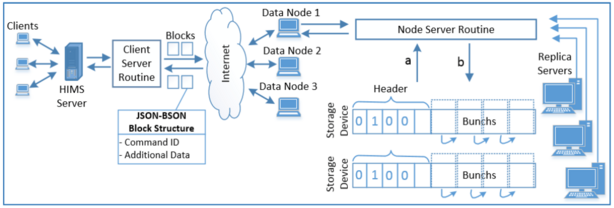
SPSS .sav files are binary files composed of two key sections:
1. Metadata Header
- Contains variable names, types (string, numeric), value labels (e.g., 1 = Male, 2 = Female), missing value codes, measurement levels (nominal, ordinal, scale), and data set properties.
2. Data Records
- Each row corresponds to a case (i.e., respondent or observation), while columns represent variables. All records are tightly packed for compression efficiency.
Internally, SPSS files are encoded with a portable, platform-independent binary format, which includes version tags and padding bytes to ensure compatibility across versions. Modern tools parse these files using a reader/parser module that reconstructs the dataset into memory (e.g., a DataFrame in Python or tibble in R) while preserving labels and formatting.
Cross-language Interfacing
- Python:
pyreadstat,savReaderWriter,pandas(viaread_spss) - R:
haven::read_sav(),foreign::read.spss() - Java: Libraries like
SPSSIOandReadStat-Javaenable integration
🔄 Basic Workflow of Using SPSS Files
The SPSS data handling workflow can be summarized in five major stages:
- Data Collection
- Survey tools or manual data entry create datasets in
.savformat.
- Survey tools or manual data entry create datasets in
- Data Cleaning & Labeling
- Variable transformation, recoding, missing value handling, and label definition are done within SPSS GUI or scripting.
- Analysis
- Statistical procedures (e.g., t-tests, regression, clustering) are performed using SPSS or external tools after importing the file.
- Sharing & Portability
- The
.savfile is distributed for review, publication, or collaborative analysis.
- The
- Integration
- Analysts may import SPSS files into R, Python, or SQL environments for extended analytics, visualization, or ML modeling.
🛠 Step-by-Step Getting Started Guide for SPSS Files in Python & R
You don’t need IBM SPSS to work with .sav files. Open-source tools can handle them efficiently.
✅ A. Working with SPSS Files in Python
1. Install pyreadstat
pip install pyreadstat
2. Read .sav File into Pandas
import pyreadstat

df, meta = pyreadstat.read_sav("survey_data.sav")
print(df.head())
print(meta.column_labels)
Code language: PHP (php)
3. Write SPSS File
pyreadstat.write_sav(df, "output.sav")
Code language: CSS (css)
✅ B. Working with SPSS Files in R
1. Install haven package
install.packages("haven")
library(haven)
Code language: JavaScript (javascript)
2. Read .sav File
data <- read_sav("survey_data.sav")
head(data)
Code language: JavaScript (javascript)
3. View Labels
str(data)
4. Write to .sav
write_sav(data, "output_file.sav")
Code language: JavaScript (javascript)
✅ C. Convert SPSS Files to CSV
Python Example:
df.to_csv("converted_data.csv", index=False)
Code language: PHP (php)
R Example:
write.csv(data, "converted_data.csv", row.names = FALSE)
Code language: PHP (php)