MOTOSHARE 🚗🏍️
Turning Idle Vehicles into Shared Rides & Earnings
From Idle to Income. From Parked to Purpose.
Earn by Sharing, Ride by Renting.
Where Owners Earn, Riders Move.
Owners Earn. Riders Move. Motoshare Connects.
With Motoshare, every parked vehicle finds a purpose.
Owners earn. Renters ride.
🚀 Everyone wins.
========================================
Any Qs - Any time
========================================
9:AM - 5 PM
========================================
Lunch Time - 12:30 PM - 1 Hour
Tea tme
	10:30 AM - 15 mns
	3 PM - min

Workstation - Windows
Cloud - Azure |
=========================================
Access - Azure
============================================================
Slides - https://devopsschool.com/slides/terraform/
Tutorials:
-------------------------------------------------------------
What is Terraform?
-------------------------------------------------------
	Coding for Infra = IAAC
	From Hasicorp
	Written in GOlang
	Release
		Community - CLI
		Enterprise - WEB
		Cloud - WEB = https://app.terraform.io/
	Version
		1.6.0


Whats there in Infra?
----------------------------------
https://registry.terraform.io/browse/providers

Why We need terraform?
------------------------------------------------------
So many Platform
So many Lang spec
So many Coding Standard
one is not working for other
Consitent change mgmt

--------------------------------
How it works?

======================================================
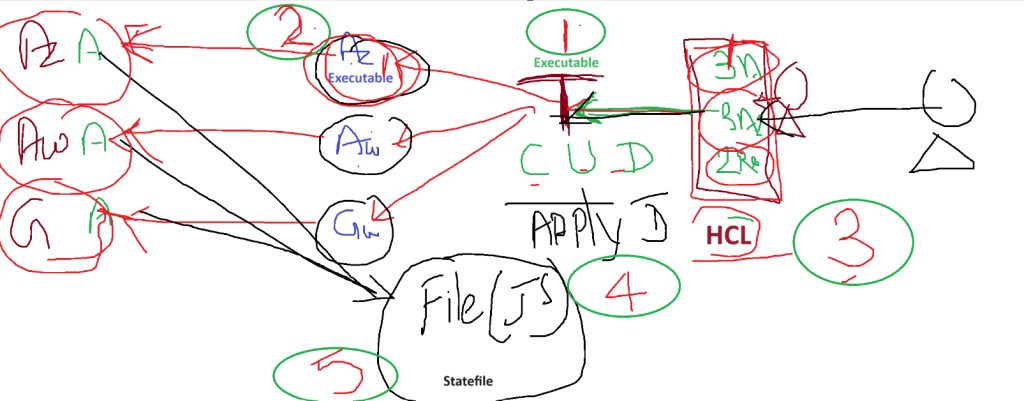
Step 1 - Installl Terraform

Step 2 - Install Providers

Step 3 - Write A code

Step 4 - Run a code

Step 5 - Validate the state file

Code language: JavaScript (javascript)
Installl Terraform
Step 2 – Install Terraform Providers (Plugins)
You can install providers using CODE.

How to store terraform code?
---------------------
anyfilename.tf


Directory === file1.tf  + file2.tf + file3.tf
              ================================
			ONE PROJECT
			ONE CODE
All TF code merged into ONE
			During - Apply - Destory

Azure
AWS
Github

--------------------------------------
terraform {
  required_providers {
    azurerm = {
      source = "hashicorp/azurerm"
      version = "3.75.0"
    }
  }
}

provider "azurerm" {
  # Configuration options
}
--------------------------------------
How to download providers? | First time | Upgrade
$ terraform init


-------------------------------------------------
terraform {
  required_providers {
    azurerm = {
      source = "hashicorp/azurerm"
      version = "3.75.0"
    }
	aws = {
      source = "hashicorp/aws"
      version = "5.20.0"
    }
  }
}

provider "azurerm" {
  # Configuration options
}


provider "aws" {
  # Configuration options
}Code language: PHP (php)
Step 3 – How to write a Code in Terraform?
====================================================
Rule#1 - You MUST know Provider(Azure)
Rule#2 - You MUST know the resources provider by Terrafrom


IMPORTANT - https://registry.terraform.io/providers/hashicorp/azurerm/latest/docs
https://registry.terraform.io/providers/hashicorp/azurerm/latest/docs/resources/resource_group

resource#1
	argument#1
	argument#2
	argument#3

resource#2
	argument#1
	argument#2
	argument#3

resource#3
	argument#1
	argument#2
	argument#3

resource "azurerm_resource_group" "example" {
  name     = "example"
  location = "West Europe"
}

resource "azurerm_resource_group" "example-rg" {
  name     = "example"
  location = "West Europe"
}

====================================================================================
Command workflow in Terraform
-----------------------------------
validate      Check whether the configuration is valid
plan          Show changes required by the current configuration
apply         Create or update infrastructure
show          Show the current state or a saved plan
destroy       Destroy previously-created infrastructure


How to Authenticate Azure using service princial and token/
<blockquote class="wp-embedded-content" data-secret="nzWp0J5j3i"><a href="https://www.devopsschool.com/blog/azure-how-to-create-iam-user-and-assign-service-principal-access/">Azure Tutorials – How to create IAM user and assign Service Principal Access?</a></blockquote><iframe class="wp-embedded-content" sandbox="allow-scripts" security="restricted" style="position: absolute; visibility: hidden;" title="“Azure Tutorials – How to create IAM user and assign Service Principal Access?” — DevOpsSchool.com" src="https://www.devopsschool.com/blog/azure-how-to-create-iam-user-and-assign-service-principal-access/embed/#?secret=i1a8YwKsZv#?secret=nzWp0J5j3i" data-secret="nzWp0J5j3i" width="600" height="338" frameborder="0" marginwidth="0" marginheight="0" scrolling="no"></iframe>

CID - 6046fe74-dfd2-4db6-ad2d-263b630b5b8f
TID - f34c8fc4-16b8-4de3-8110-45904e3b1d1a

SECRET _ 3XJ8Q~uvlwVL1mYFPAuMmNG5es2I~Lz~CcQV~cWg


provider "azurerm" {
  features {}
  subscription_id = "b3dbe884-c3c"
  client_id       = "6046fe74-d5b8f"
  client_secret   = "3XJ8Q~ues2I~Lz~CcQV~cWg"
  tenant_id       = "f31a"
}
Code language: HTML, XML (xml)
How to work with Github Provider
resource "github_repository" "example" {
  name        = "example-XXXXSSSSSDDDDD"
  description = "My awesome codebase"

  visibility = "public"
}


output "rg1" {
  value = azurerm_resource_group.example-rg.name
}


output "repo" {
  value = github_repository.example.git_clone_url
}Code language: JavaScript (javascript)
provider "github" {
token = "fdfsdfdsfdsfsfds"
}
Code language: JavaScript (javascript)How to display only Selected values from Statefile?
output "rg1" {
  value = azurerm_resource_group.example-rg.name
}


output "repo" {
  value = github_repository.example.git_clone_url
}Code language: JavaScript (javascript)
$ terraform apply --auto-approve