MOTOSHARE 🚗🏍️
Turning Idle Vehicles into Shared Rides & Earnings
From Idle to Income. From Parked to Purpose.
Earn by Sharing, Ride by Renting.
Where Owners Earn, Riders Move.
Owners Earn. Riders Move. Motoshare Connects.
With Motoshare, every parked vehicle finds a purpose.
Owners earn. Renters ride.
🚀 Everyone wins.
TYPES OF SERVICES
=======================================
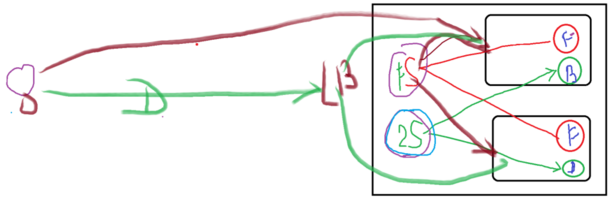
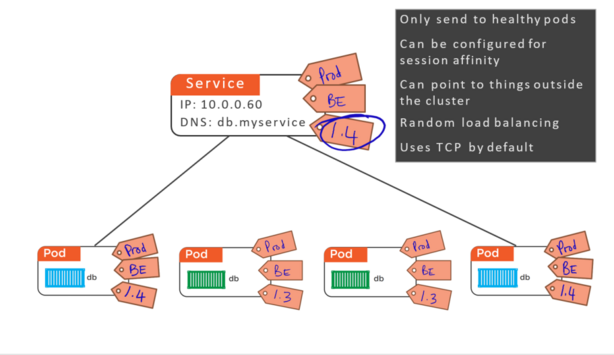
ClustorIP
	- default one
NodePort
	ClustorIP
	service get exposed at Port of the each Node of the clustor

LoadBalancer
	Create 1 SVC of Cluster IP
	service get exposed at Port of the each Node of the clustor
	Create a LB at Cloud
	Add all node of the cluster to that LB


apiVersion: v1
kind: Pod
metadata:
  name: rajesh1
  labels:
    app: helloworld
spec:
  containers:
  - name: devopsschool1
    image: scmgalaxy/nginx-devopsschoolv1
    ports:
    - name: nginx-port
      containerPort: 80


apiVersion: v1
kind: Pod
metadata:
  name: rajesh2
  labels:
    app: helloworld
spec:
  containers:
  - name: devopsschool1
    image: scmgalaxy/nginx-devopsschoolv2
    ports:
    - name: nginx-port
      containerPort: 80

kubectl create service clustorip my-ns --tcp=5678:80
kubectl create service nodeport my-ns --tcp=5678:80


NAME         TYPE        CLUSTER-IP       EXTERNAL-IP   PORT(S)          AGE
kubernetes   ClusterIP   10.96.0.1        <none>        443/TCP          3d19h
my-cs        ClusterIP   10.110.241.178   <none>        5678/TCP         9m26s
my-ns        NodePort    10.104.141.152   <none>        5678:31938/TCP   2m19s


NODEIP:31938 --> 10.104.141.152:5678 --> PODIP


 790  mkdir rajesh
  791  cd rajesh/
  792  ls
  793  clear
  794  ls
  795  vi pod1.yaml
  796  vi pod2.yaml
  797  ls
  798  kubectl get pods
  799  kubectl delete deploy my-dep
  800  clear
  801  ls
  802  kubectl get pods
  803  clear
  804  ls
  805  kubectl apply -f pod1.yaml
  806  kubectl apply -f pod2.yaml
  807  clear
  808  kubectl get pods
  809  kubectl get pods -o wide
  810  curl http://192.168.0.25
  811  curl http://192.168.0.26
  812  clear
  813  ls
  814  kubectl create service -h
  815  kubectl create service clusterip
  816  kubectl create service clusterip -h
  817  clear
  818  kubectl get svc
  819  kubectl create service clusterip my-cs --tcp=5678:80
  820  kubectl get svc
  821  clear
  822  ls
  823  kubectl get svc
  824  kubectl describe svc my-cs
  825  kubectl get pods --show-lables
  826  kubectl get pods --show-labels
  827  kubectl edit svc my-cs
  828  clear
  829  kubectl get pods --show-labels
  830  kubectl describe svc my-cs
  831  kubectl edit svc my-cs
  832  kubectl describe svc my-cs
  833  curl http://10.110.241.178
  834  curl http://10.110.241.178:5678
  835  watch curl http://10.110.241.178:5678
  836  clear
  837  kubectl create service nodeport -h
  838  clear
  839  kubectl create service nodeport my-ns --tcp=5678:80
  840  kubectl get svc
  841  kubectl get svc --show-lables
  842  kubectl get svc --show-labels
  843  kubectl get pods --show-labels
  844  kubectl edit svc my-ns
  845  kubectl describe svc my-ns
  846  kubectl get svc
  847  clear
  848  kubectl describe svc my-ns
  849  kubectl describe svc my-cs
  850  history


Code language: JavaScript (javascript)
PV and PVC using Hostpath
 873  kubectl get pv
  874  pwd
  875  clear
  876  ls
  877  vi pv1.yaml
  878  clear
  879  kubectl apply -f pv1.yaml
  880  kubevtl get pvs
  881  kubevtl get pv
  882  clear
  883  kubectl get pv
  884  vi pv1.yaml
  885  kubectl apply -f pv1.yaml
  886  kubectl get pv
  887  vi pvc1.yaml
  888  kubectl get pvc
  889  kubectl apply -f pvc1.yaml
  890  kubectl get pvc
  891  kubectl describe pvc pvchostpath
  892  kubectl get pvc
  893  clear
  894  vi pvc1.yaml
  895  kubectl apply -f pvc1.yaml
  896  kubectl get pvc
  897  kubectl get pv
  898  vi pod.yaml
  899  kubectl apply pod.yaml
  900  kubectl apply -f pod.yaml
  901  clear
  902  kubectl get pods
  903  kubectl exec task-pv-pod touch /usr/share/nginx/html/index.html
  904  kubectl exec task-pv-pod ls /usr/share/nginx/html/index.html
  905  kubectl exec task-pv-pod ls /usr/share/nginx/html/
  906  kubectl get pods -o wide
  907  clear
  908  ls
  909  kubectl get pods -o wide
  910  kubectl delete pod task-pv-pod
  911  kubectl apply -f pod.yaml
  912  kubectl get pods -o wide
  913  kubectl exec task-pv-pod ls /usr/share/nginx/html/
  914  clear
Code language: JavaScript (javascript)