MOTOSHARE 🚗🏍️
Turning Idle Vehicles into Shared Rides & Earnings
From Idle to Income. From Parked to Purpose.
Earn by Sharing, Ride by Renting.
Where Owners Earn, Riders Move.
Owners Earn. Riders Move. Motoshare Connects.
With Motoshare, every parked vehicle finds a purpose.
Owners earn. Renters ride.
🚀 Everyone wins.
Go to the project folder in the terminal.
Mac keytool -list -v -keystore ~/.android/debug.keystore -alias androiddebugkey -storepass android -keypass android

Windows keytool -list -v -keystore "\.android\debug.keystore" -alias androiddebugkey -storepass android -keypass android

Linux keytool -list -v -keystore ~/.android/debug.keystore -alias androiddebugkey -storepass android -keypass androidCode language: PHP (php)
GUI Android Studio.
- Select android/app/build.gradle file and on the right top corner click “Open for Editing in Android Studio”
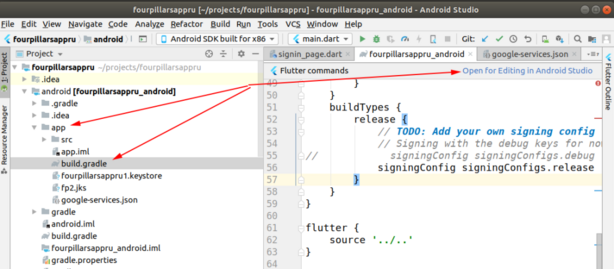
- Open Gradle panel and double click on “SigninReport”,
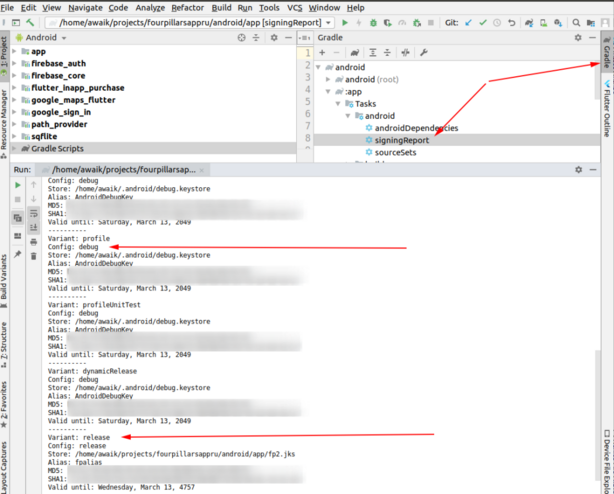
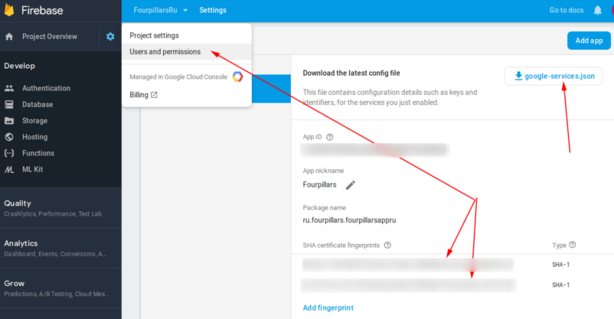
- That’s it! If you use Firebase – add these 2 keys there. You should add both keys, otherwise, without the release key, Google login will not work on the devices.