MOTOSHARE 🚗🏍️
Turning Idle Vehicles into Shared Rides & Earnings
From Idle to Income. From Parked to Purpose.
Earn by Sharing, Ride by Renting.
Where Owners Earn, Riders Move.
Owners Earn. Riders Move. Motoshare Connects.
With Motoshare, every parked vehicle finds a purpose.
Owners earn. Renters ride.
🚀 Everyone wins.
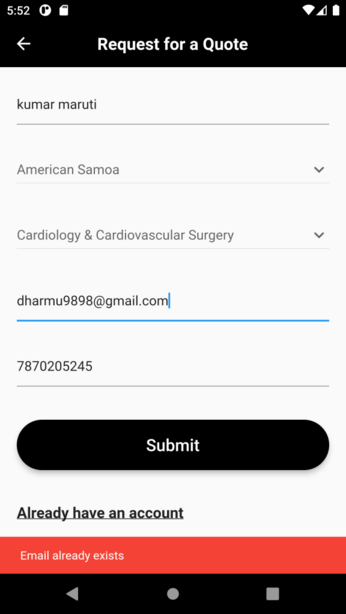
To check if an email already exists in Flutter, you can make an HTTP request to your server or API endpoint and handle the response accordingly. Here’s an example of how you can implement it:
1. First, import the necessary dependencies:
import 'package:http/http.dart' as http;
import 'dart:convert';
Code language: JavaScript (javascript)
2. Create a function to check if the email exists:
registerPress() async {
    bool emailValid = RegExp(
            r"^[a-zA-Z0-9.a-zA-Z0-9.!#$%&'*+-/=?^_`{|}~]+@[a-zA-Z0-9]+\.[a-zA-Z]+")
        .hasMatch(_email);

    if (_name.isEmpty || _email.isEmpty || _phone.isEmpty) {
      errorSnackBar(context, 'Please fill in all fields');
    } else if (dropdownvalue == 'Select Country of Residence' ||
        dropdownvalue1 == 'Select Your Treatment Category') {
      errorSnackBar(context, 'Please select country and category');
    } else if (!emailValid) {
      errorSnackBar(context, 'Email is not valid');
    }
    else {
    // Check if email already exists
    bool emailExists = await checkEmailExists(_email);
    if (emailExists) {
      errorSnackBar(context, 'Email already exists');
    }
     else {
      http.Response response = await authServices.register(
        _name,
        _email,
        _phone,
        _dailcode,
        _countryid,
        _categoryid,
        _case,
        // context,
      );Code language: JavaScript (javascript)
3. Now you can use the checkEmailExists function in your registerPress function:
 Future<bool> checkEmailExists(String email) async {
    var response = await http.get(Uri.parse(
        'https://www.myhospitalnow.com/api/v1/patient-api/check-email-exists?email=$email'));
    var resBody = json.decode(response.body);
    return resBody['exists'];
  }Code language: JavaScript (javascript)
4. Go to laravel ApI
Route::get('/check-email-exists', 'Auth\RegisterController@checkEmailExists');Code language: PHP (php)5. Go to Laravel RegisterController
  public function checkEmailExists(Request $request)
    {
        Log::info('yaha tak aa raha hai');
        $email = $request->query('email');
        $exists = User::where('email', $email)->exists();
        return response()->json(['exists' => $exists]);
    }Code language: PHP (php)