MOTOSHARE 🚗🏍️
Turning Idle Vehicles into Shared Rides & Earnings
From Idle to Income. From Parked to Purpose.
Earn by Sharing, Ride by Renting.
Where Owners Earn, Riders Move.
Owners Earn. Riders Move. Motoshare Connects.
With Motoshare, every parked vehicle finds a purpose.
Owners earn. Renters ride.
🚀 Everyone wins.
Step 1:- Run the below command to Install Laravel 5.8
composer create-project --prefer-dist laravel/laravel testingcronjob "5.8.*"Code language: JavaScript (javascript)Step 2 :- Now, we need to create a custom command. Custom command will execute with task scheduling cron job. Run the below command to create new custom command
php artisan make:command DemoCron --command=demo:cronNow we make some changes on Command file.
app/Console/Commands/DemoCron.php
<?php

namespace App\Console\Commands;

use Illuminate\Console\Command;

class DemoCron extends Command
{
    /**
     * The name and signature of the console command.
     *
     * @var string
     */
    protected $signature = 'demo:cron';

    /**
     * The console command description.
     *
     * @var string
     */
    protected $description = 'Command description';

    /**
     * Create a new command instance.
     *
     * @return void
     */
    public function __construct()
    {
        parent::__construct();
    }

    /**
     * Execute the console command.
     *
     * @return mixed
     */
    public function handle()
    {
        \Log::info("Cron is working fine!");

        /*
           Write your database logic we bellow:
           Item::create(['name'=>'hello new']);
        */

        $this->info('Demo:Cron Cummand Run successfully!');
    }
}Code language: HTML, XML (xml)
Step 3 :- Now, we need to define our commands on Kernel.php file with time when you want to run your command like as bellow functions:
| ->everyMinute(); | Run the task every minute |
| ->everyFiveMinutes(); | Run the task every five minutes |
| ->everyTenMinutes(); | Run the task every ten minutes |
| ->everyFifteenMinutes(); | Run the task every fifteen minutes |
| ->everyThirtyMinutes(); | Run the task every thirty minutes |
| ->hourly(); | Run the task every hour |
| ->hourlyAt(17); | Run the task every hour at 17 mins past the hour |
| ->daily(); | Run the task every day at midnight |
| ->dailyAt(’13:00′); | Run the task every day at 13:00 |
| ->twiceDaily(1, 13); | Run the task daily at 1:00 & 13:00 |
| ->weekly(); | Run the task every week |
| ->weeklyOn(1, ‘8:00’); | Run the task every week on Tuesday at 8:00 |
| ->monthly(); | Run the task every month |
| ->monthlyOn(4, ’15:00′); | Run the task every month on the 4th at 15:00 |
| ->quarterly(); | Run the task every quarter |
| ->yearly(); | Run the task every year |
| ->timezone(‘America/New_York’); | Set the timezone |
app/Console/Kernel.php
<?php

namespace App\Console;

use Illuminate\Console\Scheduling\Schedule;
use Illuminate\Foundation\Console\Kernel as ConsoleKernel;

class Kernel extends ConsoleKernel
{
    /**
     * The Artisan commands provided by your application.
     *
     * @var array
     */
    protected $commands = [
        Commands\DemoCron::class,
    ];

    /**
     * Define the application's command schedule.
     *
     * @param  \Illuminate\Console\Scheduling\Schedule  $schedule
     * @return void
     */
    protected function schedule(Schedule $schedule)
    {
        $schedule->command('demo:cron')
                 ->everyMinute();
    }

    /**
     * Register the commands for the application.
     *
     * @return void
     */
    protected function commands()
    {
        $this->load(__DIR__.'/Commands');

        require base_path('routes/console.php');
    }
}Code language: HTML, XML (xml)
Step 4 :- Now We’re ready to run our cron. You can manually check using following command of your cron.Run bellow command:
php artisan schedule:runCode language: CSS (css)After running above command, now you can check log file where we already print some text. So open your log file it looks like as bellow:
storage/logs/laravel-2021-08-16.php
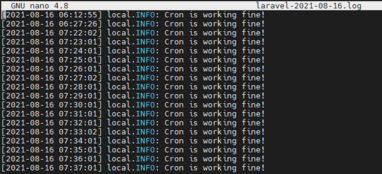
Now our Cron is Working fine, But we want to run cron at every minute in our Linux Server, So for that folow the below Steps.
========================= NOTE START ==========================
Crontab Date / Time Format

 * * * * *  command to execute
 │ │ │ │ │
 │ │ │ │ │
 │ │ │ │ └───── day of week(0-6)(0 to 6 are Sunday to Saturday, or use names; 7 is Sunday, the same as 0)
 │ │ │ └────────── month (1 - 12)
 │ │ └─────────────── day of month (1 - 31)
 │ └──────────────────── hour (0 - 23)
 └───────────────────────── min (0 - 59)
========================= NOTE END ==========================
Step 5 :- Now login into your server and navigate to /etc and run below command
sudo crontab -eAfter running command you’ll get output like below image, just select easiest
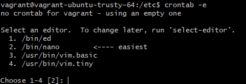
In my case it’s 2, so I typed 2 and hit enter.

now add single entry on crontab file
* * * * * php /path/to/artisan schedule:run 1>> /dev/null 2>&1


OR

* * * * * cd /path-to-your-project && php artisan schedule:run >> /dev/null 2>&1Code language: JavaScript (javascript)
I’m running on my linux server so i’ve added path to my artisan file of my laravel project, see below
my code
* * * * * php /opt/lampp/htdocs/testingcronjob/artisan schedule:run 1>> /dev/null 2>&1Code language: JavaScript (javascript)It’s Done. I hope this article help you.
Keep Exploring.
Thanks for reading.