MOTOSHARE 🚗🏍️
Turning Idle Vehicles into Shared Rides & Earnings
From Idle to Income. From Parked to Purpose.
Earn by Sharing, Ride by Renting.
Where Owners Earn, Riders Move.
Owners Earn. Riders Move. Motoshare Connects.
With Motoshare, every parked vehicle finds a purpose.
Owners earn. Renters ride.
🚀 Everyone wins.
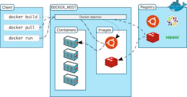
- Docker is a tool which manages container.
- As a part of managing container it performs following operations like create, start, stop, restart, remove, pause, unpause etc.
- Its an open source platform.
- Docker image do not contain the kernel
- Docker consumes less ram, cpu and other resources comparing with the virtual server
2. What is container?
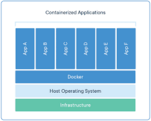
- A container is a fully independent application runtime environment.
- It helps in running the applications.
- The container has a workflow for managing applications.
- Its has many packages of software
- It is an advance approach of solving.
3. What are top 5 advantages of docker?
- efficient
- flexible
- easy
- cost effective
- secure
4. What are the top 10 commands I used today and one line explanation ?
- docker images – displays the image details in a tabular form.
- docker stop {container id} – it stops that container specified.
- docker create httpd – creates the container
- exit – used to exit the container
- docker exec -it (cont id) bash – Helps to move inside the container
- docker inspect (cont id) – Gives information about the container.
- docker commit -m”ub-up-git-ap-java” -a “rajesh Kumar” 76e6a965fb86 ramukaka – It will create an image out of the container id specified.
- docker ps -a – displays the list of details
- docker rm (cont id) – removes that container from the list
- docker restart (cont id) – Restarts the container specified.