DevOps has matured from an emerging philosophy into a mainstream engineering discipline, and with that maturity has come increasing pressure to automate not just code delivery, but the human communication that surrounds it. Bots and ChatOps represent one of the most practical answers to that pressure: they embed automation directly into the conversation channels teams already use every day.
Why Collaboration Remains a Core DevOps Challenge
Despite widespread tool adoption, many organizations still struggle with the human and process gaps that fragment the software delivery lifecycle. Common friction points include:
- Complex environment sprawl: Provisioning and configuring new environments manually is costly, slow, and error-prone—especially when configurations diverge across dev, test, and production.
- Risky manual promotions: Moving code between environments without automation introduces inconsistencies that can trigger outages.
- Dev vs. Ops culture clash: Development teams optimize for change velocity while operations teams optimize for stability. Without shared tooling and visibility, this tension fosters a blame culture rather than shared ownership.
- Synchronization gaps: Manual processes cannot keep dev, test, and production environments consistent at scale, which is a leading cause of production incidents.
Bots address many of these gaps by acting as an automated intermediary across the entire delivery lifecycle, reducing the manual handoffs that introduce risk and delay.
What Are ChatOps and Bots?
ChatOps is a term popularized by GitHub to describe the practice of “putting tools in the middle of a conversation.” Rather than requiring engineers to switch between a chat client and a dozen separate tool dashboards, ChatOps surfaces tool actions and outputs directly inside the chat interface the team is already using.
A typical CI/CD pipeline involves many discrete tools: source code management, defect tracking, continuous integration, continuous deployment, and monitoring systems. These tools rarely talk to each other natively. ChatOps bridges that gap.
The three core components of a ChatOps architecture are:
- Chat app / collaboration tool: The front-end interface (such as Slack or Microsoft Teams) where team members send commands and receive responses. This is the single pane of glass for both human conversation and automated tool interaction.
- The bot: The engine at the center of ChatOps. The bot receives commands typed in natural language or structured syntax, interprets them, and executes the corresponding action against a target system. Well-known bot frameworks include Hubot, Lita, Errbot, and cloud-native options such as AWS Lex.
- Target platforms and DevOps tools: The downstream systems the bot interacts with—CI servers, deployment orchestrators, monitoring platforms, issue trackers, and infrastructure provisioning tools. The richness of these integrations determines what the bot can actually do.
Where Bots Fit in the DevOps Pipeline
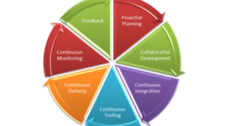
Bots can accelerate every stage of the software delivery lifecycle. The table below maps common pipeline phases to the tools bots can integrate with:
| Pipeline Phase | Example Tool Integrations |
|---|---|
| Proactive Planning | Jira (create stories, manage sprints, update backlogs) |
| Requirements Management | Jira |
| Continuous Integration | Jenkins (trigger builds, report status) |
| Continuous Deployment | Ansible, Chef (run deployments, roll back failures) |
| Continuous Monitoring | Nagios, Grafana, Splunk (collect and surface metrics) |
| Continuous Feedback | Jira, monitoring dashboards |
Beyond pipeline automation, bots handle a wide range of routine operational tasks that would otherwise consume valuable engineer time:
- Cleaning up temporary files or stale resources on servers.
- Triggering build and deployment jobs on demand or on a schedule.
- Rotating and archiving server logs.
- Onboarding new applications into monitoring platforms.
- Collecting and reporting metrics from tools such as Nagios or AppDynamics.
- Bringing multiple teams into a shared channel to triage and resolve incidents collaboratively.
Bot Technical Architecture
A practical bot implementation typically involves the following layers:
- Chat platform hosting: The bot process runs alongside or connects to your chat platform (for example, as a Slack app). This can be hosted in the cloud or on-premises, depending on your security requirements.
- Command parser: The bot’s logic layer interprets incoming chat commands. This can range from simple keyword matching to natural language processing depending on the bot framework chosen.
- Response / configuration store: A key-value data store maps commands or identifiers (such as application names or environment IDs) to the responses and actions the bot should execute. This store is populated when you configure the bot’s capabilities.
- Tool integrations: The bot calls the APIs or CLIs of target DevOps tools (Jenkins, Ansible, Jira, Nagios, etc.) and returns structured output back to the chat channel.
The tighter the API integration between the bot and downstream tools, the more powerful and reliable the automation becomes. Poorly documented or unstable APIs in target tools are the most common source of bot implementation friction.
DevOps Bot Use Cases Across the Full Lifecycle
Proactive Planning
Create new user stories directly from the chat window, assign them to sprints, and update product backlogs—without leaving Slack or Teams. Sprint planning status can be queried and surfaced at a glance for the whole team.
Build and Continuous Integration
Trigger Jenkins builds with a chat command, receive pass/fail notifications in the team channel, and run scheduled nightly builds with automated status reports distributed to relevant stakeholders.
Continuous Deployment
Execute deployment jobs across environments, check deployment status, and initiate rollbacks if failures are detected. Post-deployment actions such as JVM restarts or cache flushes can be automated as part of the same bot workflow.
Infrastructure Provisioning and Configuration Management
Invoke Chef or Ansible playbooks from chat to provision new environments, restart services, or apply configuration changes—turning what was a multi-step manual process into a single command.
Continuous Monitoring
Query application performance metrics, retrieve health check status, or pull daily summaries from monitoring tools directly within the team channel. Alerts can also be routed to the relevant chat channel so the right people see them immediately.
Continuous Feedback
Monitor application health trends and surface analytics to the team on a regular cadence, helping teams identify degradation before it becomes an incident.
Measuring the Impact of DevOps Bots
Introducing bots without measuring their impact makes it difficult to justify further investment or identify where automation is falling short. Three key metrics to track are:
- Effort reduction: Measure the reduction in engineer-hours spent on manual tasks such as triggering builds, running deployments, or pulling metrics from dashboards. This is most easily captured by comparing time-per-task before and after bot adoption.
- Human error reduction rate: Track the decrease in incidents or rework caused by manual mistakes—misconfigured deployments, missed steps, incorrect environment targets. Fewer errors mean less time spent on remediation.
- Issue triage time: For incidents that require multiple teams, measure how long it takes from alert to active collaboration. Bots that automatically pull relevant teams into a shared channel and surface diagnostic data can dramatically cut this window.
Conclusion
DevOps bots are not just a productivity novelty—they are a practical mechanism for reducing the manual friction that slows delivery pipelines and erodes team cohesion. By embedding automation into the chat tools teams already rely on, bots reduce context switching, lower error rates, and accelerate incident response. Organizations that invest in ChatOps build a foundation for faster, more reliable software delivery while simultaneously improving the day-to-day experience of their engineering and operations teams.
The key to success is integration depth: the more seamlessly your bot connects to your actual toolchain, the more value it delivers. Start with a single high-friction workflow—such as triggering builds or querying monitoring data—and expand from there as the team builds confidence in the approach.