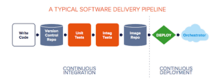
In part one of this tutorial series (originally published on JAXenter), we covered Docker basics and Continuous Integration/Delivery (CI/CD): building and testing a Java Spring microservice, and producing a ready-to-deploy Docker image. In this second and final part, we extend that pipeline with Continuous Deployment to a Kubernetes cluster.
Docker lets you create portable, reproducible application packages. Kubernetes takes those packages and runs them in the cloud — scaling them horizontally to match demand, and releasing updates with zero downtime through rolling deployments.
Adding a Production Profile to the Application
The application from part one had a significant limitation: no data persistence. Data was lost on every restart because the app used an in-memory store. To fix this, we add a production Spring profile backed by a real MySQL database.
Step 1: Add a production profile to pom.xml
Inside the <profiles>…</profiles> block, add:
<profile>
  <id>production</id>
  <properties>
    <maven.test.skip>true</maven.test.skip>
  </properties>
</profile>Code language: HTML, XML (xml)
Step 2: Add the MySQL driver dependency
Inside the <dependencies>…</dependencies> block, add:
<dependency>
  <groupId>mysql</groupId>
  <artifactId>mysql-connector-java</artifactId>
  <scope>runtime</scope>
</dependency>Code language: HTML, XML (xml)
Step 3: Create a production properties file
Create src/main/resources/application-production.properties with the following content. Note that sensitive values are read from environment variables — never hardcode credentials in source-controlled files.
spring.jpa.properties.hibernate.dialect=org.hibernate.dialect.MySQL55Dialect
spring.datasource.url=jdbc:mysql://${DB_HOST:localhost}:${DB_PORT:3306}/${DB_NAME}
spring.datasource.username=${DB_USER}
spring.datasource.password=${DB_PASSWORD}Code language: JavaScript (javascript)
The application is now ready for production deployment.
Preparing Your Cloud Infrastructure
You need two cloud resources before deploying: a MySQL database and a Kubernetes cluster. These steps are intentionally vendor-agnostic — use whatever provider suits your needs.
Creating the Database
Provision a MySQL instance (version 5.7 or 8.0+). You can use a self-managed server or a managed cloud database such as AWS RDS, Amazon Aurora, or Google Cloud SQL.
Once the database is running:
- Create a database named
demodb. - Create a user named
demouserwith at least SELECT, INSERT, and UPDATE privileges ondemodb. - Record the database hostname (or IP), port, and credentials for later use as secrets.
Create the required schema tables:
CREATE TABLE `hibernate_sequence` (
  `next_val` bigint(20) DEFAULT NULL
) ENGINE=InnoDB DEFAULT CHARSET=utf8;

CREATE TABLE `users` (
  `id` bigint(20) NOT NULL,
  `created_date` datetime DEFAULT NULL,
  `email` varchar(255) DEFAULT NULL,
  `modified_date` datetime DEFAULT NULL,
  `password` varchar(255) DEFAULT NULL,
  PRIMARY KEY (`id`)
) ENGINE=InnoDB DEFAULT CHARSET=utf8;Code language: PHP (php)
Provisioning the Kubernetes Cluster
The easiest path to a production-ready cluster is a managed Kubernetes service: Amazon EKS, Google Kubernetes Engine (GKE), Azure AKS, or DigitalOcean Kubernetes are all reasonable choices.
Because this is a microservice with modest resource requirements, small node sizes work fine. To support rolling updates (zero-downtime upgrades), provision at least two nodes so Kubernetes can take one pod offline while keeping another running.
Working with Kubernetes: Key Concepts
Before writing manifests, it helps to understand the four Kubernetes primitives used in this tutorial:
- Pods — The smallest deployable unit. A pod is one or more containers that are guaranteed to run on the same node and share a network namespace.
- Deployments — A controller that manages pods. Deployments handle scaling (replica count), rolling updates, and rollback.
- Services — A stable network endpoint (fixed IP + DNS name) in front of a set of pods. A LoadBalancer-type service provisions an external IP and distributes traffic across healthy pods.
- Labels — Arbitrary key-value pairs attached to any Kubernetes object. Selectors use labels to connect a Service to the pods managed by a Deployment.
Writing the Kubernetes Manifest
Create a file named deployment.yml at the root of your repository. The file contains both a Service and a Deployment, separated by ---.
Service definition
apiVersion: v1
kind: Service
metadata:
  name: semaphore-demo-java-spring-lb
spec:
  selector:
    app: semaphore-demo-java-spring-service
  type: LoadBalancer
  ports:
    - port: 80
      targetPort: 8080
This service listens on port 80 and proxies traffic to port 8080 on any pod whose app label matches semaphore-demo-java-spring-service.
Deployment definition
---
apiVersion: apps/v1
kind: Deployment
metadata:
  name: semaphore-demo-java-spring-service
spec:
  replicas: 3
  selector:
    matchLabels:
      app: semaphore-demo-java-spring-service
  strategy:
    type: RollingUpdate
    rollingUpdate:
      maxUnavailable: 1
      maxSurge: 0
  template:
    metadata:
      labels:
        app: semaphore-demo-java-spring-service
    spec:
      containers:
        - name: semaphore-demo-java-spring-service
          image: ${DOCKER_USERNAME}/semaphore-demo-java-spring:$SEMAPHORE_WORKFLOW_ID
          imagePullPolicy: Always
          env:
            - name: ENVIRONMENT
              value: "production"
            - name: DB_HOST
              value: "${DB_HOST}"
            - name: DB_PORT
              value: "${DB_PORT}"
            - name: DB_NAME
              value: "${DB_NAME}"
            - name: DB_USER
              value: "${DB_USER}"
            - name: DB_PASSWORD
              value: "${DB_PASSWORD}"
          readinessProbe:
            initialDelaySeconds: 60
            httpGet:
              path: /login
              port: 8080Code language: PHP (php)
Key points about this manifest:
- replicas: 3 — Set this to match the number of nodes in your cluster.
- RollingUpdate strategy — With
maxUnavailable: 1andmaxSurge: 0, Kubernetes takes down one pod at a time during an update, ensuring the remaining pods continue to serve traffic. - readinessProbe — Kubernetes waits 60 seconds after the container starts, then polls
/loginon port 8080. Only pods passing this check receive traffic. - Image tagging — The image uses
$SEMAPHORE_WORKFLOW_IDinstead oflatest. This preserves every build as a discrete, immutable tag and enables rollback to a specific previous version if a release causes problems.
Preparing Semaphore CI/CD for Continuous Deployment
Creating Secrets in Semaphore
Sensitive values must be stored as Semaphore secrets rather than in source code. You already created a Docker Hub secret in part one. Now create two more.
Database credentials secret:
$ sem create secret production-db-auth \
  -e DB_HOST=YOUR_DATABASE_IP \
  -e DB_PORT=YOUR_DATABASE_PORT \
  -e DB_NAME=YOUR_DATABASE_NAME \
  -e DB_USER=YOUR_DATABASE_USERNAME \
  -e DB_PASSWORD=YOUR_DATABASE_PASSWORD
Kubernetes cluster credentials secret:
If your cluster provides a kubeconfig file, upload it to Semaphore so that kubectl can authenticate:
$ sem create secret production-k8s-auth \
  -f kubeconfig.yml:/home/semaphore/.kube/configCode language: JavaScript (javascript)
Some cloud providers require additional tooling beyond a kubeconfig file. For example, AWS clusters often require aws-iam-authenticator. Install any such tools in the pipeline’s prologue commands (you have full sudo access in Semaphore agents) and consult your provider’s documentation for specifics.
Creating the Deployment Pipeline
Create the file .semaphore/deploy-k8s.yml:
version: v1.0
name: Deploy to Kubernetes
agent:
  machine:
    type: e1-standard-2
    os_image: ubuntu1804

blocks:
  - name: Deploy to Kubernetes
    task:
      secrets:
        - name: production-k8s-auth
        - name: production-db-auth
        - name: dockerhub
      prologue:
        commands:
          # Add any provider-specific installation/auth commands here
          # e.g., gcloud auth, aws configure, doctl auth, etc.
          - checkout
      jobs:
        - name: Deploy
          commands:
            - cat deployment.yml | envsubst | tee deployment.yml
            - kubectl apply -f deployment.ymlCode language: PHP (php)
The envsubst command substitutes the shell variable placeholders in deployment.yml (such as ${DOCKER_USERNAME} and $SEMAPHORE_WORKFLOW_ID) with their real values from the injected secrets and the Semaphore environment. The resulting manifest is then applied to the cluster with kubectl apply.
Updating the Docker Build Pipeline
Two changes are needed in .semaphore/docker-build.yml.
Change 1: Replace the latest tag with $SEMAPHORE_WORKFLOW_ID in the build and push commands:
- docker build \
    --cache-from "$DOCKER_USERNAME"/semaphore-demo-java-spring:latest \
    --build-arg ENVIRONMENT="${ENVIRONMENT}" \
    -t "$DOCKER_USERNAME"/semaphore-demo-java-spring:$SEMAPHORE_WORKFLOW_ID .
- docker push "$DOCKER_USERNAME"/semaphore-demo-java-spring:$SEMAPHORE_WORKFLOW_IDCode language: PHP (php)
Change 2: Add a promotion block at the end of .semaphore/docker-build.yml to automatically trigger the deployment pipeline when a build on the master branch passes:
promotions:
  - name: Deploy to Kubernetes
    pipeline_file: deploy-k8s.yml
    auto_promote_on:
      - result: passed
        branch:
          - masterCode language: CSS (css)
Your First Deployment
With everything in place, commit and push your changes to trigger the full pipeline:
$ git add .semaphore deployment.yml
$ git commit -m "add Kubernetes deployment pipeline"
$ git push origin masterCode language: JavaScript (javascript)
The CI/CD pipeline will run in sequence: first the build-and-test pipeline, then the Docker build pipeline, and finally the Kubernetes deployment pipeline. After a few minutes, Kubernetes takes over.
Monitor the rollout with kubectl:
# Check deployment status
$ kubectl get deployments

# Check individual pod status
$ kubectl get pods

# Retrieve the external LoadBalancer IP
$ kubectl get servicesCode language: PHP (php)
Once the LoadBalancer IP appears under EXTERNAL-IP, your application is live and serving traffic.
Wrapping Up
You now have a complete, end-to-end CI/CD pipeline that builds, tests, packages, and deploys a Java Spring microservice to Kubernetes — automatically, on every push to master.
To go further, consider these follow-on exercises:
- Smoke-test your live cluster. Re-run the integration tests from part one, but point them at the external LoadBalancer IP instead of localhost.
- Observe a rolling update. Make a small code change and push to
master. Watch Kubernetes restart pods one at a time while the service remains available throughout. - Experiment with multi-container pods. Split the application into additional services (e.g., a separate background worker) and run them as separate containers within the same pod, or as separate deployments communicating over internal Kubernetes Services.
- Improve secrets management. Consider replacing plain Semaphore environment-variable secrets with Kubernetes Secrets objects or an external secrets manager (e.g., HashiCorp Vault, AWS Secrets Manager) for tighter in-cluster security.
This tutorial is adapted from content originally published on JAXenter. The demo project referenced uses Semaphore CI/CD.