
This article is based on a white paper originally published by Capgemini covering configuration management challenges in cloud-based DevOps test environments.
Background: Why Configuration Management Matters in Modern DevOps
The shift toward customer-centric digital businesses, combined with the adoption of agile and DevOps practices, has accelerated enterprise migration to cloud platforms. Moving legacy IT systems to the cloud offers clear advantages: global development reach, shorter deployment cycles, and faster time to market for new features.
From a quality assurance perspective, this shift places new demands on test environment management. Testers need environments that spin up quickly, match production configurations accurately, and remain consistent across iterations. In traditional software development, configuration management (CM) was largely a manual discipline focused on maintaining the consistency of a platform’s functional and physical attributes. In a cloud-native DevOps context, that manual approach becomes a significant bottleneck.
Modern projects require automated environment provisioning that is both instantaneous and repeatable — ensuring that each new environment mirrors its predecessors exactly. Configuration management is therefore a foundational challenge when building a robust test environment management framework on cloud infrastructure.
Types of Test Environments
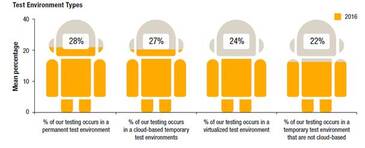
Test environments in cloud-based DevOps pipelines generally fall into several categories. According to the World Quality Report 2016, testing typically occurs across the following environment types:
- Permanent, cloud-based environments: Long-lived environments hosted on cloud infrastructure, used for sustained integration or regression testing.
- Temporary, cloud-based environments: On-demand environments that are provisioned for a specific test run and then decommissioned to reduce cost.
- Virtualized test environments: Environments running on virtual machines or containers, enabling rapid cloning and parallel test execution.
- Temporary, non-cloud environments: Short-lived environments built on on-premises infrastructure for isolated or compliance-driven testing scenarios.
Configuration and Environment Management on Cloud: Scope and Challenges
A well-defined configuration management policy is central to determining whether test environments are genuinely ready to operate in the cloud. The scope of CM services for test environments covers three core activities:
- Defining and implementing configuration management policies
- Establishing reference configurations for each environment type
- Developing and maintaining a configuration management plan
Beyond these strategic activities, day-to-day CM operations for test environments typically include:
- Administering the configuration management toolset
- Monitoring and continuously improving CM processes and assets
- Validating and deploying software releases
- Promoting configuration changes across development, testing, staging, and production environments
- Automating configuration deployment and compliance reporting tasks
- Validating and publishing release notes
The primary objective of test environment management is fast setup time combined with on-demand availability. Meeting this objective requires accelerating the deployment pipeline and stabilising environments at each stage. Delays in promoting code from development through testing to staging must be eliminated through automation.
The World Quality Report 2016 identified managing multiple versions of ERP test environments as a persistent challenge, attributing much of the difficulty to the absence of automated CM tooling for cloud-hosted test environments.
Building an Automated Configuration Management Toolset
The foundation of automated CM for test environments is a toolset capable of discovering system state, generating compliance reports, and executing configuration changes consistently across environments. The following step-by-step approach provides a practical implementation path:
- Identify configuration items (CIs): Catalogue the OS-level items (firewall rules, hostnames, network settings) and application-level items that need to be managed and tracked.
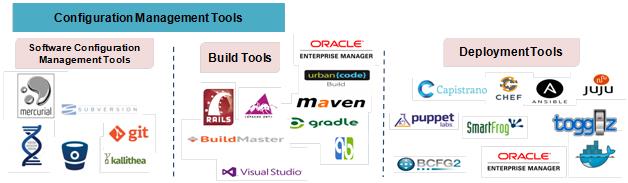
- Select and install a CM tool: Choose a configuration management engine suited to your stack and team skill set. Common options include Puppet, Chef, Ansible, and Salt. Each uses a different paradigm (agent-based vs. agentless, declarative vs. procedural), so evaluate them against your environment constraints.
- Integrate supporting tooling: Connect your CM tool to version control (Git), a CI server (Jenkins), and a build tool (Maven or equivalent) to create a fully automated pipeline from code commit to environment deployment.
- Generate baseline reports: Produce “as-is” configuration reports to document the current state of all managed environments before making changes.
- Write deployment scripts: Build CM scripts (Puppet manifests, Chef cookbooks, Ansible playbooks, or Salt states) that codify desired environment configurations.
- Establish an automated deployment workflow: Define the promotion workflow so that tested configurations move automatically from development to test to staging environments with minimal manual intervention.
- Document procedures: Record deployment procedures, rollback plans, and environment specifications so the process is repeatable by any team member.
- Release for operational use: Publish the validated CM scripts and workflows for use by development, QA, and operations teams.
Choosing the Right Configuration Management Tool
The four most widely adopted open-source CM tools each have distinct characteristics worth understanding before committing to one:
| Tool | Architecture | Language | Best suited for |
|---|---|---|---|
| Puppet | Agent/master | Puppet DSL (Ruby-based) | Large, heterogeneous infrastructure with strong compliance requirements |
| Chef | Agent/server | Ruby | Teams comfortable with Ruby and needing fine-grained control |
| Ansible | Agentless (SSH) | YAML | Rapid adoption, simpler environments, no agent overhead |
| Salt | Agent/master or agentless | Python/YAML | High-speed execution at scale, event-driven automation |
In practice, many teams combine tools: for example, using Terraform for infrastructure provisioning, Ansible for configuration management, and Jenkins for orchestrating the end-to-end pipeline.
Benefits of Automating Configuration Management
Automating configuration management across test environments delivers measurable improvements to DevOps delivery pipelines:
- Consistency and repeatability: Codified configurations eliminate environment drift, ensuring that every provisioned environment is identical to its predecessors.
- Faster environment provisioning: On-demand spin-up and teardown reduces idle environment costs and unblocks testers waiting for environments.
- Better pipeline control and asset utilisation: Automated management improves visibility into environment state, enabling smarter scheduling and reducing total cost of ownership (TCO).
- Improved productivity: Integrating health checks and smoke tests (shakedowns) into automated build and deployment workflows means teams spend less time diagnosing environment issues and more time testing product functionality.
- Audit and compliance: Automated CM reports provide an auditable record of configuration state at every stage of the pipeline.
Conclusion
As cloud adoption accelerates and DevOps pipelines grow in complexity, manual configuration management can no longer keep pace. Automating CM across test environments — using tools like Puppet, Chef, Ansible, or Salt, integrated with Git, Jenkins, and complementary tooling — enables teams to provision consistent, on-demand environments at the speed the business demands. The result is a more focused development and testing practice with lower operational overhead and higher confidence in release quality.